eSIM Data Throttling for Travelers: Spot Speed Caps Before Buying

Yes, eSIM data can be throttled by the network operator that serves it, for the same reasons physical-SIM data is. The usual causes are fair-use caps, congestion-based deprioritization, and plan limits such as hotspot or high-speed gigabyte allowances. Below, we show you how to test your speeds, where to find carrier disclosures, and what to look for before you buy.
TL;DR:
- Persistent slow speeds after an allowance is exhausted suggest a cap; slowdowns limited to busy times or places suggest lower priority during network congestion.
- Before buying, check the full speed data allowance, speed after its threshold, hotspot limit, fair use trigger, and whether the allowance lasts your trip.
- Use one speed test app at different times and two locations; record download, upload, and latency, then compare results with another SIM or Wi Fi.
- Choose plans that publish exact deprioritization triggers and network management terms; budget providers may lose priority to major carrier customers during congestion.
Table of Contents
- How data throttling works and the types you’ll encounter
- What “unlimited” and fair-use policies mean for eSIM plans
- How to test whether your eSIM plan is throttling you
- Carrier disclosures, transparency rules, and your rights
- How to choose eSIM plans with less restrictive throttling
- Practical data-management tactics for travelers
- Why clear plan terms matter on the road
- How we help you check allowances before you buy
- FAQ
- Sources
How data throttling works and the types you’ll encounter
Throttling is a speed reduction applied by the network operator. Operators use it to manage congestion and to enforce the limits written into a plan. The FCC’s open internet orders describe the ban on blocking and throttling while still allowing reasonable network management, so some speed management is lawful as long as it is disclosed.
You will mostly run into several patterns:
- Data-cap throttling: a fixed speed cap kicks in after you use a defined high-speed allotment. Speeds stay low until your plan renews or you buy a top-up.
- Deprioritization: your traffic gets lower priority only when a tower is busy. Speeds recover when congestion eases, so the slowdown depends on time and place.
- Application or content-based throttling: certain traffic, often video, is slowed while browsing and messaging feel normal.
- Time-based throttling: speeds drop at set hours or after a set period of heavy use.
Each pattern has a symptom. A permanent crawl after a threshold points to a cap. A slowdown only at rush hour or in crowded areas points to deprioritization. If video buffers but web pages load fine, suspect content-based management.
What “unlimited” and fair-use policies mean for eSIM plans
“Unlimited” rarely means unlimited full-speed data. Most plans include a high-speed allotment, and after that, speeds are reduced or your traffic is deprioritized. Some thresholds are generous: Consumer Reports has pointed to unlimited plans that allow 50 GB before slowing heavy users, and it notes that disclosures improved after FCC scrutiny.
Many travelers also need less than they think. Consumer Reports advises checking your real device usage, since many people need far less high-speed data than they expect.
Before buying, check these plan constraints:
- The size of the high-speed allotment and what happens after it
- Hotspot or tethering caps, which are often lower than the main allowance
- Any stated minimum speed after the threshold
- The exact fair-use policy wording and its trigger
Past the threshold, expect standard-definition video at best, slow uploads on video calls, and a hotspot that struggles to keep several devices going.
How to test whether your eSIM plan is throttling you
You can run a repeatable test over time. The FCC encourages consumers who suspect underperformance to use independent speed-test apps and to report persistent deceptive performance.
- Pick one reputable speed-test app and use it for every test so results stay comparable.
- Test at different times of day, including a busy evening, and in at least two locations.
- Record download speed, upload speed, latency, time, and place each time. Aim to collect multiple samples.
- Run a control test on another SIM or a known-good Wi-Fi network to rule out your device.
- Compare your usage against your allotment. Steady slow speeds after you cross a threshold suggest a cap. Slowdowns only at peak times suggest deprioritization.
- Save screenshots and your log. If performance looks deceptive, report it to the FCC and contact the provider with your data.
Carrier disclosures, transparency rules, and your rights
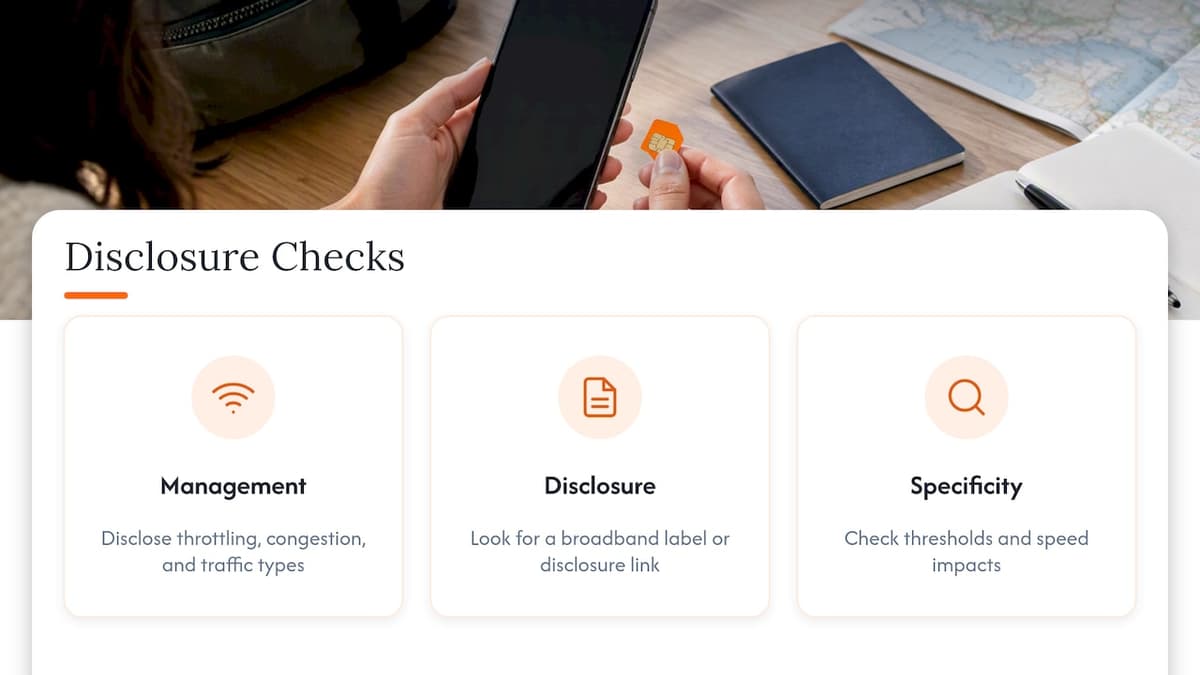
Providers have to tell you how they manage traffic. The FCC’s Open Internet Transparency Rule requires disclosure of network management practices, performance characteristics, and commercial terms so you can make informed choices.
Providers must disclose network management practices, performance characteristics, and commercial terms.
The FCC’s disclosure instructions say these disclosures should cover throttling, congestion management, and the types of traffic subject to those practices.
Specificity matters. In an FCC investigation of a “Top 3 Percent Policy,” where heavy-data users were deprioritized, the Bureau found that earlier disclosures were not specific enough about thresholds and speed impacts. When you read a provider’s page, look for a network management section, a link to a broadband label or disclosure, and concrete numbers instead of general promises.
How to choose eSIM plans with less restrictive throttling
Shop like a skeptic. Vague language is where surprise slowdowns hide, and clear terms are the best predictor of a smooth trip.
Use this checklist before you buy:
- A stated high-speed gigabyte allotment, not just the word “unlimited”
- A separate, stated hotspot allowance
- Precise deprioritization wording, such as a gigabyte or percentage threshold
- Any published minimum or expected speeds
- An easy-to-find network management disclosure link
- A clear duration, so you know whether your data allowance spans your whole trip
Read the fine print for the difference between “may be deprioritized” and a defined trigger. The first tells you nothing you can plan around. The second lets you budget your data. Also remember that budget providers can be deprioritized in busy periods; Consumer Reports notes smaller providers may favor major carriers’ customers during congestion.
Finally, confirm your phone is compatible and unlocked. A common oversight is skipping the compatibility and unlock check before buying. If you are swapping or selling an older device, deactivating its eSIM first keeps things clean.
Pro Tip: If a plan page does not state a concrete high-speed allowance and hotspot cap, message support before you pay and ask for both numbers in writing.
Practical data-management tactics for travelers
You can lower your odds of hitting a threshold without changing plans.
- Open your phone’s Cellular or Mobile Data screen. Modern phones break usage down by app, and social media and HD video streaming are typically the biggest drains. Restrict background data for the worst offenders.
- Drop streaming quality to standard, or download shows and maps on Wi-Fi before you leave your hotel.
- Turn off auto-play video and automatic app updates on cellular.
- Limit hotspot time and the number of connected devices, and think about a dedicated plan if you tether heavily.
Our guides on global data usage tips and travel data management go deeper on measuring and trimming usage.
Why clear plan terms matter on the road
Nothing sours a trip like a map that stops loading in an unfamiliar city, and the frustration is worse when the plan said “unlimited.” My view: most travelers do not mind limits, they mind surprises. Plain numbers for the high-speed allowance and hotspot cap remove the guesswork. Our eSIM explainers are a good place to start planning.
— Theo Wheeler
How we help you check allowances before you buy
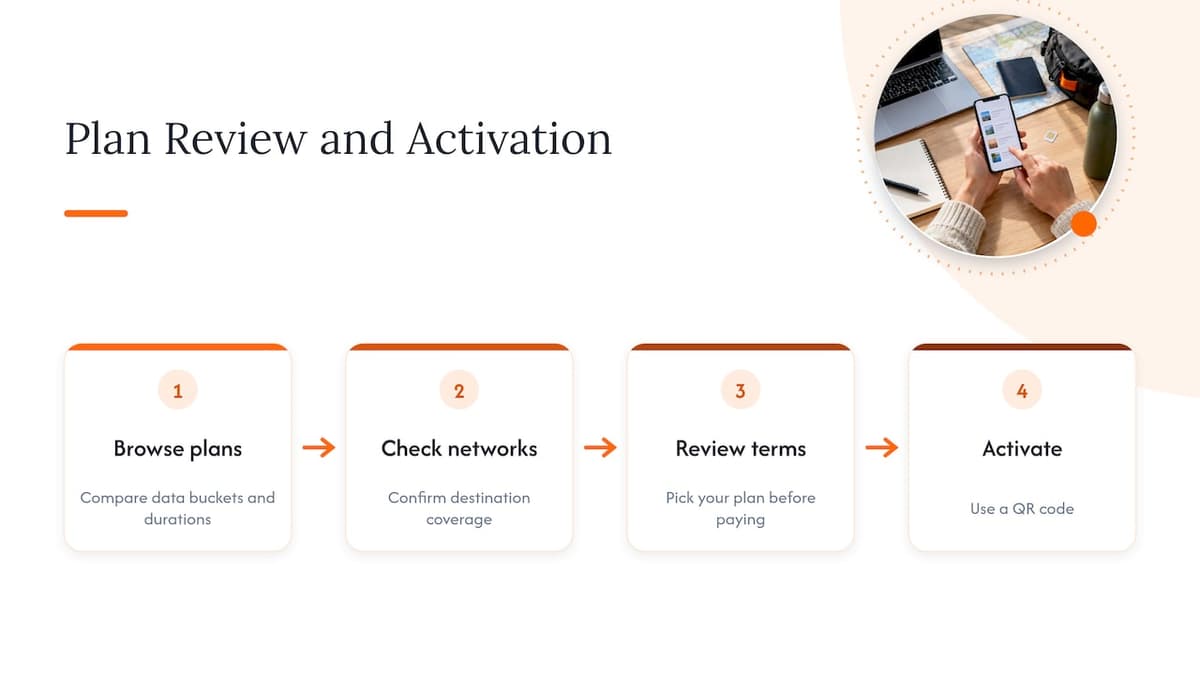
We offer global and regional prepaid eSIM plans with coverage details and flexible durations, so you can review plan details before you pay. Browse our Global eSIM Plans to compare data buckets and durations, then check networks by country to confirm coverage for your destination. Pick your plan, review its terms, and activate with a QR code when you are ready.
FAQ
Does an eSIM work with mobile data?
Yes. An eSIM provides cellular data just like a physical SIM, and your phone uses it for browsing, maps, and apps. Make sure your device is eSIM-capable and carrier-unlocked first.
Which eSIM is best for travel?
The best one matches your destination and your real usage. Check your phone’s data screen to estimate how much you need, then choose a plan with a clearly stated high-speed allowance and coverage for your countries.
Is there a free eSIM service available?
Free eSIM offers are rare and usually come with tight data or time limits. Read the terms for the high-speed allotment and any throttling rules before relying on one.
Can I still use WhatsApp with an eSIM?
Yes. WhatsApp runs over mobile data, so it works on an eSIM data plan. Messages use very little data, though calls and video calls use more.
Sources
Recommended
Related Topics
Stay Connected Anywhere
Prepaid eSIM data plans for 180+ countries and territories. No physical SIM required.