7–365 Days: 3 eSIM Validity Windows and a Checklist for Travelers

The physical eSIM chip inside your device almost never expires. What does expire is the plan or profile loaded onto it: the data allowance and the validity window attached to your purchase. That window typically starts either when you install the profile or when your phone first connects to a network, and common lengths run from 7 to 30 days for travel bundles, 30 days for standard plans, and up to 365 days for long-term or data-based options.
TL;DR:
- Most travel eSIM plans last between 7 days and 365 days, depending on whether they are time-based, data-based, or hybrid, with provider policies controlling expiration.
- Plans typically become active either at installation or upon first network connection, so timing your activation correctly can prevent unnecessary expiration before arrival.
- Once a plan expires, devices usually lose data access immediately, and renewing or topping up depends on the vendor’s specific rules, which often require a new purchase.
- Compatibility checks and device unlock status should be confirmed well before travel, as locked devices or unsupported models can render a valid plan useless.
- Buying plans close to departure and carefully following activation rules helps avoid premature expiration and maximizes usable data during travel.
Table of Contents
- What Actually Expires: Chip, Profile, and Data Plan
- When Does the Validity Clock Actually Start?
- How Long Do eSIM Plans Typically Last?
- What Happens When Your eSIM Plan Expires
- Can You Extend, Top Up, or Renew an eSIM Plan?
- Practical Tips to Avoid Premature Expiry
- Device Compatibility and Other Activation Gotchas
- What Lumo Recommends for Trip-Ready Activation
- A Note on the Mistakes Travelers Keep Making
- How Lumo Removes the Guesswork From Activation Timing
- Sources
- FAQ
What Actually Expires: Chip, Profile, and Data Plan
Three separate things get lumped together under “eSIM,” and mixing them up causes most of the confusion. The embedded chip is hardware built into your phone, tablet or laptop, and it has no expiration date at all. The profile is the downloadable file, tied to a specific carrier, that the chip stores. The plan is the prepaid allowance and time limit attached to that profile.
- The chip: permanent hardware, reused across many profiles over the life of the device.
- The profile: a downloadable carrier configuration that can sit unused or get deleted.
- The plan: the data allowance and validity period that actually expires.
Vendors set expiry rules at the plan level, not the hardware level, because that is where the service they are selling actually lives. Always check the specific terms for the plan you bought, and keep your purchase receipt or confirmation email in case you need to dispute a validity issue later.
When Does the Validity Clock Actually Start?
Providers use one of two triggers, and knowing which applies to your purchase changes when you should install.
- Install trigger: validity begins the moment you download and activate the profile, regardless of whether you have connected to a network yet.
- First-connection trigger: validity begins only once your device actually connects to a network at your destination, per how roaming works between visited networks.
- Hybrid cases: some vendors give you a separate window to download the profile, then a shorter countdown once you activate it or first connect.
If you install too early under the install trigger, you burn days before you even land. Check the vendor’s activation policy or a dedicated timing guide before you buy, so you know whether to install before departure or wait until you arrive.
How Long Do eSIM Plans Typically Last?
Most travel eSIM plans fall into three buckets: time-based, data-based, or a hybrid of both.
- Time-based: a flat validity window, commonly 7, 15, 30, or up to 365 days, regardless of how much data you use.
- Data-based: the plan lasts until you exhaust the allowance, such as 5GB, even if that happens in two days.
- Hybrid: “whichever comes first” rules, where a 5GB/7-day plan ends at day 7 even with data left, or ends early if you burn through 5GB by day 3.
Apple documents that provider policies, not the operating system, determine when a travel eSIM plan actually becomes active, and notes that iOS can auto-switch profiles in some scenarios, which is worth checking before you assume a plan is running when it is not, according to Apple’s eSIM travel guidance. Some vendors also set a separate, nonrefundable download window that closes before you ever activate the plan, so an unused bundle can effectively expire before you have used a single megabyte.
What Happens When Your eSIM Plan Expires
Once you hit the validity deadline or exhaust the data allowance, whichever governs your plan, the profile stops passing traffic.
- Your device typically loses data access on that profile immediately, though calls and texts on a primary line are usually unaffected.
- If the device holds multiple profiles, it may fall back to another active eSIM or physical SIM, or simply show no data connection.
- Temporary numbers tied to a data-only eSIM are generally not preserved after expiry, since most travel plans are data-only with no dedicated number.
- If you expected data to remain and it did not, contact support with your purchase ID and screenshots showing the plan’s stated terms.
Expiry is usually final for that specific profile: once it lapses, the fix is topping up or buying a new plan rather than reviving the old one.
Can You Extend, Top Up, or Renew an eSIM Plan?
Whether you can add data or time depends entirely on the vendor’s rules, and they vary more than most travelers expect.
- Topping up: many providers let you add data or days to an active plan through an app or dashboard without reinstalling anything.
- Renewing after expiry: some vendors block top-ups once a plan lapses, forcing a fresh purchase and a new QR code or profile download.
- Seamless add-ons: others allow a grace period where you can extend the same profile even a day or two past expiry.
Pro Tip: Top up while you still have a sliver of data or time left, since a plan that has already expired often can’t be renewed and needs a brand-new purchase instead.
If you are running low mid-trip, check your provider’s app first. If the option to top up is missing, assume you will need to buy and install a new plan before your current one lapses.
Practical Tips to Avoid Premature Expiry
A little planning before you leave prevents most of the headaches travelers run into with eSIM timing.
- Buy your plan close to your travel dates rather than weeks ahead, unless the vendor’s download window is long enough to make early purchase safe.
- Install the profile per the vendor’s stated rule: before departure only if validity starts on first connection, otherwise wait until you land.
- Confirm your device is carrier-unlocked before you travel, since a locked phone can block a third-party profile entirely.
- Turn off background app refresh and pause large app or OS updates once you land, per data-saving tactics for travelers.
- Choose a smaller-data, longer-duration plan for light use spread across weeks, and a short, high-data plan for a dense few days of streaming or navigation.
Reviewing app sync settings before departure, as covered in this travel data management guide, also helps stretch a data-based allowance further.
Device Compatibility and Other Activation Gotchas
A validity window means nothing if your phone can never activate the profile in the first place. Not every device supports eSIM, and even those that do may be locked to a home carrier.
- Confirm eSIM support and check your device’s IMEI before buying, using a step-by-step compatibility check if you are unsure how.
- Unlocking timelines vary by carrier: Consumer Reports notes that T-Mobile requires roughly 40 days and Verizon around 60 days before a device qualifies for unlock.
- Recent iOS versions can automatically switch active profiles in certain situations, which can quietly interrupt a plan you thought was still running.
Check unlock status and eSIM support well ahead of your trip, not the night before you fly.
What Lumo Recommends for Trip-Ready Activation
Some eSIM providers build their plans around instant QR code activation, broad global coverage, and multiple duration options, aiming to reduce timing mistakes that cause wasted purchases. As the author covering this topic, Theo Wheeler recommends a simple three-step habit: buy the plan once your trip is confirmed, install it at your destination unless the vendor’s policy says otherwise, and top up before the plan lapses rather than after.
A Note on the Mistakes Travelers Keep Making
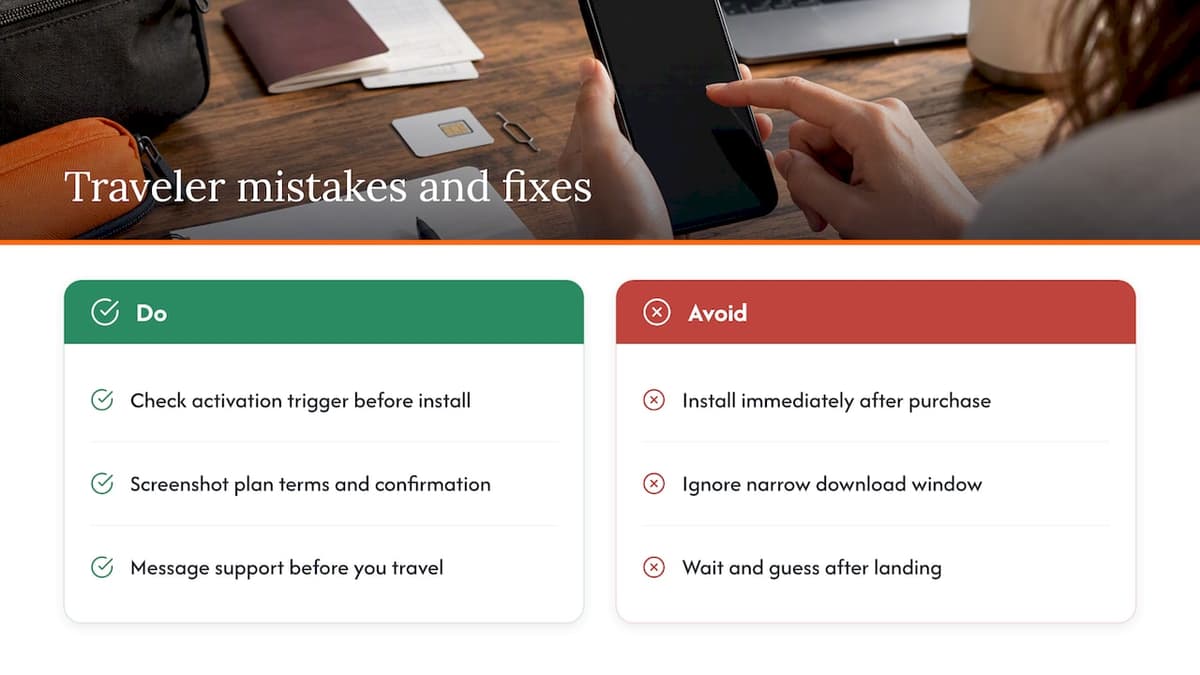
The two mistakes I see most often are installing a profile the moment it’s purchased, weeks before a trip, and missing a narrow download window buried in a confirmation email. Both are avoidable with five minutes of reading the fine print.
Check the vendor’s stated activation trigger before you install anything, and keep a screenshot of the plan terms and your purchase confirmation. If something does not match what was advertised, that documentation is what support teams need to resolve a dispute quickly. For anything unusual, a quick message to support before you travel is worth more than guessing after you land.
— Theo Wheeler
How Lumo Removes the Guesswork From Activation Timing
The validity confusion above is exactly what Lumo’s setup is built to avoid. Instant QR code activation means you can install the moment you land rather than fumbling with a carrier store, and clear instructions on each plan page tell you whether validity starts on install or on first connection before you buy.
Lumo offers plan durations to match different trips: Global eSIM Plans for multi-country itineraries, or single-country options like United States eSIM Plans and United Kingdom eSIM Plans for a focused trip. If you are heading to Europe, Europe eSIM Plans start at $1 one-off, and 24/7 support is there if an activation window or top-up question comes up mid-trip.
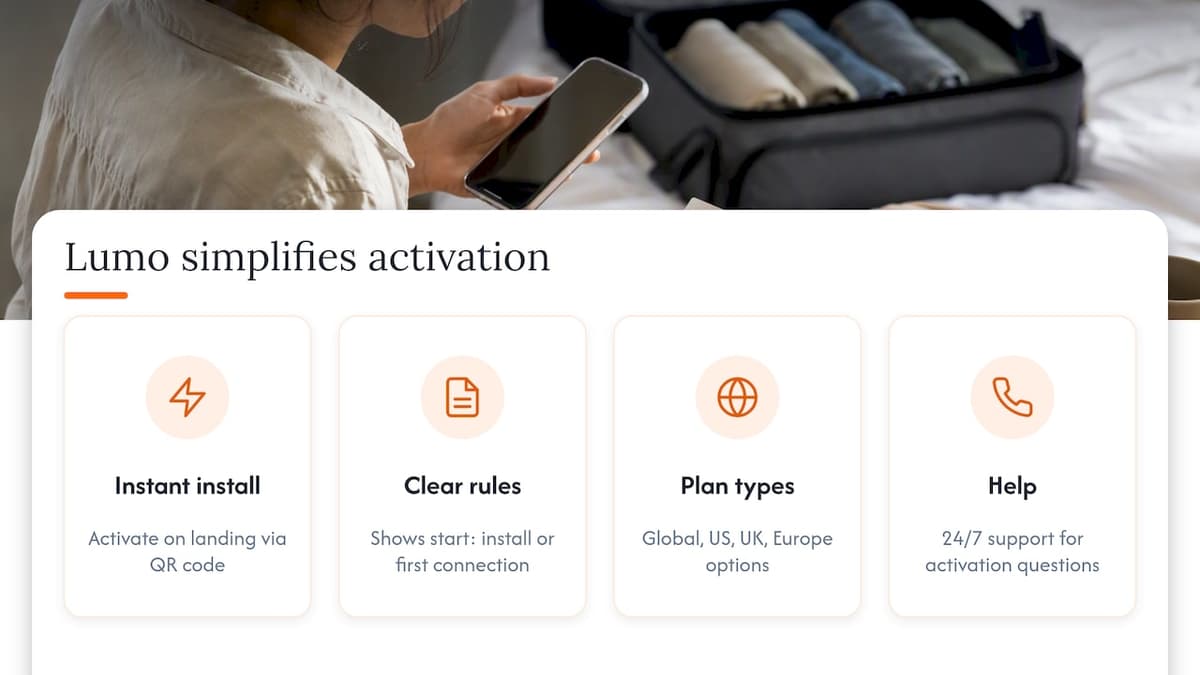
Check the activation rules on your eSIM provider’s destination plan page before you buy, and pick the duration that matches your trip length.
Sources
- Use eSIM while travelling internationally with your iPhone - Apple Support (IE)
- How to Unlock Your Phone From Any Major Carrier - Consumer Reports
- How roaming works - CTIA
FAQ
What is the disadvantage of eSIM?
The main drawback is that switching devices requires reinstalling the profile, and you cannot simply move a physical card between phones. Validity and activation rules also vary by vendor, so a plan can lapse or fail to activate if you misjudge the timing or your device is not unlocked.
When should I buy an eSIM before travel?
Buy close to your departure date unless the vendor’s download window is generously long, since installing too early can start the validity clock before you arrive. Check the specific plan’s activation timing guidance to see whether validity starts on install or on first network connection.
How do I know if my eSIM is expired?
Check the plan’s remaining data and days in the provider’s app or account dashboard, which typically shows both figures clearly. If your device shows no data connection on that profile and the dashboard confirms the validity period has passed, the plan has expired.
Does your eSIM expire?
The eSIM chip itself does not expire, but any plan or profile loaded onto it does, based on either a time limit or a data allowance. Many eSIM providers list specific duration and data limits on each destination plan page to inform buyers of the validity window before purchase.
Recommended
Related Topics
Stay Connected Anywhere
Prepaid eSIM data plans for 180+ countries and territories. No physical SIM required.