Extend eSIM Validity: 3 Expiry Clocks to Check Before Buying Again

The eSIM chip in your device normally does not expire, but the data plan running on it does, and whether that plan can be extended depends entirely on the provider’s own rules. The fastest move when you need more time is to check your provider’s account portal or app for a top-up or extend option before you do anything else. Avoid deleting the eSIM profile until you have confirmed whether extension is possible, since some providers use that profile to reconnect a renewed plan.
TL;DR:
- A QR code may expire before installation, activation can have its own deadline, and some regional plans require activation within 90 days of purchase.
- Plans commonly last 1, 7, 15, 30, 90, or 365 days, and hybrid plans end when their date limit or data cap arrives first.
- Some providers accept top ups only before a plan lapses; if renewal is unavailable, a new short term plan is usually the quickest replacement.
- Expired plans stop data and any bundled voice or text service immediately; unused allowances generally do not roll over unless the provider’s terms say otherwise.
- Deleting an eSIM profile permanently removes it from the device, so save its QR code, receipt, and order details first.
Table of Contents
- What actually expires: eSIM profile vs. eSIM plan
- The three expiry windows people see
- How long do eSIM plans normally last?
- What happens when an eSIM plan expires
- Can you extend or renew an eSIM plan? Practical options and step-by-step actions
- How to manage expired or unused eSIM profiles on your device
- A traveler’s checklist for avoiding eSIM headaches
- How Lumo can help when you need more time or a replacement plan
- FAQ
- Sources
What actually expires: eSIM profile vs. eSIM plan
A lot of confusion around eSIM expiration comes from mixing up two separate things: the profile and the plan. The profile is the small set of credentials stored on your device’s embedded secure element, called the eUICC. This container generally does not expire on its own and stays put until you or your provider removes it. The FCC treats the profile and the service plan as distinct, and GSMA’s technical specifications describe profile deletion as a specific, separate action from any billing or plan event.
The plan is the subscription sitting on top of that profile: the data allowance, the days of service, and the terms that govern when it ends. This is the part with a true expiration date.
A few practical consequences follow from this split:
- Deleting a profile removes it permanently from your device, even if the plan tied to it still had time or data left.
- A plan that lapses may leave the profile sitting inactive on your device, or the provider may remove it automatically, depending on their own policy.
- Reinstalling a deleted profile is usually not possible; you would need a new QR code or activation method from the provider.
The three expiry windows people see
Travelers often assume “expired” means one thing, but an eSIM plan can hit expiration at three different points, each with its own clock.
- Install or download window: the QR code or activation link you receive has its own shelf life. Miss this window and the code stops working, even if you never used a single megabyte of data.
- Activation window: once downloaded, many plans give you a limited number of days to actually activate service, and some start the countdown the moment you connect to a network rather than the moment you install the profile.
- Post-activation validity: this is the main plan duration or data cap. Service ends when the allotted time runs out, the data is used up, or both, depending on how the plan is structured.
A short regional plan might expect activation within 90 days of purchase, while a data-only plan might simply run until its gigabyte allowance is gone, regardless of how many calendar days have passed, so consider simpler trip planning tips for multi-destination itineraries. Because these windows vary by provider, it is worth reading the fine print on your specific plan rather than assuming all eSIMs behave the same way. Our guide on eSIM validity windows walks through these distinctions with a traveler checklist if you want a deeper look before your trip.
How long do eSIM plans normally last?
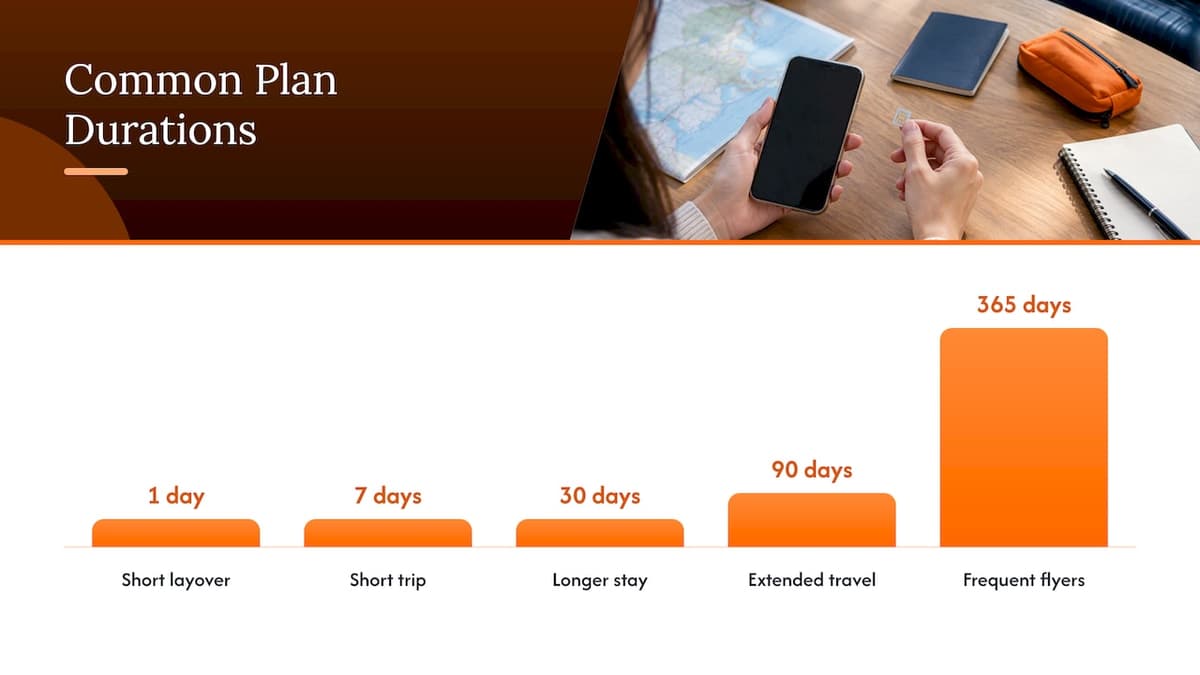
Plan lengths vary quite a bit depending on the provider and the type of trip you’re planning. Common durations include:
- 1 day plans for short layovers or single-event connectivity
- 7 and 15 day plans for short trips
- 30 day plans for longer stays or monthly refreshes
- 90 and 365 day plans for extended travel or frequent flyers
- Data-only plans that expire the moment the gigabyte allowance runs out, regardless of how many days remain
Many plans are hybrid: they end on whichever comes first, the final day of validity or the final gigabyte of data. A 10 GB, 30-day plan ends at day 30 even if you have data left, or it ends on day 12 if you burn through 10 GB early.
Shorter plans typically carry a higher cost per gigabyte than longer ones, since providers price convenience and flexibility into the shortest windows; our own Global eSIM Plans start from $7 for 30 days and 3 GB, which illustrates how bundling days and data together shapes the price. If your plan’s terms start the clock at purchase rather than at activation, buying too early can quietly eat into your usable travel days before you’ve even landed.
What happens when an eSIM plan expires
Once a plan reaches the end of its validity window or exhausts its data, service stops immediately. There is generally no automatic rollover of unused data or days unless the provider explicitly states otherwise in its terms.
- Mobile data stops working right away, and any voice or SMS features bundled with the plan stop as well.
- Some providers leave the inactive profile on your device for a grace period, allowing you to reactivate with a new purchase, while others remove it entirely once the plan lapses.
- Prepaid services can be subject to unused-balance loss or maintenance fees, so it is worth checking your provider’s terms directly, since the FCC’s guidance on prepaid phone cards notes these practices are common across prepaid mobile products generally.
- Reactivation and refund options are provider-specific, so keeping your receipt, order confirmation, and any screenshots on hand makes it much easier to get help if you contact support.
Can you extend or renew an eSIM plan? Practical options and step-by-step actions
Whether you can extend a plan comes down to the provider’s own policy, and some are far more flexible than others. Work through these steps in order rather than jumping straight to a new purchase.
- Check your provider’s account portal or app first. Look for wording like “top-up,” “extend,” or “add-on,” since many providers handle renewals this way rather than through a separate purchase flow.
- Apply any top-up while the plan is still active, if that’s what the provider requires. Some providers only allow extensions before the original plan fully lapses, not after.
- Contact support if you’re unsure. Have your receipt, order number, and any screenshots ready, since this speeds up the process and improves your odds of a resolution.
- If reactivation isn’t supported, buy a new short-term plan. This is often the quickest path when a provider has no renewal mechanism at all.
- Only remove the old, inactive profile after you’ve confirmed it won’t be reused. Some providers re-link a renewed purchase to the same profile rather than issuing a new one.
Pro Tip: Don’t delete an inactive eSIM profile until you’ve confirmed your extension options; some providers need that existing profile in place to reconnect a renewed plan.
How to manage expired or unused eSIM profiles on your device
Deciding whether to keep or delete an inactive profile depends on whether you might reactivate it later. If a provider might let you top up and reuse the same profile, leave it in place. If the plan is permanently closed and you don’t expect to return to that provider, deleting it frees up a profile slot on your device.
On both iPhone and Android, deleting an eSIM profile typically happens through the device’s cellular or mobile network settings, where you select the specific plan and choose to remove it. This action is permanent and cannot be undone from the device side.
- Save your original QR code, purchase receipt, and any order reference before deleting anything.
- Record your device’s EID if the provider asked for it during setup, since some support teams need it for reactivation.
- Confirm your device is unlocked before relying on a new provider’s eSIM, since carrier unlocking policies can affect whether alternative eSIMs will work at all.
For a deeper look at device compatibility before you switch providers, see our eSIM compatibility guide.
A traveler’s checklist for avoiding eSIM headaches
The travelers who run into the fewest problems follow a simple pattern: they buy their eSIM close to departure rather than weeks ahead, they keep the QR code and receipt saved somewhere easy to find, and they read the activation rules before assuming a plan works the way the last one did. Treat the activation voucher like a boarding pass with its own expiration, separate from the data plan itself. When extension isn’t an option, having a fast replacement plan ready, with broad country coverage, matters more than chasing a refund.
— Theo Wheeler
How Lumo can help when you need more time or a replacement plan
When a provider won’t extend your plan, or you’d rather not wait on a support ticket while traveling, buying a new plan is often the faster path. We built our checkout around instant QR code activation, so a replacement plan can be up and running in minutes rather than hours.
- Coverage spans 160+ countries, so switching providers mid-trip rarely means losing connectivity altogether.
- Plans come in a range of durations and data sizes, letting you match a replacement to your trip length.
- Our coverage page lets you confirm network availability at your destination before you buy.
If you’re weighing a top-up against a fresh plan, our Europe eSIM Plans start from $1, and our United States eSIM Plans start from $2, both activated the same way: scan the code, connect, and you’re online.
FAQ
How do I refresh my eSIM?
Check your provider’s account portal or app first for a top-up or renewal option, since this is the fastest way to add time or data to an existing plan. If no renewal option exists, you’ll generally need to purchase a new plan and activate it with a fresh QR code.
How long can we use eSIM?
The eSIM profile itself generally doesn’t expire, but the service plan running on it does, with common durations ranging from a single day up to a year depending on the provider. How long you can actually use a given plan depends on its specific validity terms and data allowance.
How long is a SIM card valid if not used?
Validity for an unused SIM or eSIM plan depends entirely on the provider’s terms, since some start the clock at purchase while others wait until first activation or network connection. Prepaid services can also lose unused value over time, so checking the specific plan’s expiration policy before you buy is worth the extra minute.
Does eSIM have limitations?
Yes, eSIM plans carry the same kinds of limitations as physical SIM cards: fixed validity periods, data caps, and provider-specific rules on activation timing. Device compatibility and unlock status also affect which eSIMs will work on a given phone or tablet.
Sources
Recommended
- 7–365 Days: 3 eSIM Validity Windows and a Checklist for Travelers
- When to Activate an eSIM: The Right Timing for Travel
- Store 8+ eSIMs, Run 2 on iPhone: Limits by Model for Travelers
Related Topics
Stay Connected Anywhere
Prepaid eSIM data plans for 180+ countries and territories. No physical SIM required.