Store 8+ eSIMs, Run 2 on iPhone: Limits by Model for Travelers
An iPhone can store eight or more eSIM profiles at once, according to Apple’s own guidance, but storage capacity has nothing to do with how many you can use at the same moment. Active limits depend on model: iPhones released before the iPhone 13 generally run one active eSIM at a time, while iPhone 13 and every model since support two active eSIMs simultaneously. Regional variants complicate this further, since some iPhone 14 through 17 models sold in the US ship without a physical SIM tray at all.
TL;DR:
- iPhones before the iPhone 13 can store eight or more eSIM profiles but only support one active eSIM at a time; iPhone 13 and newer support two active eSIMs simultaneously.
- In regions like the US, many iPhone 14 through 17 models ship without a physical SIM tray, meaning both active lines must be eSIMs, not a mix of eSIM and nano-SIM.
- Managing eSIMs involves distinguishing between stored profiles—kept on the device—and active profiles, which connect to networks; deleting profiles is irreversible, and reinstallation depends on the carrier.
- Regional variations mean some iPhones retain physical SIM trays, especially outside the US, so device configuration must be checked before traveling internationally.
- The storage limit rarely hinders regular use; travelers and device fleets should focus on labeling and cleaning unused profiles, as most users never approach the eight-profile maximum.
Table of Contents
- iPhone eSIM Limit by Model: What Each Generation Actually Supports
- Stored vs Active eSIM Profiles: The Distinction That Actually Matters
- Why Your iPhone’s SIM Setup Might Differ From a Friend’s
- How to Check and Manage eSIMs on Your iPhone
- Fixing Activation Errors and Keeping Your eSIM List Tidy
- A Note From Our eSIM Specialist
- Who Actually Needs to Worry About the iPhone eSIM Limit
- Get Your Next Travel eSIM Set Up in Under a Minute
- Sources
- FAQ
iPhone eSIM Limit by Model: What Each Generation Actually Supports
The confusion around iPhone eSIM capacity almost always comes down to mixing up two different numbers: how many profiles the phone can hold in storage, and how many it can run at once. Those numbers are not the same, and Apple has never published a hard per-model storage ceiling. What Apple has confirmed is the “8 or more” figure as a general benchmark across supported devices, plus specific rules for active-line behavior.
Here’s how the generations break down:
- iPhone XS, XR, and 11 series: Support eSIM alongside a physical nano-SIM, but only one line can be active at a time. You can store multiple eSIM profiles, but switching between them means manually toggling in Settings.
- iPhone 12 series: Same one-active-line limit as the XS/XR/11 generation. You get eSIM plus nano-SIM, but Dual SIM here means one line live, one dormant, not two simultaneous connections.
- iPhone 13 and iPhone SE (3rd generation): This is where dual-active support begins. You can run two eSIMs at once, or one eSIM plus one nano-SIM, giving you a genuine two-line setup for calls, texts, and data simultaneously.
- iPhone 14 through iPhone 17 series: Dual-active eSIM support continues, but with a regional twist. Many US models dropped the nano-SIM tray entirely, meaning your two active lines have to both be eSIMs rather than one eSIM and one physical card.
The practical takeaway: if you’re running an iPhone 12 or earlier, don’t expect to juggle a work line and a travel data plan at the same moment without switching manually. If you’ve got an iPhone 13 or newer, you can genuinely run two lines side by side, which matters a lot if you’re trying to keep a home number active while using a local data plan abroad.
Stored vs Active eSIM Profiles: The Distinction That Actually Matters
Think of your iPhone’s eSIM storage like a Rolodex of contacts. You can keep dozens of business cards filed away, but you can only have a couple sitting on your desk in active use at any given time. That’s essentially the difference between a stored eSIM profile and an active one.
A stored profile lives on the eUICC, the embedded chip that holds eSIM data. It sits there, inactive, not consuming a cellular line, not costing you anything beyond whatever the carrier already charged. An active or enabled profile is one you’ve switched on in Cellular settings, and it’s actually connecting to a network for calls, texts, or data.
This distinction traces back to the GSMA’s SGP.22 standard, the technical specification that governs how eSIM works across devices. The baseline version of that standard only anticipated one enabled profile at a time. Apple’s implementation on iPhone 13 and later extends that with multi-enabled-profile (MEP) support, letting two profiles run active simultaneously instead of one.
A few practical rules follow from this setup:
- Deleting a profile removes it from storage entirely, freeing up a slot, but you’ll likely need to reinstall it from scratch if you want it back.
- Disabling a profile keeps it stored and ready, just not currently connected. This is the better option if you plan to reuse the same plan later.
- Whether a deleted profile can be reinstalled without extra cost or paperwork depends entirely on your carrier’s or eSIM provider’s own reinstallation policy, not on Apple.
Pro Tip: Before deleting anything to free up space, check whether your carrier lets you reinstall it later. Some regional carriers treat a deleted eSIM as a used ticket, meaning you’d have to buy a new plan entirely just to get back online.
Why Your iPhone’s SIM Setup Might Differ From a Friend’s
Two people can own what looks like the identical iPhone and end up with completely different SIM setups, because Apple varies hardware by region. In the United States, iPhone 14 through 17 models commonly ship as eSIM-only, with no physical tray whatsoever. Buy the same model number in most other markets, and you’ll likely find a nano-SIM slot still present.
A few regional exceptions worth knowing:
- Mainland China, Hong Kong, and Macao versions of recent iPhones generally retain a physical SIM tray and have different eSIM activation rules, since Apple documents distinct model variants by market.
- If you’re buying a used or imported iPhone, always confirm which SIM variant you actually have before assuming eSIM-only or dual-tray behavior.
- Using a foreign eSIM plan generally requires an unlocked device. A carrier-locked iPhone can block eSIM installation from any provider besides the one that locked it, regardless of how many profiles you’ve got stored.
Check your specific model’s SIM configuration before you travel, not after you’ve already tried to activate a plan at the airport.
How to Check and Manage eSIMs on Your iPhone
Managing multiple eSIM profiles is straightforward once you know where Apple buried the settings. Here’s the actual process:
- Check your SIM type first. Go to Settings, tap General, then About, and look for “Cellular” or “Model Number” info that indicates eSIM-only versus eSIM plus nano-SIM.
- View stored profiles. Open Settings, tap Cellular (or Mobile Data), and you’ll see every eSIM currently stored on the device, active or not.
- Add a new eSIM. Scan a QR code from your carrier or Lumo, use a carrier’s dedicated app, or let automatic installation trigger through network provider activation if your carrier supports it.
- Switch active lines. Tap the eSIM you want to enable, toggle it on, then assign which line handles cellular data, voice calls, and text messages under Default Voice Line and iMessage/FaceTime settings.
- Label each profile. Rename each eSIM something obvious, like “Home” or “Japan Trip,” so you don’t accidentally rack up roaming charges by leaving the wrong line active. Our guide to managing multiple eSIM profiles walks through this labeling process in more detail.
Pro Tip: Always activate and test a new travel eSIM over Wi-Fi before you land in a new country. It confirms the profile installed correctly and lets you fix any issues while you still have your home connection as a backup.
Fixing Activation Errors and Keeping Your eSIM List Tidy
Most eSIM activation failures trace back to one of three things: a locked device, a carrier that hasn’t finished provisioning the profile on its end, or a phone that already thinks a plan is “enabled” without confirming it’s actually ready to use. Apple’s own troubleshooting guidance recommends checking unlock status and carrier support before assuming the eSIM itself is broken.
If your iPhone reports storage full when adding a new profile, you’ll need to delete an existing one first. Before you do, remember the storage ceiling is a device-level limit, not a lifetime cap tied to your accounts. Clearing out expired travel eSIMs periodically avoids scrambling under time pressure right before a trip.
A few habits keep things running smoothly:
- Disable rather than delete plans you’ll likely reuse, since reinstallation isn’t guaranteed.
- Preinstall eSIMs for destinations you visit often, rather than buying fresh each time.
- Clear out expired or one-time travel plans every few months to keep storage available.
- Contact your carrier for activation or billing issues; contact Apple only for device-level or Settings malfunctions.
Our guide to fixing eSIM activation issues covers specific error messages and their solutions if the basics above don’t resolve things.
A Note From Our eSIM Specialist
I’ve spent years watching travelers wrestle with SIM logistics, and the eSIM storage ceiling almost never causes real problems. What trips people up is disorganization: unlabeled profiles, forgotten expired plans, and confusion between disabled and deleted. Lumo’s own workflow for frequent travelers is simple: preinstall your next destination’s eSIM before you fly, label it clearly, test it on Wi-Fi, and keep one backup profile stored in case your primary line fails.
Who Actually Needs to Worry About the iPhone eSIM Limit
Almost nobody hits eight stored profiles through normal use. The exceptions are frequent international travelers and businesses managing device fleets, both of whom benefit from a deliberate naming and cleanup routine rather than letting profiles pile up.
— Theo Wheeler
Get Your Next Travel eSIM Set Up in Under a Minute
Reading through Apple’s storage rules is useful, but it doesn’t get you connected the moment you land somewhere new. Prepaid eSIM plans with instant QR code activation, covering many countries, are available, with quick setup from purchase to working data. No account registration, no contract, no waiting on a carrier store.
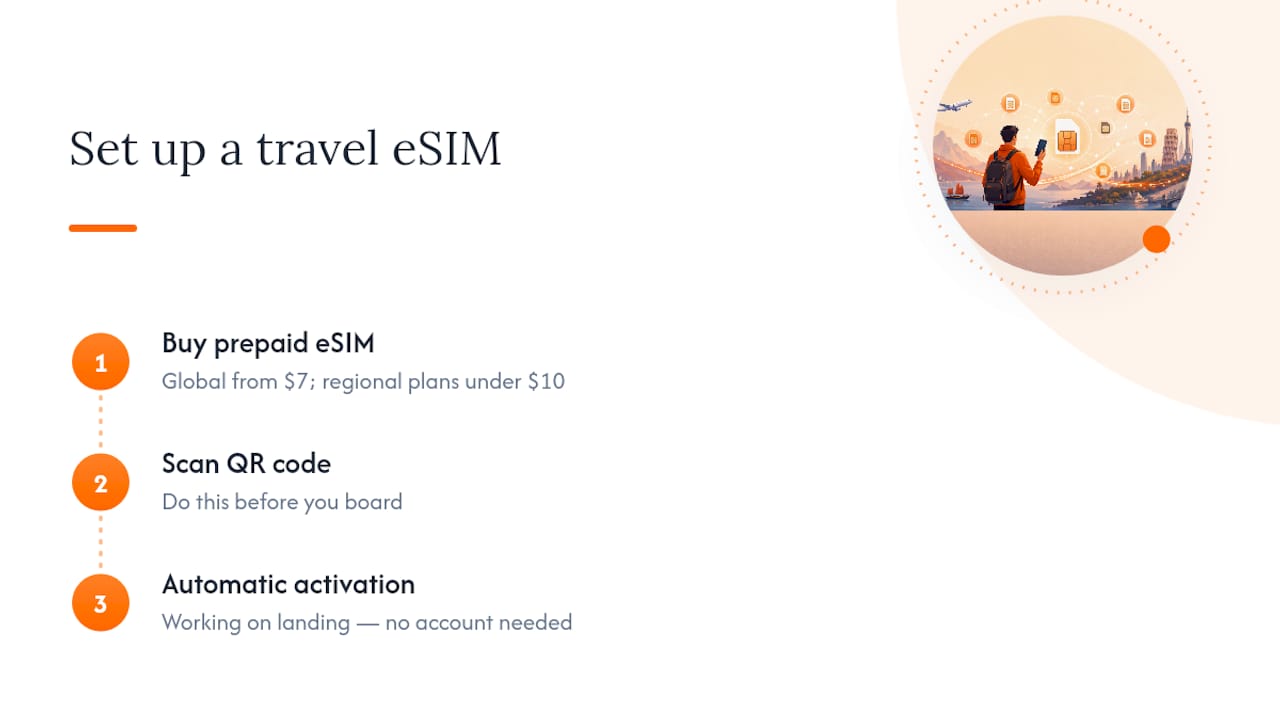
If you’re planning a multi-country trip, the Global eSIM Plans start at $7 for a one-off plan and cover broad regional roaming. Heading somewhere more specific, Lumo also runs dedicated pages for Europe, Asia, Africa, the Caribbean, the United States, and the United Kingdom, each with plans starting under $10. Pick your destination, scan the code before you board, and you’ll have a working line ready the second you land.
Sources
- Use eSIM while traveling internationally with your iPhone - Apple Support
- eSIM Profile Limits: How Many You Can Store and Use | SimFinder
FAQ
How Many eSIMs Can I Use on My iPhone?
You can store eight or more eSIM profiles on any modern iPhone, but active use depends on your model. Iphone 13 and later support two active eSIMs at once, while iPhone 12 and earlier models run one active eSIM at a time.
Can I Have Three eSIMs Active on My iPhone at Once?
No. Even the newest iPhone models cap active eSIM use at two simultaneous profiles, regardless of how many you have stored. You can store additional profiles beyond two, but only two can be enabled and connected at the same time.
What Is the Disadvantage of eSIM on iPhone?
The main drawback is that switching carriers or reinstalling a deleted eSIM isn’t always instant, since reinstallation depends on your carrier’s or provider’s own policy. There’s also no physical card to swap into another device if your iPhone breaks, unlike a traditional SIM.
How Much Data Do I Need for a Two-Week Trip?
Data needs vary widely based on how much you stream, navigate, or work remotely, so there’s no single universal figure. Lumo’s regional plans offer multiple data tiers, letting you pick an amount that matches your actual usage rather than overpaying for unused data.
Do I Need to Delete an eSIM to Add a New One?
Only if your iPhone reports storage as full, which happens after you’ve accumulated numerous stored profiles over time. In most everyday cases, you can add a new eSIM without deleting anything, since Apple’s stored limit sits at eight or more profiles.
Recommended
Related Topics
Stay Connected Anywhere
Get instant eSIM data plans for 160+ countries. No physical SIM required.