eSIM Compatible Phones: North America Model Checklist 2026
Most modern flagship phones sold in North America support eSIM, and a large share of mid-range devices do too. Imei, though carrier locks, regional firmware, and model variants can block activation even when the hardware is present. The brands most reliably covered: Apple (iPhone XR and newer), Google Pixel (Pixel 3 and newer), Samsung Galaxy (S20 and newer, plus Z Fold/Flip), and select Motorola, OnePlus, and Sony models.
Before you buy a plan or travel, run these three quick checks:
- Settings check: Look for “Add eSIM” or “Add Cellular Plan” in your phone’s SIM or network settings.
- EID check: Go to Settings > General > About (iPhone) or Settings > About Phone (Android) and look for an EID number. No EID, no eSIM hardware.
- Carrier check: Confirm your carrier supports eSIM on your specific plan. AirTalkWireless notes that even eSIM-capable phones can be blocked if the carrier hasn’t enabled it on your account or plan tier.
Regional caveats matter more than most buyers expect. The same phone model sold in Canada, the US, and Europe can have different firmware, different band support, and different eSIM behavior. Always verify the exact model number, not just the commercial name.
Key Takeaways
Many phones sold in North America since 2018 support eSIM, but carrier locks and regional firmware mean hardware alone doesn’t guarantee activation.
| Point | Details |
|---|---|
| 300+ devices support eSIM in 2026 | Carrier locks, regional variants, and firmware can still block activation on hardware-capable phones. |
| iPhone 14 US models are eSIM-only | No physical SIM tray; confirm eSIM carrier support before traveling with a US iPhone 14 or newer. |
| EID presence confirms hardware | Dial *#06# or check Settings > About to find your EID; then verify carrier activation separately. |
| Model number beats commercial name | The exact SKU (e.g., SM-S928U) determines eSIM support; the marketing name does not. |
| Lumo for travel eSIM | Lumo offers instant QR-activated prepaid plans covering 160+ countries, no contract required. |
Table of Contents
- 1. Which iPhone models support eSIM?
- 2. Which Samsung Galaxy phones support eSIM?
- 3. Google Pixel phones that support eSIM
- 4. Other Android brands with notable eSIM support
- 5. How to check if your phone supports eSIM
- 6. Carrier support and eSIM activation in North America
- 7. Common eSIM limitations and how to work around them
- 8. How to confirm model-specific compatibility before you buy
- Your phone supports eSIM. Here’s what Lumo offers next.
- Sources
- FAQ
1. Which iPhone models support eSIM?
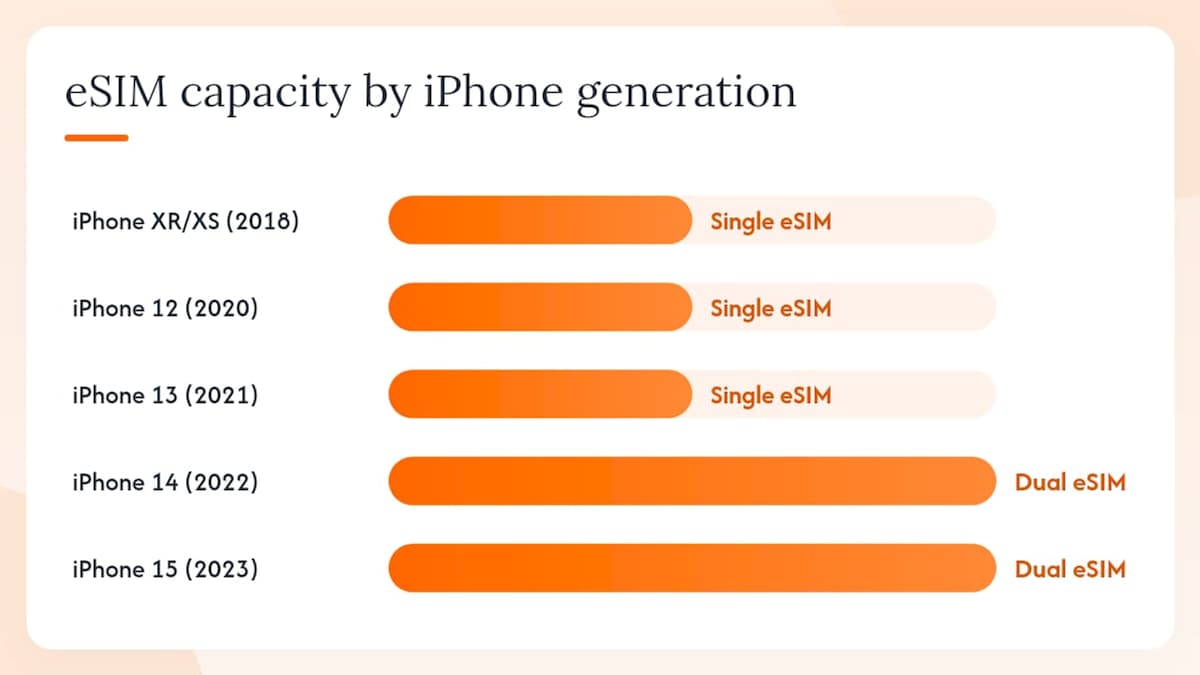
Apple has the most consistent eSIM story of any manufacturer. Every iPhone from the XR (2018) onward includes eSIM hardware, and Apple’s official support page lists exact model compatibility and step-by-step iOS instructions for adding and managing eSIM profiles.
| iPhone Generation | eSIM Implementation | US-Specific Notes |
|---|---|---|
| iPhone XR, XS, XS Max (2018) | Single eSIM + physical nano-SIM | Dual SIM via eSIM + physical SIM |
| iPhone XR and newer | Single eSIM + physical nano-SIM | Dual SIM via eSIM + physical SIM |
| iPhone 12 series (2020) | Single eSIM + physical nano-SIM | Dual SIM via eSIM + physical SIM |
| iPhone 13 series (2021) | Single eSIM + physical nano-SIM | Dual SIM via eSIM + physical SIM |
| iPhone 14 series (2022) | eSIM-only (US models) | No physical SIM tray in US variants |
| iPhone 15 series (2023) | eSIM-only (US models), dual eSIM | Supports two active eSIM profiles simultaneously |
| iPhone 14 series and newer | eSIM-only (US models), dual eSIM | Same dual-eSIM implementation as iPhone 15 US |
The US iPhone 14 shift to eSIM-only was a significant change. If you bought your iPhone 14 or newer in the US, there is no physical SIM tray. That means you cannot fall back to a physical SIM card while traveling, so confirming eSIM compatibility with your destination carrier before you leave is not optional.
How to check eSIM on iPhone:
- Open Settings > General > About
- Scroll to EID — its presence confirms eSIM hardware
- Go to Settings > Cellular and look for Add eSIM or Add Cellular Plan
- To add a plan via QR code, tap Add eSIM > Use QR Code and scan
Carrier lock is the one thing that can still trip up iPhone users. A phone purchased through AT&T, Verizon, or T-Mobile on a payment plan is often carrier-locked until the device is paid off. Unlocked iPhones bought directly from Apple work with any compatible carrier’s eSIM from day one.
2. Which Samsung Galaxy phones support eSIM?
Samsung’s eSIM support is broad but uneven. The flagship S series and the Z Fold/Flip foldables are the safest bets; certain A-series models include eSIM hardware, but coverage varies by market and carrier variant.
Model families with reliable eSIM support in North America:
- Galaxy S20, S21, S22, S23, S24, S25 series — eSIM supported across most US and Canadian carrier variants
- Galaxy Z Fold 2 and newer, Z Flip 3 and newer — eSIM standard on these foldable lines
- Galaxy A54, A55 — eSIM included on unlocked and some carrier variants; confirm before purchase
- Galaxy A34 and below — eSIM support is inconsistent; check the exact model number
The regional firmware issue is real and frustrating. A Galaxy S24 purchased from a US carrier may have eSIM enabled, while the same commercial model bought in Southeast Asia or imported from a different region may have it disabled at the firmware level. Esims, manufacturer and regional variance in eSIM support is significant, and IMEI-based compatibility checks are the most reliable way to confirm.
How to check eSIM on Samsung:
- Go to Settings > Connections > SIM Manager
- Look for an Add eSIM or Add Mobile Plan option
- Alternatively, go to Settings > About Phone > Status Information and look for an EID
If “Add eSIM” is missing from SIM Manager, the device either lacks eSIM hardware or the carrier firmware has disabled it. Contact Samsung support with your exact model number (found on the box or under Settings > About Phone > Model Number) to confirm which applies.
Pro Tip: If you bought a Samsung device through a carrier and the eSIM option is grayed out or missing, call the carrier first. Some carriers disable eSIM on locked devices until the device is fully paid off or unlocked.
3. Google Pixel phones that support eSIM
Pixel devices have supported eSIM since the Pixel 3 (2018), and Google’s implementation is generally cleaner than Samsung’s because Pixel phones ship with stock Android and fewer carrier-specific firmware modifications.
Pixel models with confirmed eSIM support:
- Pixel 3 and 3a (2018–2019) — single eSIM, limited carrier support at launch
- Pixel 4 and 4a (2020) — eSIM supported, dual SIM via eSIM + physical SIM
- Pixel 5 and 5a (2021) — eSIM supported
- Pixel 6, 6a, 6 Pro (2021–2022) — eSIM supported, broader carrier compatibility
- Pixel 7, 7a, 7 Pro (2022–2023) — eSIM supported, dual SIM
- Pixel 8, 8a, 8 Pro (2023–2024) — eSIM supported, multiple eSIM profiles
- Pixel 9, 9 Pro, 9 Pro XL, 9 Pro Fold (2024) — eSIM supported, latest generation
How to add an eSIM on Pixel:
- Go to Settings > Network & Internet
- Tap SIMs or Mobile Network
- Select Add eSIM or the + icon
- Choose Scan QR code or Enter activation code manually
Pixel phones purchased directly from the Google Store are typically unlocked and work with any compatible carrier. Carrier-purchased Pixels may be locked, though Google’s policy generally requires carriers to unlock devices after 60 days. For travel eSIM use, an unlocked Pixel is the most flexible option.
4. Other Android brands with notable eSIM support
Beyond Apple, Samsung, and Google, several other manufacturers sell eSIM-capable phones in North America. The key warning applies to all of them: because Android manufacturers ship multiple regional SKUs, two phones with the same commercial name can differ in eSIM support depending on where they were sold. The model number matters more than the marketing name.
Motorola The Razr+ (2023, 2024) and Razr (2023, 2024) foldables support eSIM. The Edge 40 Pro, Edge 50 Pro, and Edge+ series also include eSIM on unlocked US variants. Budget Moto G models generally do not. Check Settings > Network & Internet > SIMs for an “Add eSIM” option, or look for an EID under Settings > About Phone > IMEI Information.
OnePlus Recent flagships including the OnePlus 12, OnePlus 13, and OnePlus Open support eSIM on their global and North American variants. Earlier OnePlus models (pre-2022) often lack eSIM hardware entirely. OnePlus devices sold through US carriers may have carrier-specific firmware; unlocked models from OnePlus.com are the safer choice for eSIM use.
Sony Xperia The Xperia 1 V, Xperia 1 VI, Xperia 5 V, and Xperia 10 V support eSIM on their global variants. Sony’s North American distribution is limited, so confirm the exact model number and region before purchase. Sony’s settings path: Settings > Network & Internet > SIM cards > Add eSIM.
Oppo, Realme, and Xiaomi These brands have eSIM-capable flagship models (Oppo Find X series, Xiaomi 14 series), but North American availability is limited and carrier support is inconsistent. If you’re importing or buying unlocked, verify the model’s EID and confirm band compatibility with your US or Canadian carrier before committing. Lumo’s mobile network compatibility guide covers band differences by region in detail.
Microsoft Surface Duo The Surface Duo 2 supports eSIM on its US variant. The original Surface Duo does not. Both are discontinued but still in circulation; check Settings > Network & Internet > Mobile Network for eSIM options.
5. How to check if your phone supports eSIM
Three checks cover almost every scenario, and you can run all three in under two minutes.
Step 1: Settings UI check
- iPhone: Settings > Cellular > Add eSIM (or Add Cellular Plan)
- Samsung: Settings > Connections > SIM Manager > Add eSIM
- Pixel/stock Android: Settings > Network & Internet > SIMs > Add eSIM
- Other Android: Settings > Network & Internet or Connections > look for SIM or eSIM options
If the option exists, your phone has eSIM hardware and the carrier firmware hasn’t disabled it.
Step 2: IMEI/EID lookup
Dial *#06# on any phone. On eSIM-capable devices, this displays both the IMEI and the EID (Embedded Identity Document). The EID is a 32-digit number that identifies the eSIM chip. IMEI.info recommends this method as one of the most reliable hardware checks. You can also find the EID in Settings > General > About (iPhone) or Settings > About Phone (Android).
Step 3: Manufacturer and carrier compatibility pages
| Check Type | Where to Go | What to Look For |
|---|---|---|
| iPhone model | Apple Support HT211023 | Model listed as eSIM-capable |
| Samsung model | Samsung’s device support page | eSIM listed under connectivity specs |
| Pixel model | Google’s Pixel specs page | eSIM listed under connectivity |
| Any Android | IMEI.info device checker | EID present in device profile |
| Carrier activation | AT&T, Verizon, T-Mobile support pages | eSIM activation instructions for your plan |
Pro Tip: An EID in your settings confirms eSIM hardware exists, but it doesn’t guarantee activation will work. A carrier-locked device or a carrier plan that doesn’t support eSIM can still block you. Always confirm with your carrier before purchasing a travel eSIM plan.
6. Carrier support and eSIM activation in North America
Hardware is only half the equation. Forbes notes that network support for eSIM varies by operator, and that holds true in North America: AT&T, Verizon, and T-Mobile all support eSIM on their postpaid plans, but activation rules differ.
What to expect from major US carriers:
- AT&T: Supports eSIM on most postpaid plans; prepaid eSIM support is more limited. Carrier-locked AT&T devices require unlocking before accepting a third-party eSIM.
- Verizon: Supports eSIM on postpaid and select prepaid plans. Verizon unlocks devices after 60 days of active service.
- T-Mobile: Strong eSIM support across postpaid and prepaid. T-Mobile also supports eSIM on many MVNO plans that run on its network.
- Canadian carriers (Rogers, Bell, Telus): All three major carriers support eSIM on postpaid plans; prepaid eSIM availability varies by carrier and province.
MVNO caveats: MVNOs (Mobile Virtual Network Operators) like Mint Mobile, Visible, and Consumer Cellular vary widely. Some support eSIM natively; others require a physical SIM for initial activation. Check the MVNO’s support page for your specific device before assuming eSIM will work.
Standard eSIM activation steps:
- Confirm your phone is unlocked and your carrier plan supports eSIM
- Get your eSIM activation QR code from your carrier or eSIM provider
- Go to your phone’s eSIM settings (Add eSIM / Add Cellular Plan)
- Select Scan QR Code and scan the code
- Follow the on-screen prompts to assign the eSIM to a line (primary or secondary)
- Restart the phone if prompted; the eSIM profile activates within a few minutes
For travel eSIMs specifically, the process is the same. Lumo’s step-by-step eSIM activation guide walks through QR activation for each major platform in detail.
7. Common eSIM limitations and how to work around them
eSIM is convenient, but it comes with real constraints. Cape identifies limited device support, extra setup steps, and carrier/region restrictions as the primary drawbacks, and those limitations hit travelers hardest.
Key limitations:
- Carrier-locked devices: A phone locked to AT&T won’t accept a Verizon or travel eSIM. Unlock your device before traveling.
- Regional firmware: Some carrier-sold Android phones have eSIM disabled at the firmware level. This can’t be fixed without a factory reset or firmware flash, and sometimes not at all.
- Profile limits: Most phones support 5–10 stored eSIM profiles but only 1–2 active simultaneously. Switching is easy; storing unlimited profiles is not.
- Device transfers: Moving an eSIM profile to a new phone requires deleting it from the old device first. Some carriers require a support call to reissue the profile.
- Setup requires internet: You need a Wi-Fi or data connection to download an eSIM profile. If you land somewhere with no connectivity, you can’t activate a new eSIM on the spot.
Mitigation tactics:
- Unlock your device before you travel. Most US carriers unlock after 60 days of service; request it proactively.
- Keep a physical SIM as a fallback, especially on long stays or in markets where local carrier support for eSIM is limited.
- Download your travel eSIM profile before you leave home, while you’re still on Wi-Fi.
- Check band compatibility for your destination country. A phone that supports eSIM but lacks the right frequency bands won’t connect reliably.
- Use a free IMEI check to confirm a used device isn’t blacklisted or locked before you buy it.
For short trips and multi-country itineraries, eSIM is almost always the faster option. For long stays where a local number and in-person carrier support matter, a physical SIM can still be the better call.
8. How to confirm model-specific compatibility before you buy
The commercial name of a phone tells you almost nothing about its eSIM status. The model number does.
Where to find your exact model number and EID:
- iPhone: Settings > General > About (shows Model Number, IMEI, and EID)
- Samsung: Settings > About Phone > Status Information (shows Model Number and EID)
- Pixel: Settings > About Phone (shows Model Number and IMEI/EID)
- Any phone: Dial *#06# to display IMEI and EID on screen
- Device box: The model number is printed on the original packaging
How to verify compatibility:
- Cross-reference your model number against the manufacturer’s official support page. Apple’s support page lists every eSIM-capable iPhone and iPad by model number. Samsung and Google maintain similar spec pages.
- Use an IMEI/eSIM lookup tool like IMEI.info to check whether your specific device profile includes eSIM hardware.
- Run a free IMEI blacklist and lock check if you’re buying a used device. A blacklisted phone won’t activate on any carrier, eSIM or physical SIM.
Buying tip: When purchasing a used phone, ask the seller for the exact model number (not just “Galaxy S24” but the full alphanumeric SKU like SM-S928U) and verify the region and carrier variant before completing the transaction. A US unlocked variant and a carrier-branded variant of the same phone can behave very differently.
Why this list focuses on North America and how it was compiled
This compatibility reference covers North America specifically because eSIM support, carrier activation rules, and regional firmware vary enough between markets that a global list would be misleading for US and Canadian buyers.
Sources used to compile and verify entries:
- Manufacturer support pages (Apple Support, Samsung Device Support, Google Pixel specs)
- Carrier support documentation (AT&T, Verizon, T-Mobile, Rogers, Bell, Telus)
- IMEI/eSIM lookup databases including IMEI.info and esims.ca
- Settings-path verification against current iOS 18 and Android 15 menu structures
Limits to keep in mind: carrier firmware locks can change with software updates, and new model variants are released throughout the year. This list reflects confirmed information as of 2026. For the most current model-level confirmation, always cross-check against the manufacturer’s own support page and your carrier’s eSIM activation documentation.
Lumo’s take: what to do once you know your phone is compatible
Once you’ve confirmed your phone supports eSIM and your device is unlocked, the practical next step for travelers is straightforward. A prepaid travel eSIM from Lumo activates via QR code in under five minutes, covers 160+ countries, and requires no contract or carrier account. For short trips and multi-country itineraries, that’s a significant advantage over hunting for a local SIM at the airport. Lumo’s plans are flexible on duration and data limits, and 24/7 support is available if activation hits a snag. One reminder: confirm your specific model and carrier unlock status before purchasing any eSIM plan, including Lumo’s.
Your phone supports eSIM. Here’s what Lumo offers next.
Knowing your phone is eSIM-ready is the first step. The second is having a plan that actually works when you land. Lumo’s prepaid eSIM plans cover 160+ countries with 4G/5G connectivity, activate instantly via QR code, and require no registration or long-term commitment. Whether you’re crossing into Canada for a weekend or running a three-country itinerary through Europe, you get local data rates without roaming fees. Plans are flexible on both duration and data, so you pay for what you need. Browse Lumo’s available plans, select your destination, and have your eSIM profile ready before your flight boards.
Sources
Direct links for confirming compatibility and activating eSIM:
- Imei
- Does My Phone Have an eSIM? — AirTalkWireless
- eSIM Compatibility Checker Canada: Does Your Phone Support eSIM?
- Apple Support — eSIM information and device compatibility
- Forbes Advisor — eSIM overview and network support
- 5 Key Disadvantages of eSIM & How They Affect Users | Cape - Cape
FAQ
How do I know if my phone is eSIM compatible?
Go to Settings and look for “Add eSIM” or “Add Cellular Plan” in your SIM or network settings. You can also dial *#06# to display your EID; if an EID appears, your phone has eSIM hardware.
What phones can get an eSIM?
Most flagship phones released since 2018 support eSIM, including iPhone XR and newer, Samsung Galaxy S20 and newer, Google Pixel 3 and newer, and select Motorola, OnePlus, and Sony models. Over 300 devices are confirmed eSIM-capable in 2026.
What phones can’t use eSIM?
Budget Android phones, older flagships (pre-2018), and many carrier-branded models with disabled firmware cannot use eSIM. Even a hardware-capable phone can be blocked if it’s carrier-locked or running region-specific firmware that disables eSIM.
What are the disadvantages of eSIM?
The main drawbacks are carrier lock restrictions, the need for an internet connection to activate a profile, limited simultaneous active profiles, and difficulty transferring profiles between devices. Cape highlights these as the primary pain points for travelers, with carrier restrictions being the most common blocker.
Can I use a travel eSIM like Lumo on a carrier-locked phone?
No. A carrier-locked phone will only accept eSIM profiles from the locking carrier. Unlock your device first (contact your carrier; most US carriers unlock after 60 days of service), then you can activate a Lumo prepaid eSIM plan for travel.
Recommended
Related Topics
Stay Connected Anywhere
Prepaid eSIM data plans for 180+ countries and territories. No physical SIM required.