Travelers: 4 Fair Use Numbers to Check on an eSIM Before You Buy

“Unlimited” eSIM plans almost always mean unlimited access, not unlimited high-speed data. Before you buy, confirm four numbers: the daily high-speed cap in GB, the post-cap speed in kbps or Mbps, when and in what timezone the allowance resets, and whether hotspot or tethering is allowed. If a provider can’t give you clear answers to all four, treat the plan as a risk, not a bargain.
TL;DR:
- Most unlimited eSIM plans impose daily high-speed data caps of 1 to 3 GB, with actual speeds after the cap varying from 128 kbps to 3 Mbps.
- To avoid unexpected slowdowns, confirm the post-cap speed, reset time and timezone, hotspot policies, and whether tethering is supported before purchase.
- Throttling typically occurs after the daily allowance is used up, often reducing your speed to a fixed, slow rate until the reset; deprioritization depends on network congestion and is unpredictable.
- If you exceed the daily high-speed limit, most providers reduce your speed rather than cut off service entirely, making accurate monitoring essential for reliable connectivity.
- Always ask providers directly for the four key numbers in writing and avoid plans with vague language or missing specific details to prevent surprises abroad.
Table of Contents
- What Fair Use Policy Means for eSIM Plans
- How the Fine Print Actually Works
- How to Find and Read a Provider’s Fair Use Policy Before You Buy
- What Happens When You Exceed a Fair Use Limit
- Unlimited or Fixed-GB: A Quick Decision Framework
- Why Lumo Makes Checking These Numbers Easier
- How FUPs Affect Streaming, Gaming, and Remote Work
- Getting Clarity Directly From Providers
- An Editor’s Take on Reading the Fine Print
- Ready to Buy? Check the Numbers, Then Check Out
- Primary Sources and Further Reading
- Sources
- FAQ
What Fair Use Policy Means for eSIM Plans
A fair use policy, often shortened to FUP, is the fine print that defines what “unlimited” actually delivers once you’re using real data on a real trip. The core distinction is access versus speed. You get unlimited days of connectivity, but only a portion of each day runs at full speed. After that, most providers slow your connection rather than cut it off entirely.
This structure isn’t unique to eSIMs. Home internet providers, mobile carriers, and satellite services all use some version of it, and the logic is the same everywhere: unlimited high-speed data for every customer, all the time, would collapse a network’s capacity. The pattern that shows up most often across travel eSIMs is a daily allowance of full-speed data, commonly in the range of 1 to 3 GB per day, followed by reduced speeds until the clock resets. That range varies by provider, region, and how congested the local network happens to be.
Two forces drive this design:
- Network management. Mobile networks have finite capacity in any given cell tower area, and a small number of heavy users can degrade service for everyone else nearby.
- Roaming wholesale costs. When you use an eSIM abroad, the provider is often buying wholesale data access from a local carrier, and unrestricted high-speed usage at scale would make “unlimited” pricing unsustainable.
- Fairness across the user base. FUPs exist to stop a small percentage of users from consuming a disproportionate share of shared bandwidth.
None of this makes “unlimited” a scam. It makes it a specific product with rules you need to read once before you buy, the same way you’d check baggage limits before you pack.
How the Fine Print Actually Works
Every FUP is built from five recurring clauses, and once you know the pattern, provider pages stop feeling like legal mazes. Here’s how to translate each one into what happens on your phone.
Daily cap. When a plan lists “5 GB per day at high speed,” that’s your usable budget before things slow down. Five gigabytes is roughly six to eight hours of standard-definition video streaming, or a full day of maps, messaging, and social browsing with some music streaming mixed in. Once you’re over it, the countdown resets on the provider’s schedule, not yours.
Post-cap speed. This is the number that decides whether your trip stays functional or grinds to a halt. The gap between tiers is enormous:
- 128 kbps handles texting and basic web pages, but video calls and streaming will stutter or fail.
- 512 kbps supports slow-loading pages and low-resolution video, with frequent buffering.
- 1 Mbps is workable for browsing, email, and standard-definition streaming with patience.
- 3 Mbps can still carry a video call or HD streaming reasonably well.
Two plans advertising the same “3 GB/day” cap can feel completely different in practice if one throttles to 128 kbps and the other to 1 Mbps. The industry-standard advice is to prioritize the post-cap speed number over the daily GB figure whenever your trip involves continuous streaming or long video calls.
Hotspot and tethering. Many unlimited eSIM plans restrict or exclude tethering entirely, treating it separately from on-device data allowance. If you’re planning to connect a laptop through your phone’s hotspot, this single clause can make or break a remote work trip. It’s worth reading Lumo’s guide on sharing eSIM data through a hotspot before assuming your plan supports it.
Deprioritization versus throttling versus overages. These aren’t interchangeable. Throttling is a hard, predictable speed reduction after you cross a threshold. Deprioritization means your traffic gets lower priority only when the local network is congested, so you might see full speed most of the day and a crawl during a busy evening in a city center. Overage charges are a third model entirely, where you pay per extra gigabyte instead of getting throttled.
Deprioritization is unpredictable by design. A plan using deprioritization can run at full speed most of the time and still let you down exactly when you need it most, during peak evening hours in a crowded destination.
Reset mechanics. Some plans reset at local midnight in the destination’s timezone; others reset on a UTC clock or use a rolling 24 hour window from your last top-up. A local-midnight reset can actually work in your favor for evening streamers, since you might catch two high-speed windows within a single UTC day. Rolling windows are harder to track and reduce predictability.
How to Find and Read a Provider’s Fair Use Policy Before You Buy
The FUP rarely sits on the main plan page in bold text. It hides in footnotes, help center articles, or the terms and conditions linked at checkout, usually in a smaller font size than the price. Here’s how to extract what you need in under two minutes.
- Open the plan page and scroll to the bottom. Look for a footnote or asterisk near the word “unlimited.”
- Search the help center. Use the provider’s own search bar with terms like “fair use,” “throttle,” “kbps,” or “per day.”
- Try a targeted search engine query. Something like
site:providername.com "fair use" throttleoften surfaces the exact policy page faster than browsing. - Extract the four numbers as you go: daily cap, post-cap speed, reset time and timezone, and hotspot rule.
- If any number is missing, ask support directly and screenshot the reply. Screenshotting chat responses gives you a record if the actual service doesn’t match what an agent promised.
Pro Tip: Keep a screenshot folder on your phone labeled by provider name. If your speed gets throttled sooner than expected on a trip, that saved chat transcript is your strongest evidence when you ask for a refund or credit.
Walk away from any plan whose policy uses language like “speeds may be reduced during periods of high usage” with no number attached. Vague enforcement language, paired with an absence of any of the four numbers, is the clearest signal that you won’t know what you’re getting until you’re already abroad and stuck with it.
What Happens When You Exceed a Fair Use Limit
Crossing your daily allowance rarely means losing service outright. The most common enforcement pattern is a drop to a fixed reduced speed, sometimes as slow as 128 kbps, until your reset window arrives. Some providers instead use deprioritization, so your speed dips only when the local tower is under heavy load, which makes the experience feel inconsistent from one hour to the next. A smaller number suspend the connection temporarily or, in repeated-violation cases, terminate the plan.
Notification quality varies widely. Some apps show a live usage meter that’s fairly accurate; others update with enough lag that you’re throttled before you see any warning. If you find yourself capped:
- Buy an add-on data pack if the provider offers one, which is often the fastest fix.
- Switch to Wi-Fi wherever it’s available rather than burning reduced-speed mobile data.
- Contact support and ask directly what speed tier you’re on and when it resets.
- Consider a fixed-GB plan next trip if you’re consistently exceeding daily allowances.
If your usage meter and the provider’s billed usage disagree significantly, save screenshots and escalate with specific timestamps. That evidence matters more than a general complaint.
Unlimited or Fixed-GB: A Quick Decision Framework
The math here is simpler than it looks. You need three inputs: trip length in days, your expected GB per day, and whether you need hotspot support.
- Multiply expected daily GB by trip days to get your total-trip need. A ten-day trip at 2 GB per day needs roughly 20 GB total.
- Compare that number to a fixed-GB bundle’s price and allowance. If a fixed 20 GB plan covers your estimate with room to spare, it’s often cheaper than an unlimited plan with a lower daily cap than you need.
- Check if your daily habits spike unpredictably. Streaming-heavy days, video calls, or navigation-heavy road trips push usage up fast, and that’s where unlimited plans with a workable post-cap speed start to earn their price.
A weekend trip with light streaming usually favors fixed-GB. A two-week remote work trip with video calls and hotspot needs almost always favors unlimited, provided the hotspot clause and post-cap speed both check out. A long-term slow traveler moving city to city for months benefits from unlimited specifically because daily usage is unpredictable and inconsistent connectivity is the real enemy, not total volume.
When in doubt, buy the smaller plan and add data if you run out. Overbuying a giant fixed bundle you never touch wastes more money than most people expect.
Why Lumo Makes Checking These Numbers Easier
Lumo runs an eSIM platform built around instant activation and coverage across more than 160 countries, with flexible data plans designed so travelers aren’t stuck guessing at fine print. Activation uses a QR code, connections run on 4G and 5G networks, and support is available around the clock if you need a straight answer about hotspot access or reset timing before you commit. Lumo’s blog also breaks down what “unlimited” actually means across its own plan lineup, along with broader guidance on eSIM security practices for travelers connecting to unfamiliar networks abroad. Before checkout, message support and ask directly for the daily cap, post-cap speed, reset timezone, and hotspot policy.
How FUPs Affect Streaming, Gaming, and Remote Work
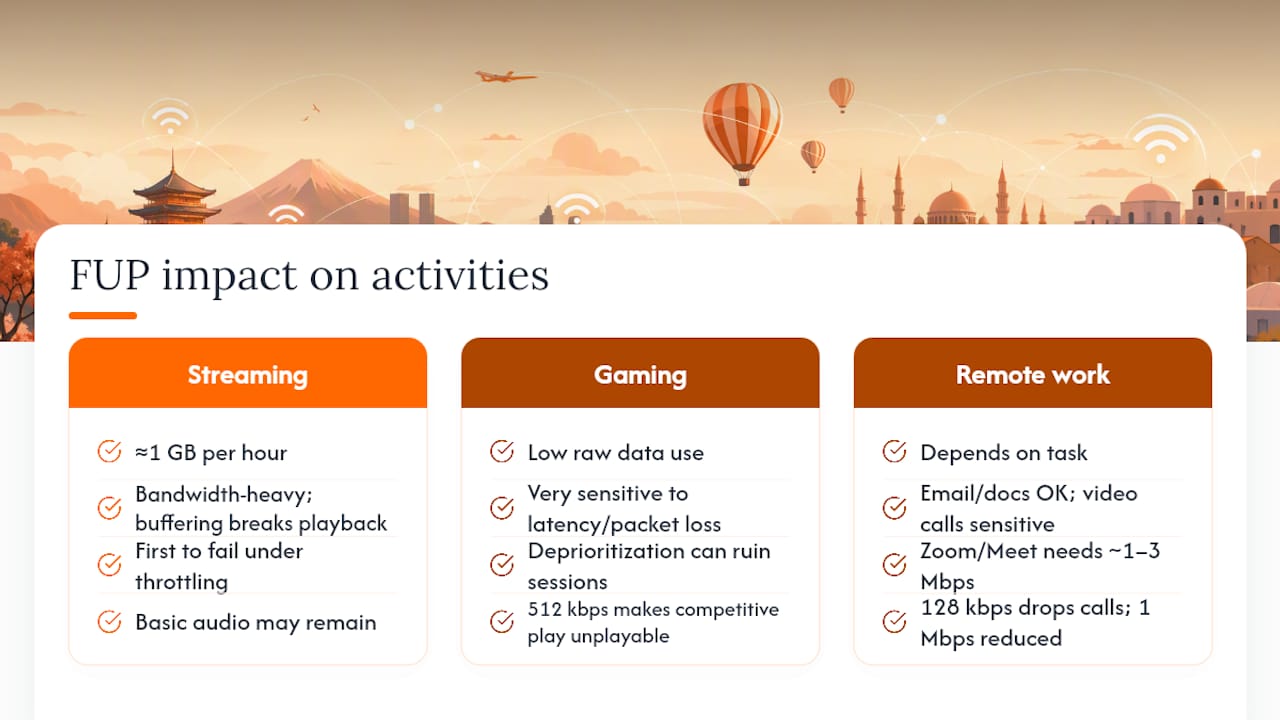
Not all data use hits an FUP the same way. Streaming video is the fastest way to burn through a daily high-speed allowance, since even standard definition playback can consume a gigabyte an hour or more. Once you’re throttled to a lower tier, streaming is usually the first thing to break, since buffering makes anything beyond basic audio unwatchable.
Gaming online reacts differently. Most games consume relatively little raw data, but they’re extremely sensitive to latency and packet loss, which means deprioritization during network congestion can ruin a session even if you haven’t touched your daily cap. A throttled connection at 512 kbps might still let you check email fine but make competitive online gaming unplayable.
Remote work sits in the middle and depends entirely on what you’re doing. Email, messaging apps, and document editing survive throttled speeds without much trouble. Video calls are the breaking point. A call on Zoom or Google Meet typically needs somewhere around 1 to 3 Mbps to stay stable, which means a post-cap speed of 128 kbps will drop your calls entirely while a 1 Mbps tier might hold on with reduced video quality. If your work depends on video calls or large file uploads, the post-cap speed number matters more than the daily cap size, and the hotspot policy matters more than either one if you’re tethering a laptop.
Getting Clarity Directly From Providers
Most FUP confusion isn’t malicious, it’s just poor documentation. Providers often know the exact numbers internally but never publish them clearly, which means a direct question to support frequently gets you further than reading the terms page a third time.
When you contact support, ask specific, closed-ended questions rather than general ones. Instead of “what’s your fair use policy,” ask “what is my daily high-speed data allowance in GB, and what speed do I get afterward in kbps or Mbps?” Specific questions get specific answers, and vague questions get vague, boilerplate replies pulled from a script.
Always get the answer in writing, whether that’s email or chat, and screenshot it immediately. If a support agent tells you something that contradicts the published terms, that written record becomes useful leverage if you need a refund or credit later. It’s also reasonable to ask whether a plan’s hotspot restriction can be waived or clarified for your specific device, since some providers apply blanket language in their terms that doesn’t reflect how the network actually behaves.

If a provider refuses to give you numbers at all, hedging with phrases like “speeds may vary,” that’s your answer. A provider confident in its own policy will state it plainly, because transparent disclosure protects both sides from disputes later.
An Editor’s Take on Reading the Fine Print
The four-number checklist isn’t optional homework, it’s the entire difference between a smooth trip and a throttled, frustrating one. Any provider unwilling to state its daily cap, post-cap speed, reset time, and hotspot rule in plain language is telling you something about how it handles disputes, too.
*— Theo Wheeler
Ready to Buy? Check the Numbers, Then Check Out
Once you’ve got the four numbers locked in, the actual purchase should take less than a minute. Lumo’s Global eSIM Plans page lists coverage and data options for travelers heading across multiple countries, while region-specific pages like Europe eSIM Plans and Asia eSIM Plans suit trips staying within one continent. Every plan activates through a QR code scan, with no contract and no registration wall slowing you down at checkout.
Before you tap buy, message Lumo’s support team and ask directly for your plan’s daily high-speed cap, post-cap speed, reset timezone, and hotspot policy. Save the reply. That two-minute check is the same habit that separates travelers who land with working data from those who spend day one of a trip fighting with customer support over a policy nobody explained upfront.
Primary Sources and Further Reading
- Unlimited eSIM Fair Use Policy: Read This Before You Buy
- ISP fair use policies and data caps explained
- Federal Communications Commission (FCC) network management guidance
- U.S. Department of State travel resources
Sources
- Unlimited eSIM Fair Use Policy: Read This Before You Buy
- ISP fair use policies and data caps explained (2026)
- Federal Communications Commission (FCC) — network management / consumer guidance
FAQ
What Is the Downside of Having an eSIM?
The main downside is device dependency: if your phone breaks or gets lost, you can’t just pop the eSIM into a spare handset the way you would a physical SIM. eSIMs also require an internet connection to activate initially, which can be awkward if you land with a dead physical SIM and no Wi-Fi to complete setup.
What Does a 100GB Fair Use Policy Limit Mean?
A fair use limit typically means your total high-speed allowance before the provider throttles your speed or reviews your account for the billing period, not a hard cutoff where service stops. The exact post-cap speed and reset timing vary by provider, so check those specific numbers rather than assuming the threshold alone tells the full story.
Which Countries Restrict or Block eSIM Use?
A handful of countries restrict eSIM activation or require local registration due to telecom regulations that change periodically, so the safest move is checking current guidance for your specific destination before departure. The U.S. Department of State’s travel resources is a solid starting point for country-specific entry and connectivity requirements.
Does Lumo Have a Fair Use Policy?
Lumo’s plans are built around clear, flexible data allowances rather than vague “unlimited” language designed to obscure limits, and its blog explains how it defines its data plans for travelers. Current pricing and plan details, including any plan-specific limits, are listed on the Global eSIM Plans page and confirmed directly through Lumo’s 24/7 support.
How Can I Monitor My Data Usage to Stay Within a Fair Use Limit?
Most eSIM apps include a built-in usage meter you can check daily, though accuracy and update speed vary by provider. Pairing that in-app tracker with your phone’s native data usage settings, and switching to Wi-Fi for large downloads, gives you a reliable second check against surprise throttling.
Recommended
Related Topics
Stay Connected Anywhere
Get instant eSIM data plans for 160+ countries. No physical SIM required.