How to switch mobile carriers abroad in 2026 seamlessly

Landing in a foreign country and seeing a $200 roaming charge on your first day stings. Expensive international rates drain your budget fast, but switching to a local carrier or eSIM cuts costs by up to 90% while keeping you connected. This guide walks you through preparing your device, executing the switch smoothly, choosing between physical SIMs and eSIMs, and troubleshooting common issues so you stay online without breaking the bank.
Table of Contents
- What You Need Before Switching Mobile Carriers Abroad
- Step-By-Step Guide To Switching Carriers Abroad With Sim Or Esim
- Choosing Between Local Sim Cards And Esims For International Travelers
- Avoiding Common Mistakes And Troubleshooting Connectivity Abroad
- Connect Globally With Lumo Esim’s Instant Plans
- How To Switch Mobile Carriers Abroad: Faq
Key takeaways
| Point | Details |
|---|---|
| Unlock your phone first | Carrier-locked devices reject foreign SIMs, so verify unlock status before departure. |
| eSIMs enable instant switching | Scan a QR code to activate data in minutes without visiting stores or swapping physical cards. |
| Disable home roaming after switching | Turn off cellular data on your original SIM to prevent surprise charges. |
| Dual-SIM setups maintain home access | Keep your home number active for calls while using travel data on a second profile. |
| Local options save 70-90% on data | Switching from roaming to local SIMs or eSIMs slashes per-GB costs dramatically. |
What you need before switching mobile carriers abroad
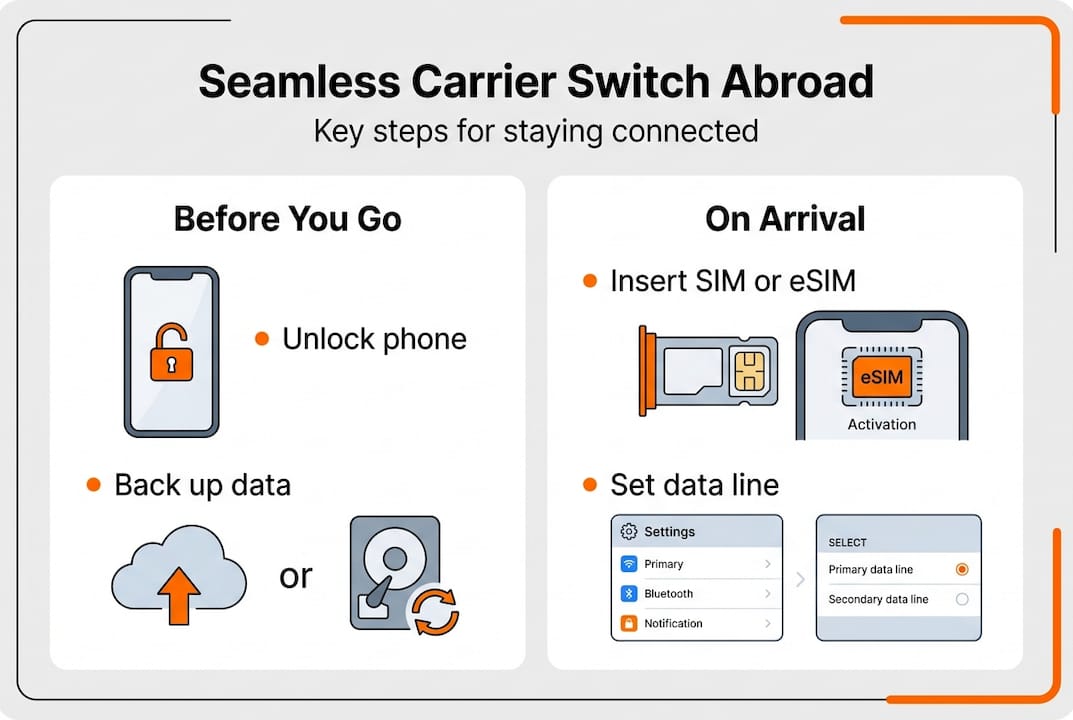
Preparing your device properly prevents headaches at the airport and ensures seamless connectivity from touchdown. Start by confirming your phone is unlocked. Carrier-locked devices refuse to accept SIMs from other networks, leaving you stuck with expensive roaming. Contact your home carrier to unlock your phone at least a week before departure, as processing can take several business days.
Back up your contacts, photos, and essential data before swapping SIMs. Cloud services like iCloud or Google Drive sync automatically, but double-check that everything uploaded successfully. Losing access to two-factor authentication codes or important messages mid-trip creates unnecessary stress.
Decide between a physical SIM card and an eSIM based on your itinerary. Physical SIMs work for single-country stays exceeding two weeks, while eSIMs shine for multi-destination trips or short visits. eSIM profiles install digitally, eliminating the need to hunt down stores or carry tiny cards. Your phone must support eSIM technology, which most models from 2020 onward do.
Review your phone’s compatibility with VoLTE and APN settings for your destination. Some carriers require specific configurations to enable voice calls over LTE or internet access. Research these requirements online or contact the carrier directly before purchasing a plan.
Dual-SIM capability transforms how you manage connectivity abroad. Newer iPhones and Android devices support two active lines simultaneously, letting you keep your home number reachable for calls while routing data through a cheaper local plan. This setup prevents missed messages from banks or family while you explore.
Pro Tip: Download eSIM profiles and carrier apps over Wi-Fi before leaving home. Airport connections can be slow or unreliable, and having everything ready eliminates activation delays when you land.
| Preparation step | Why it matters | Timeline |
|---|---|---|
| Unlock phone | Enables foreign SIM acceptance | 1-2 weeks before travel |
| Backup data | Prevents loss during SIM swap | 2-3 days before departure |
| Purchase eSIM/SIM | Ensures immediate activation abroad | 1 week to 1 day before flight |
| Check APN settings | Guarantees internet and call functionality | 3-5 days before travel |
Understanding avoiding roaming fees strategies adds another layer of savings. Roaming charges accumulate quickly because your home carrier bills premium rates for borrowing foreign networks. Switching to a local provider bypasses these markups entirely, giving you direct access to regional pricing.
Step-by-step guide to switching carriers abroad with SIM or eSIM
Executing the switch correctly ensures you stay connected from the moment you clear customs. Follow these steps in order to avoid common pitfalls and activate service smoothly.
-
Power off your phone completely before removing or inserting any SIM card. Hot-swapping risks damaging the SIM tray or corrupting data on the card itself.
-
For physical SIMs, locate the SIM tray using the ejector tool included with your phone. Remove your home SIM carefully and store it in a safe place. Insert the new local SIM with the gold contacts facing down, ensuring it clicks into place securely.
-
For eSIMs, open your phone’s settings and navigate to the cellular or mobile data section. Select “Add Cellular Plan” or “Add eSIM” and scan the QR code provided by your carrier. The profile installs within seconds.
-
Update Access Point Name settings if data doesn’t connect automatically. Navigate to Settings, then Cellular, then Cellular Data Network. Enter the APN details provided by your new carrier, typically found on their website or activation card.
-
Reboot your device after installing the SIM or eSIM profile. This refresh forces your phone to register with the new network and apply updated settings. If service still doesn’t appear, toggle airplane mode on and off to trigger a network search.
-
Test connectivity thoroughly before leaving the airport or your accommodation. Make an outgoing call to verify voice service, send a text message to confirm SMS functionality, and browse a website to check data speeds. Running these tests early gives you time to troubleshoot issues while support is accessible.
Pro Tip: Label your eSIM profiles clearly in your phone’s settings. Names like “Home” and “Travel” or “US” and “France” prevent confusion when switching between lines for calls versus data.
Some carriers require manual activation through an app or website after installation. Download the carrier’s app over Wi-Fi and follow their activation prompts. This step typically involves entering your phone number or confirming your identity through a verification code.
If your eSIM troubleshooting guide doesn’t resolve connection problems, contact carrier support immediately. Most providers offer 24/7 chat or phone assistance, and resolving issues early prevents wasted vacation time.
Dual-SIM users should designate which line handles calls, texts, and data in their phone settings. Assigning your travel SIM for data while keeping your home line active for calls ensures you don’t miss important communications without paying roaming fees.
Choosing between local SIM cards and eSIMs for international travelers
Selecting the right connectivity option depends on trip length, data needs, device compatibility, and how much flexibility you require. Both physical SIMs and eSIMs deliver significant savings compared to roaming, but they serve different travel styles.
Local physical SIM cards typically cost less for extended single-country stays. Purchasing a SIM at a local carrier store or airport kiosk gives you immediate access to domestic rates, often as low as $1 to $3 per gigabyte. However, you must visit a physical location, present identification, and wait for activation, which can take 10 to 30 minutes.
eSIMs eliminate physical logistics entirely. You purchase a plan online, receive a QR code via email, and activate service instantly by scanning the code in your phone settings. This convenience makes eSIMs ideal for remote workers who need reliable connectivity the moment they land or travelers hopping between multiple countries.

Data costs vary significantly by region and provider. Local SIMs in Southeast Asia or Eastern Europe offer incredible value, sometimes under $1 per GB for prepaid plans. Western Europe and North America charge $3 to $5 per GB through local carriers, still far cheaper than the $10 to $20 per GB roaming rates from major US carriers.
| Option | Best for | Pros | Cons |
|---|---|---|---|
| Local physical SIM | Single-country stays over 2 weeks | Lowest cost per GB, widely available | Requires store visit, needs ID, single-use |
| Regional eSIM | Multi-country trips in one area | Covers multiple nations, instant activation | Slightly higher cost than local SIM |
| Global eSIM | Frequent travelers, short trips | Works in 100+ countries, easy switching | Premium pricing, limited data allowances |
| Home carrier roaming | Emergency backup only | No setup required, familiar billing | Extremely expensive, slow speeds |
Dual-SIM phones unlock the best of both worlds. Keep your home SIM active in one slot for receiving calls and texts, while using a local SIM or eSIM in the second slot for data. This setup prevents missed verification codes from banks or important calls from family without paying roaming fees.
eSIM providers often bundle regional or global plans that work across dozens of countries. A single European eSIM might cover 30 nations, eliminating the need to purchase new SIMs every time you cross a border. Compare top travel eSIMs 2026 to find plans matching your itinerary.
Consider coverage quality beyond just price. Some budget carriers throttle speeds after you consume a certain amount of data, while others deprioritize traffic during peak hours. Read reviews and check coverage maps to ensure your chosen provider delivers reliable service in the areas you’ll visit.
Purchasing eSIMs before departure gives you time to troubleshoot activation issues at home rather than scrambling in a foreign airport. Most providers deliver QR codes within minutes of purchase, and you can install the profile without activating it until you arrive. Understanding benefits of eSIM technology helps you maximize these advantages.
Avoiding common mistakes and troubleshooting connectivity abroad
Even careful preparation can’t prevent every hiccup, but knowing common pitfalls helps you recover quickly and maintain reliable service throughout your trip. Most connectivity issues stem from simple oversights that take minutes to fix.
Verify your phone is carrier unlocked before purchasing any SIM or eSIM. Insert a friend’s SIM from a different carrier to test, or contact your home carrier for confirmation. Locked phones display error messages like “SIM Not Supported” or “Invalid SIM” when you try to activate foreign service.
Check VoLTE and APN compatibility for your destination network. Some carriers require Voice over LTE support to make calls, while others need specific APN configurations for internet access. Search “[carrier name] APN settings” online and enter the details manually in your phone’s cellular settings if auto-configuration fails.
Disable cellular roaming on your home SIM immediately after switching to a local carrier. Leaving roaming active can trigger background data usage or incoming calls that bill at premium rates. Navigate to your home SIM’s settings and toggle “Data Roaming” off completely.
Restart your device or toggle airplane mode if connectivity drops unexpectedly. Network registration glitches happen frequently when switching between carriers or crossing borders. A quick reboot forces your phone to reconnect and often resolves “No Service” errors within seconds.
Dual-SIM users must designate which line handles mobile data in their settings. Your phone won’t automatically route data through the cheaper travel SIM. Open Cellular settings, tap “Mobile Data,” and select your travel line as the default for internet access.
Pro Tip: Take screenshots of your APN settings and carrier support contact information before traveling. If you need to reconfigure settings or contact support, you’ll have the details accessible offline.
- Ensure your eSIM profile is set as the active line for data in your phone’s cellular settings
- Verify you purchased enough data for your trip; running out mid-journey forces you to buy expensive top-ups
- Check that your phone’s software is updated to the latest version; outdated iOS or Android builds sometimes block eSIM activation
- Confirm your eSIM hasn’t expired; some plans activate automatically upon installation and count down from that moment
If data works but calls fail, your carrier likely doesn’t support VoLTE on your device. Use internet-based calling apps like WhatsApp, Skype, or FaceTime Audio as workarounds. These apps route voice calls over your data connection, bypassing traditional cellular voice networks entirely.
Slow speeds despite full signal bars often indicate network congestion or throttling. Check your plan’s terms to see if you’ve exceeded a high-speed data cap. Many carriers slow speeds to 2G after you consume your allotted 4G/5G data, making browsing painfully slow.
For persistent issues, contact carrier support through their app or website chat. Explain your problem clearly, mention your device model, and ask for specific troubleshooting steps. Most providers can remotely refresh your connection or push updated settings to your device. If problems continue, visit a carrier store for in-person assistance. Bring your passport and any activation materials you received.
Understanding eSIM connectivity issues and avoiding roaming fees strategies together creates a robust knowledge base for managing mobile service abroad confidently.
Connect globally with Lumo eSIM’s instant plans
Mastering carrier switching abroad opens up affordable, reliable connectivity wherever your travels take you. Lumo simplifies this process even further with instant eSIM activation covering over 160 countries worldwide. Purchase a plan online, receive your QR code immediately, and activate service the moment you land.
Lumo’s multi-profile management lets you store and switch between regional plans effortlessly, perfect for frequent travelers hopping between continents or remote workers maintaining connectivity across time zones. Flexible data packages deliver significant savings compared to traditional roaming, with transparent pricing and no hidden fees. Whether you need a week in Europe or a month across Asia, Lumo eSIM instant global plans provide the seamless connectivity modern travelers demand.
How to switch mobile carriers abroad: FAQ
What devices support eSIM switching abroad?
Most smartphones released after 2020 support eSIM technology, including iPhone XS and newer, Samsung Galaxy S20 and later, Google Pixel 3 and up, and many other flagship models. Check your device specifications or contact your manufacturer to confirm compatibility before purchasing an eSIM plan.
Is it better to buy local SIM cards at the airport or online?
Online purchases offer better prices and more time to research plans, but airport kiosks provide immediate assistance if you encounter activation issues. For single-country trips, airport SIMs work fine despite slightly higher costs. For multi-country itineraries, buy eSIMs online before departure to avoid hunting for stores in each location.
Can I keep my home number active while using an eSIM abroad?
Yes, dual-SIM phones let you maintain your home number for calls and texts while routing data through a travel eSIM. Configure your settings to use your home line for voice and your travel line for data, preventing missed calls without paying roaming fees. Understanding eSIM benefits helps you maximize this flexibility.
How do I know if my phone is unlocked?
Contact your home carrier and request unlock status confirmation, or test by inserting a SIM from a different carrier. Unlocked phones accept any compatible SIM and display the new carrier’s name in the status bar. Locked devices show “SIM Not Supported” or “Invalid SIM” error messages when you attempt to use foreign SIMs.
What should I do if my data isn’t working after switching SIMs?
Restart your phone first, as this resolves most connectivity glitches. If data still fails, verify you entered the correct APN settings for your new carrier, check that mobile data is enabled in your settings, and confirm your plan has activated and includes remaining data. Toggle airplane mode on and off to force a network reconnection, or contact carrier support for remote troubleshooting.
Recommended
Related Topics
Stay Connected Anywhere
Get instant eSIM data plans for 160+ countries. No physical SIM required.