Traveling With eSIM Advantages: What You Get and What You Don’t
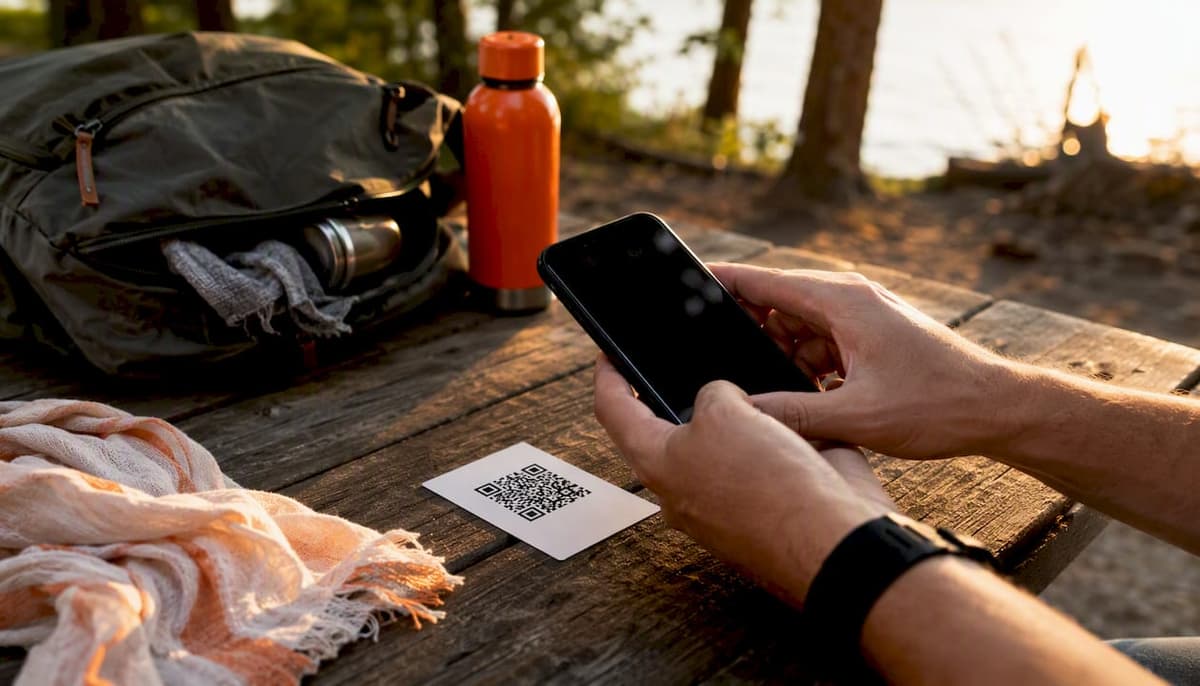
For most international and multi-country trips, an eSIM beats a physical SIM on nearly every measure a traveler actually cares about: setup time, price, and border-to-border flexibility. The exceptions are narrow: locked older phones, trips longer than a month in one country, or situations where you need a genuine local phone number for banking or a delivery app.
If your trip is under two weeks and touches more than one country, buy a regional eSIM plan before you leave and activate it once you land. If you’re staying somewhere for a month or longer, run the math against a local SIM first. Either way, one decision matters more than the plan you pick.
Pro Tip: Before you buy anything, confirm your phone is carrier-unlocked and check which data line your phone will treat as “active” once the new eSIM installs. Getting this wrong is the single most common reason travelers land, connect to nothing, and then rack up accidental roaming charges on their home line.
- Unlocked and eSIM-capable device confirmed
- Plan matches your actual route, not just your first stop
- Home number preserved through a dual-SIM setup if you need it for calls or 2FA
Key Takeaways
For most trips under a month that cross more than one country, an eSIM beats a physical SIM on cost, setup time, and security, provided your device is unlocked and eSIM-capable.
| Point | Details |
|---|---|
| Check unlock status first | Confirm your phone is carrier-unlocked before buying any third-party eSIM plan. |
| Match trip length to option | Under two weeks favors eSIM; 30+ days in one country often favors a local physical SIM. |
| Verify the active data line | Phones store multiple eSIM profiles but only run one or two active, so confirm settings to avoid roaming charges. |
| Keep dual-SIM for your number | Run your eSIM for data while your home SIM stays active for calls and texts. |
| Test with Lumo before a big trip | Lumo covers 160-plus countries with instant QR activation and multi-device support for phones, tablets, and laptops. |
Table of Contents
- Traveling With eSIM Advantages That Actually Move the Needle
- When an eSIM Is Not the Right Call
- How to Buy and Activate an eSIM Before You Fly
- Which Devices Support eSIM and How Dual-SIM Actually Works
- What eSIM Travel Plans Actually Cost, and When a Physical SIM Wins
- How to Evaluate an eSIM Provider (and Why Lumo Fits Most Trips)
- Quick Decision Matrix: eSIM or Physical SIM?
- What I’ve Learned Watching Travelers Actually Use eSIMs
- Try Lumo Before Your Next Trip
- Sources
- FAQ
Traveling With eSIM Advantages That Actually Move the Needle
The convenience argument gets repeated so often it starts to sound like marketing, but it holds up under scrutiny. You buy the plan from your couch, scan a QR code or tap install in an app, and the profile sits ready on your phone before you’ve packed your bag. This avoids waiting in lines at airport kiosks or dealing with language barriers during setup. T-Mobile’s guide to eSIM travel confirms this pre-install approach means you can be online the moment your plane touches down, not forty minutes later.
Multi-country plans solve a problem physical SIMs were never built to handle well. If your itinerary runs Portugal to Spain to France in ten days, a regional eSIM covers all three without you swapping a single card at a border. That single point matters more on a trip like this than almost anything else, because the alternative is either three separate SIM purchases or accepting your home carrier’s roaming rates, which are rarely a bargain.
Price is where the gap gets concrete. A 7-day travel eSIM commonly runs between $2 and $10, while an airport physical SIM for the same trip typically costs $10 to $30, according to SimFinder’s cost comparison. A 7-day Japan eSIM, for instance, can run around $4 against a $15 to $30 airport SIM, and that price difference alone often covers a meal or two on the ground.
Security is the advantage travelers underestimate most. A physical SIM can be pulled from your phone by a thief or a hotel employee with a paperclip and repurposed elsewhere. An eSIM is a digital profile embedded in the device hardware. It cannot be physically removed, which closes off a real vector for SIM-swap fraud that targets SMS-based two-factor authentication. AARP has flagged this same point in guidance aimed at travelers wary of losing their SIM abroad, and it’s one of the few security upgrades that costs you nothing extra to use.

Dual-SIM setups round out the case. Keep your home number active for calls and texts, and let the eSIM handle data. Your bank’s fraud alert still reaches you, your kids can still call you, and none of that runs through your home carrier’s expensive roaming rates. Lumo’s own breakdown of eSIM benefits for travelers walks through this dual-line setup in more detail if you want to see it configured step by step.
When an eSIM Is Not the Right Call
None of this makes eSIMs universally correct, and pretending otherwise does readers a disservice. A handful of situations genuinely favor the plastic card.
Device compatibility is the first wall people hit. Phones older than roughly 2018, and some carrier-locked devices even from recent years, simply can’t add a third-party eSIM profile. Locked phones are the more common trap: an unlocked phone is required to add a regional eSIM, and confirming that status in your settings before departure prevents an activation failure you’d otherwise discover at 30,000 feet with no Wi-Fi to fix it.
Local phone numbers matter more than people expect until they need one. Some banking apps, ride-share services, and government portals in certain countries require an SMS verification code sent to a local number, not your eSIM data line. If your trip depends on setting up a local bank account or signing a lease, a physical SIM with a real local number may be unavoidable.
Long stays change the economics entirely. A traveler settling into Bangkok or Ho Chi Minh City for two months will usually find that a local SIM bought from a convenience store costs less over that period than a comparable eSIM data allowance, particularly in markets where local carriers price aggressively for residents.
Switching phones is where eSIMs show their one real friction point. Moving a physical SIM between two phones takes five seconds. Moving an eSIM profile often requires provider reactivation or platform-specific transfer tools, and jumping between an iPhone and an Android device can be slower still. Frequent device-swappers should keep a backup physical SIM in a drawer somewhere just in case.
Run through this quickly before you commit to either option:
- How long is the trip? Under two weeks favors eSIM outright.
- Do you need a local number for banking, delivery apps, or a landlord?
- Is your phone actually unlocked and eSIM-capable?
- Will you be switching devices mid-trip?
How to Buy and Activate an eSIM Before You Fly
Getting online the moment you land comes down to doing the setup work before you leave, not after.
- Check your unlock status. Go to your carrier’s account settings or call support to confirm your device isn’t locked to your home network.
- Confirm eSIM support on your device. iPhone XS and later, most Pixel and Galaxy phones from 2019 onward, and select iPads support eSIM. Check your phone’s specifications if you’re unsure.
- Pick a plan that matches your actual route, not just your first destination, especially if you’re crossing borders.
- Install before departure. Scan the QR code or install through the provider’s app while you still have reliable Wi-Fi.
- Set the correct active line. Go into your cellular settings and confirm the new eSIM is set as your active data line, while your home SIM (physical or eSIM) stays set for calls and texts if you want it reachable.
Pre-installing solves the single biggest source of travel-day stress: dead air the moment you step off the plane. Buying and activating before you go means you land already connected instead of hunting for airport Wi-Fi to download a QR code.
A few things go wrong often enough to name. “No activation” errors usually trace back to a locked device or a plan purchased for the wrong region. QR code failures are frequently a screenshot problem, since some providers require you to scan the original code rather than a saved image. Duplicate-profile conflicts happen when travelers install a new eSIM without deleting an old, unused one, and the phone gets confused about which profile to prioritize.
Pro Tip: If you’re switching phones mid-trip, check with your provider before you travel about how eSIM transfer works on their platform. Some require you to be online with the old device to transfer credentials to the new one, which is impossible to do after the old phone is already lost or broken.
Most eSIM travel plans support personal hotspot and tethering, letting you share your connection with a laptop or a travel companion’s phone, though allowances and speeds vary by provider and plan tier. Check the specific terms before you rely on it for something like a video call.
Which Devices Support eSIM and How Dual-SIM Actually Works
Checking support takes under a minute. On iPhone, go to Settings, then Cellular, and look for “Add eSIM.” On Android, the path is usually Settings, then Network & Internet, then SIMs, though it varies slightly by manufacturer. Windows laptops and some tablets support eSIM too, letting you get cellular data without a physical modem, though Microsoft notes the setup process differs from smartphones and depends on your specific PC model.
As a rough cutoff, most phones released from 2018 onward support eSIM in some form, but this is a guideline, not a guarantee. Carrier-locked devices remain the exception that trips people up most, since the hardware might technically support eSIM while the carrier restriction blocks a third-party profile from loading.
Dual-SIM behavior deserves a closer look because it’s where most billing mistakes happen. A phone can typically store eight to ten eSIM profiles but only run one or two active at a time, depending on the device. That distinction between stored and active is exactly where travelers get burned: your home SIM sits there, technically present, and if it’s still set as active for data instead of just voice and SMS, you could be racking up international roaming charges without realizing it. Before you board your flight, open your cellular settings and manually confirm which line handles data and which handles calls.
- iPhone: Settings > Cellular > check “Add eSIM” availability and active line assignment
- Android: Settings > Network & Internet > SIMs > check active data/call assignment
- Windows: Settings > Network & Internet > Cellular, availability varies by device
What eSIM Travel Plans Actually Cost, and When a Physical SIM Wins
Numbers make this decision easier than any general advice can. A 7-day travel eSIM typically runs $2 to $10, while the same trip’s airport physical SIM commonly runs $10 to $30. That gap tends to hold across most popular destinations, though exact pricing depends on the country and data allowance you choose.
| Trip Length | Typical eSIM Cost | Typical Physical SIM Cost | Better Value |
|---|---|---|---|
| 7 days | $2–$10 | $10–$30 (airport) | eSIM |
| 30 days, single country | Comparable to local SIM in many markets | Often cheaper in budget destinations | Compare both |
| 30+ days, single country | Usually more expensive than local options | Often cheapest, especially in Southeast Asia | Physical SIM |
Use trip length as your simplest filter: under two weeks, buy the eSIM without overthinking it. Two to four weeks, actually compare prices for your specific destination, since this is the zone where the answer flips depending on the country. Thirty days or more in one place, price out a local SIM before you commit to a data plan, particularly in markets like Thailand or Vietnam where prepaid local SIMs are priced aggressively for residents and tourists alike.
Truescho’s provider comparison backs this pattern up: eSIMs win on cost and convenience for typical short and multi-country trips, while physical SIMs pull ahead for long single-country stays or when you need a genuine local number.
How to Evaluate an eSIM Provider (and Why Lumo Fits Most Trips)
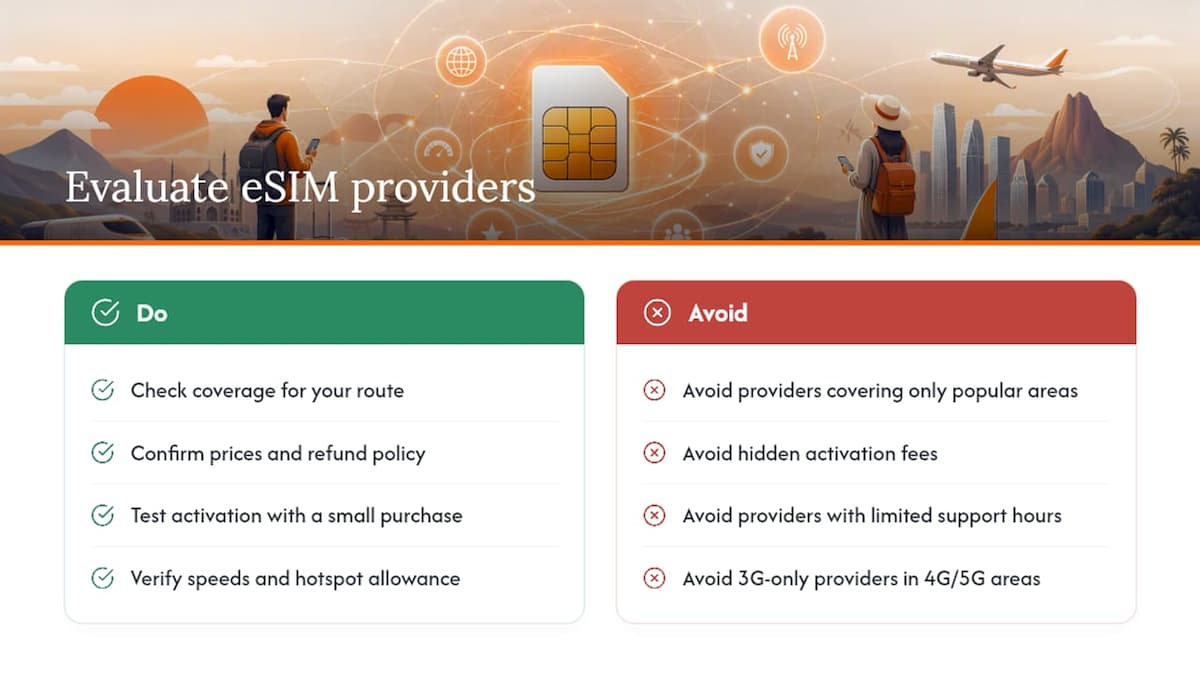
Not every eSIM provider is built the same way, and the differences show up fast once you’re actually traveling. Before you buy, run through a short list: does the provider cover the specific countries on your route, or just the popular ones? Are prices shown upfront with no hidden activation fee? What’s the refund policy if the eSIM fails to activate or your trip gets canceled? How easy is the QR code or app workflow, and does support run 24/7 or just during one time zone’s business hours?
Speed matters too. A provider offering only 3G in a country where 4G or 5G is standard will leave you frustrated the first time you try to load a map. Hotspot allowance is worth checking line by line, since some providers cap tethering separately from regular data use. And because an eSIM profile lives on your device, ask how the provider handles data privacy and profile security, not just price.
Lumo covers 160-plus countries with instant QR-code activation, 4G and 5G speeds where available, and support for multiple device profiles across phones, tablets, and laptops, which matters if you’re the kind of traveler who brings a laptop and wants data on both. Its plans are built around exactly the workflow this article walks through: buy before you fly, scan the code, land connected. For a closer look at how the underlying technology protects your data while you’re switching networks abroad, Lumo’s guide on mobile data security for eSIM travelers covers the hotspot and VPN side of things in more depth.
Pro Tip: Run a small test purchase on a short domestic or nearby trip before your big international one. Activating a plan once, ahead of time, tells you whether the process is as smooth as it should be, long before you’re relying on it in an unfamiliar city.
Business travelers juggling event logistics across multiple countries face a related challenge worth flagging here: keeping teams connected while managing venues and schedules abroad. Jigsaw Conferences’ work on global travel logistics covers how connectivity planning fits into broader trip coordination for groups, not just individuals.
Quick Decision Matrix: eSIM or Physical SIM?
| Traveler Profile | Trip Pattern | Recommended Option |
|---|---|---|
| Vacationer, single or multi-country | 1–2 weeks | eSIM |
| Business traveler, several countries | Under 3 weeks, frequent moves | eSIM |
| Long-stay student or expat | 30+ days, one country | Physical SIM (compare local pricing) |
| Digital nomad, laptop and phone | Ongoing, multiple stops | eSIM with multi-device support |
A vacationer bouncing between Italy and Greece for twelve days is the textbook eSIM case: one regional plan, zero SIM swaps, online at both airports. A student moving to Seoul for a semester is the opposite case, where a local SIM purchased after arrival will almost certainly beat any eSIM plan on price once you’re past the first month. A digital nomad working from a laptop and a phone across three countries in six weeks sits in the middle, and this is exactly where a provider supporting eSIM across multiple device types earns its keep.
What I’ve Learned Watching Travelers Actually Use eSIMs
The gap between how eSIMs get marketed and how people actually use them is bigger than most coverage admits. The pitch is always “instant global connectivity,” but the real friction point isn’t the eSIM itself, it’s the ten seconds nobody spends checking which line is set as active before boarding the plane. That single setting decides whether you land connected or land with a surprise roaming bill from your home carrier.
I’d also push back on the idea that eSIMs are simply “better” in some absolute sense. They’re better for a specific, common shape of trip: short to medium duration, multiple countries, a traveler who wants to be reachable without renting a new number every border crossing. They’re not automatically better for someone settling into one city for a season, and providers who imply otherwise are selling convenience as if it were a universal law.
Where I think the industry gets it right is treating the device check as non-negotiable rather than optional advice. An unlocked, eSIM-capable phone isn’t a nice-to-have footnote, it’s the actual gate that determines whether any of this works at all. Skip that check and every other advantage on this page becomes irrelevant the moment you land.
Try Lumo Before Your Next Trip
There’s a real cost to figuring this out the hard way at an airport kiosk with a language barrier and a line behind you. Lumo gives you instant eSIM activation, coverage across 160-plus countries, and flexible plans sized to your actual trip, whether that’s a five-day city break or a six-country tour. Buy your plan, scan the QR code before you leave home, and set your active data line, and you’re online the moment you land, with your home number still reachable if you keep dual-SIM active.
Refund and top-up terms are listed clearly on the plan page before you check out, and support runs 24/7 if activation gives you trouble. Pick your destination and get your plan set up at Lumo’s eSIM store before your next flight leaves the ground.
Sources
- Use eSIM with iPhone while travelling abroad | Apple Support (en-Mide)
- eSIM vs SIM Card for International Travel | SimFinder
- Physical SIM vs eSIM explainer | CNET
- Use an eSIM to get a cellular data connection on your Windows PC | Microsoft Support
Provider terms and device support change over time, so check your phone’s own settings and your chosen provider’s current policy before you travel.
FAQ
Is an eSIM a good idea for travel?
Yes, for most trips under a month, particularly ones crossing multiple countries, an eSIM tends to be cheaper, faster to activate, and more secure than a physical SIM, provided your phone is unlocked and eSIM-capable.
What are the downsides of using an eSIM?
The main drawbacks are device compatibility limits on older or locked phones, difficulty getting a local phone number for banking or local services, and friction when transferring a profile between phones on different operating systems.
Do I need to turn off data roaming when using eSIM?
You should turn off data roaming on your home SIM line specifically, while your eSIM’s own data line stays on, since the eSIM is designed to connect to a local network without triggering your home carrier’s roaming charges.
Should I turn off my eSIM when traveling?
No, keep the eSIM’s data line active during your trip; instead, check that your home SIM or old eSIM profile is set to voice/SMS only, or fully off for data, so you don’t accidentally get charged for roaming on the wrong line.
Recommended
Related Topics
Stay Connected Anywhere
Prepaid eSIM data plans for 180+ countries and territories. No physical SIM required.