Mobile data security essentials for eSIM travelers
TL;DR:
- Most travelers underestimate how poorly secured their apps and provider infrastructure are, even when focusing on Wi-Fi risks. Using an eSIM reduces SIM-swapping and physical theft risks but depends on provider transparency and jurisdiction, making provider choice critical. Prioritize cellular connections with trusted, transparent eSIM providers and adopt layered security habits to stay protected worldwide.
Most frequent travelers believe they have their digital safety figured out. They avoid sketchy ATMs, use strong passwords, and maybe even run a VPN on hotel Wi-Fi. But here is the uncomfortable reality: the biggest gaps in mobile data security for international travelers are not where most people look. Digital security behavior studies consistently reveal that mobile connectivity underpins everything from two-factor authentication to banking and work access, yet the habits protecting those connections remain dangerously inconsistent. This guide unpacks the real layers of mobile data security, with specific focus on what eSIM travelers need to know and act on.
Table of Contents
- Why mobile data security is essential for travelers
- eSIM solutions: benefits and limitations for security
- How mobile data compares to public Wi-Fi and SIM cards
- Layered security: Practical steps for global mobile safety
- What GSMA compliance means and doesn’t for end users
- The truth about mobile data security most guides miss
- Stay secure and connected with trusted eSIM solutions
- Frequently asked questions
Key Takeaways
| Point | Details |
|---|---|
| Mobile data is safer | Cellular or eSIM-based data is more secure than public Wi-Fi but still needs proper device and app hygiene. |
| eSIMs lower specific risks | eSIM solutions reduce physical SIM loss and SIM-swapping attacks but don’t eliminate all security concerns. |
| Provider transparency matters | Choose providers who are clear about traffic routing and privacy policies to reduce jurisdiction-based exposure. |
| Layered protection is best | Combine network choice with MFA, software updates, and careful app permissions for optimal safety while traveling. |
| Standards set the baseline | GSMA compliance ensures eSIM security standards but user habits and provider operations ultimately drive real-world safety. |
Why mobile data security is essential for travelers
Your phone is not just a communication device when you travel. It is your boarding pass, your bank, your work portal, and your identity verification tool all at once. That makes it the single highest-value target on your person, and the risks are not limited to physical theft.
Public Wi-Fi vulnerabilities create serious mismatches for travelers relying on mobile connectivity. Open networks in airports, cafes, and hotels can expose traffic to interception, credential harvesting, and man-in-the-middle attacks. Most users connect without thinking twice. The risk is real and immediate.
The threats go beyond just Wi-Fi, though. Consider these common attack surfaces frequent travelers face:
- SIM swapping: Fraudsters convince carriers to transfer your number to a device they control, bypassing SMS-based two-factor authentication
- Unsecured apps: Apps that transmit data over insecure URLs expose credentials even on cellular networks
- Lost or stolen devices: Physical access to an unlocked device bypasses nearly every digital protection layer
- Rogue hotspots: Fake Wi-Fi networks mimicking legitimate ones intercept login credentials in real time
- Foreign network interception: Some international carriers in certain jurisdictions may be subject to government-mandated data monitoring
“Most travelers focus on Wi-Fi risk while underestimating how poorly secured their own apps are—apps they actively use for banking and remote work on every trip.”
Reviewing mobile security tips for travelers before a trip is not just a precaution. It is a baseline requirement for anyone who works or banks remotely.
eSIM solutions: benefits and limitations for security
eSIMs offer meaningful security advantages over physical SIM cards, but they are not a silver bullet. Understanding both sides matters a lot before assuming your eSIM alone keeps you safe.
On the positive side, eSIMs reduce SIM-swapping risk and eliminate the vulnerability of a physical card being removed from your device. If your phone is stolen, a reputable eSIM provider can remotely disable the profile, cutting off access to your data plan and reducing the attacker’s options.
But the picture gets more complex when you look at how eSIM traffic is actually routed. eSIM privacy exposure often depends entirely on the provider’s infrastructure choices, and some traffic may pass through foreign jurisdictions with different privacy laws. That means choosing an eSIM provider is not just a price and coverage decision. It is a security decision.
| Security factor | Physical SIM | eSIM |
|---|---|---|
| SIM-swapping risk | High | Low |
| Physical theft risk | High | Low (no card to remove) |
| Remote disablement | No | Yes |
| Data routing transparency | Varies | Varies |
| Provider jurisdiction risk | Varies | Varies |
Here is what to look for in a trustworthy eSIM provider for eSIM security explained:
- Clear documentation of where traffic is routed
- Published privacy and data handling policies
- GSMA certification and compliance
- Responsive 24/7 support for security incidents
- Option to remotely disable profiles immediately
Pro Tip: Never activate an eSIM from an unknown provider offering extreme discounts. Low-cost eSIM services sometimes lack transparent routing documentation, leaving your data exposed in ways you cannot easily detect. Explore established eSIM service options from vetted providers, and check the essential eSIM security tips before you travel.
How mobile data compares to public Wi-Fi and SIM cards
One of the most practical decisions you make as a traveler is choosing which connection to use for which activity. Not all connectivity is equal, and understanding the hierarchy helps you protect what matters most.
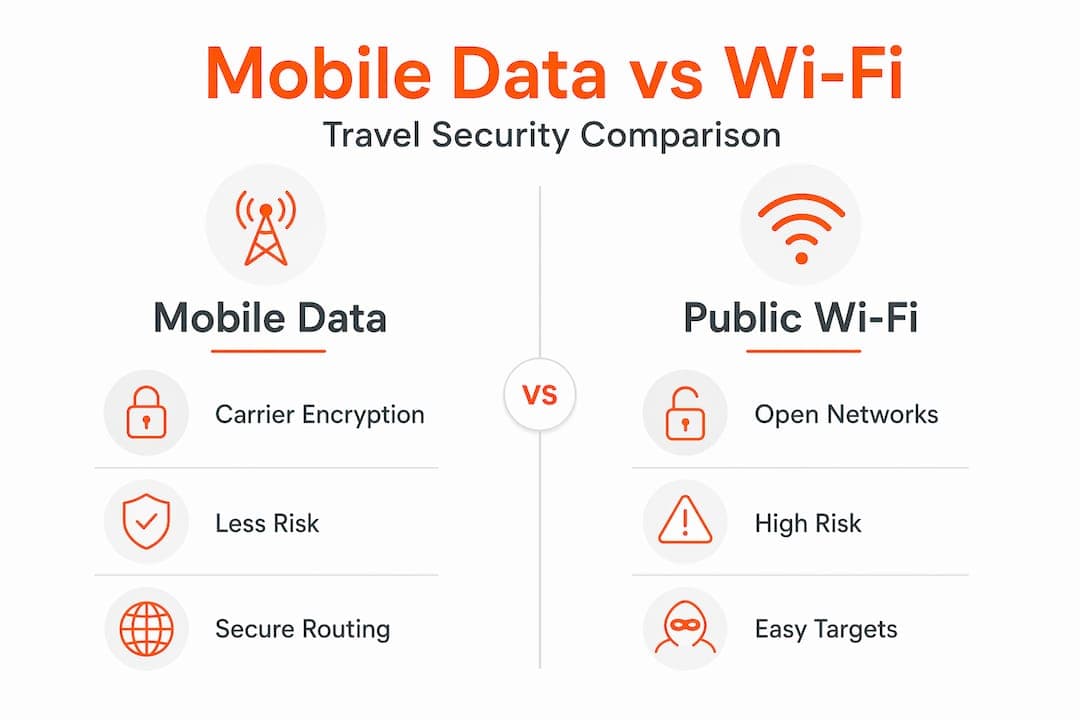
Cellular data is generally safer than public Wi-Fi for sensitive tasks. Mobile networks encrypt traffic at the carrier level, making interception far harder than on open Wi-Fi. But cellular is not perfect. Mobile app vulnerabilities are widespread even on cellular networks, because poorly coded apps send data over insecure channels regardless of what network carries it.
| Connectivity type | Interception risk | SIM-swap risk | App vulnerability risk |
|---|---|---|---|
| Public Wi-Fi | Very high | N/A | High |
| Physical SIM (cellular) | Low | High | High |
| eSIM (cellular) | Low | Low | High |
| eSIM + VPN | Very low | Low | Medium |
Here is a practical priority order for your connectivity decisions:
- Use cellular (eSIM or SIM) for all sensitive activity: Banking, email, work portals, and authentication should never run over open Wi-Fi
- Add a VPN for a second layer: A trusted VPN encrypts your traffic even if the network or app is compromised
- Reserve Wi-Fi for low-stakes tasks: Streaming, browsing news, and general research are lower-risk Wi-Fi uses
- Disable Wi-Fi auto-connect: This prevents your device from silently joining rogue hotspots
For a deeper breakdown, the mobile data security explained guide walks through how each layer functions and where the real exposure points sit.
Key stat: Research into mobile app security failures finds widespread coding flaws across both Android and iOS apps, meaning your cellular connection cannot compensate for an insecure app transmitting your credentials in plain text.
Layered security: Practical steps for global mobile safety
Security is not a single setting you turn on. It is a stack of habits and tools working together. Here is how to build that stack effectively for global travel:
- Default to cellular for sensitive tasks: Treat your eSIM data as the trusted channel for anything involving passwords, payments, or work access
- Replace SMS-only MFA with app-based authentication: SMS-based MFA is vulnerable to SIM-swapping; switch to an authenticator app like Google Authenticator or Authy
- Update your OS and apps before every trip: Patching closes known vulnerabilities that attackers actively exploit on mobile devices
- Audit app permissions regularly: An app with camera or location access it does not need is a liability; revoke permissions that are not necessary
- Enable full-device encryption: Both iOS and Android support this; make sure it is active and your lock screen is set to a strong PIN or biometric
“The most effective mobile security approach treats apps as untrusted by default, regardless of how reputable the developer appears.”
Pro Tip: Before traveling to a new country, check map-based safety resources to understand local network risk levels and whether additional precautions like a VPN are especially important in that region.
Your secure mobile data guide and data security tips for global nomads can help you build a pre-trip security checklist that covers every layer of the stack.
What GSMA compliance means and doesn’t for end users
GSMA is the global standards body for mobile networks. Its eSIM compliance framework defines the technical criteria providers must meet for secure eSIM provisioning. When an eSIM provider claims GSMA compliance, it signals that their technical infrastructure meets baseline security requirements for issuing and managing eSIM profiles.
| GSMA compliance covers | GSMA compliance does NOT cover |
|---|---|
| Secure eSIM provisioning | Data routing transparency |
| Interoperability standards | Jurisdictional privacy exposure |
| Technical security criteria | How providers log or use your data |
| Device authentication | End-to-end user privacy |
But here is the important caveat: user experience and privacy exposure vary significantly even among GSMA-compliant providers. Compliance is a floor, not a ceiling. A provider can meet all technical criteria and still route your traffic through jurisdictions with aggressive data access laws.
What this means for you:
- Verify, do not just trust: Ask providers directly about data routing and jurisdiction
- Read privacy policies before purchase: Look for explicit statements about data sharing and government access
- GSMA compliance is necessary but not sufficient: Use it as a starting filter, not a final decision
Reviewing eSIM security best practices will help you evaluate providers beyond just the compliance checkbox.
The truth about mobile data security most guides miss
Here is what years of watching travelers navigate global connectivity has made clear: most security guides treat the problem as a checklist exercise. Use a VPN. Check. Update your phone. Check. Done. That thinking is exactly what leaves sophisticated travelers exposed.
The real differentiator is understanding provider transparency and jurisdictional complexity at a level most articles skip entirely. Your eSIM provider’s choice of routing infrastructure matters more than whether your phone has the latest software update. A device running last month’s OS on a transparent, well-managed eSIM network is likely safer than a fully patched device on an opaque eSIM service routing traffic through high-risk jurisdictions.
The second thing most guides miss is the evolving nature of the threat. Mobile app security failures are not static. New vulnerabilities emerge constantly, and the apps you trusted six months ago may have introduced new risks with an update. The travelers who stay genuinely secure are the ones who treat security as an ongoing practice, not a pre-trip setup task.
Understanding the benefits of rising eSIM adoption matters here too. As eSIM becomes the standard, provider ecosystems are maturing, which means better transparency tools, clearer compliance documentation, and stronger accountability overall. Leaning into established, reputable providers now positions you to benefit from that maturation.
Control your security posture actively. Choose providers based on transparency, not just coverage maps or price.
Stay secure and connected with trusted eSIM solutions
Applying everything in this guide becomes much simpler when your eSIM provider is built with traveler security in mind from the start.

Lumo is built for exactly this. With coverage across more than 160 countries, instant QR code activation, and transparent connectivity policies, Lumo eSIM for travelers gives you the global reach you need without sacrificing the security posture you have worked to build. Whether you are switching between local carriers in Southeast Asia, managing remote work from Europe, or simply protecting your banking apps while on the move, Lumo’s flexible plans and reliable 5G/4G network access keep you connected on your terms. Pair it with the habits from this guide and you have a genuinely strong mobile security stack.
Frequently asked questions
Is mobile data really safer than public Wi-Fi while traveling?
Yes, cellular is generally safer than open Wi-Fi for sensitive tasks, but your device’s app security and your provider’s practices still determine your real level of protection.
Do eSIMs make my personal data completely secure?
No, eSIM security depends heavily on your provider’s routing choices and your own device hygiene; eSIMs reduce some risks but do not eliminate them.
How can I check if my eSIM provider is trustworthy?
Look for GSMA compliance, transparent data routing policies, and clearly stated privacy practices before committing to any eSIM provider.
What should I do if my phone with an eSIM is lost or stolen abroad?
Contact your provider immediately to remotely disable your eSIM profile and cut off any further data access from the stolen device.
Does using a VPN or encrypted apps make a difference with eSIM security?
Absolutely. Adding a VPN creates an additional encrypted tunnel over your cellular connection, which is especially valuable on international networks where routing transparency is harder to verify.
Recommended
Related Topics
Stay Connected Anywhere
Prepaid eSIM data plans for 180+ countries and territories. No physical SIM required.