Mobile Data Security Explained: Protect Your Data with eSIM
TL;DR:
- Mobile data security protects all device information from interception and various technological threats.
- eSIM technology reduces risks like SIM swapping and cloning through remote, encrypted provisioning.
- Travelers should update devices, choose reputable providers, verify VPN apps, and disable auto-connections for safety.
Cellular data feels safe. You skip the sketchy coffee shop Wi-Fi, keep your hotspot on, and assume you’re covered. But that assumption has a real cost. Mobile threats have grown far beyond public Wi-Fi risks, and travelers or remote workers relying on any network without a security strategy are exposed in ways most people never consider. This guide walks you through what mobile data security actually means, how eSIM technology changes the equation, and the practical steps you can take right now to keep your data locked down wherever you work or travel.
Table of Contents
- What is mobile data security?
- How eSIM strengthens mobile data security
- Core threats and common misconceptions
- Practical steps to secure your mobile data while traveling
- Our take: What most travelers miss about mobile data security
- Protect your data with trusted eSIM solutions
- Frequently asked questions
Key Takeaways
| Point | Details |
|---|---|
| Layered security is essential | Relying on eSIM alone is not enough—combine with trusted providers and smart app use. |
| Choose your provider carefully | Where and how your data is routed matters as much as the technology itself. |
| Most VPNs are not failproof | Over 20 percent of VPN apps leak data, so always research before you connect. |
| Take easy protection steps | Keep devices updated, use strong access credentials, and avoid networks you can’t verify. |
What is mobile data security?
Mobile data security means protecting every piece of information your device sends, receives, or stores while connected to a cellular or wireless network. That includes your emails, login credentials, work files, banking sessions, and even your location data. If it moves through your phone, it can potentially be intercepted.
The threats are more varied than most people realize:
- Data interception via rogue cell towers (also called IMSI catchers or “stingrays”)
- Fake carrier networks that mimic legitimate providers to capture traffic
- Insecure or poorly configured apps that transmit data without encryption
- Public Wi-Fi attacks, even when you think you’re on cellular
- Malicious profiles installed during device setup or app downloads
Here’s a number that should make you pause: 61 out of 281 VPN apps tested were found to leak unencrypted data. These are tools people specifically install for security. That gap between perceived protection and actual protection is exactly where attackers operate.
One important point: out-of-box OS security is not enough on its own. Without proper device management or additional security layers, even a fully updated phone carries risk. For remote workers handling sensitive client data or travelers accessing corporate systems abroad, mobile security tips for travelers go well beyond keeping your software current. Understanding the full threat landscape is the first step toward real protection, and it starts with knowing that no single tool or setting makes you immune.
The risks multiply the moment you cross a border. Unfamiliar networks, local carrier handoffs, and region-specific app behavior all introduce new variables. Staying safe requires understanding not just your device, but the ecosystem it connects to. Protecting user data is an active practice, not a one-time setup.
How eSIM strengthens mobile data security
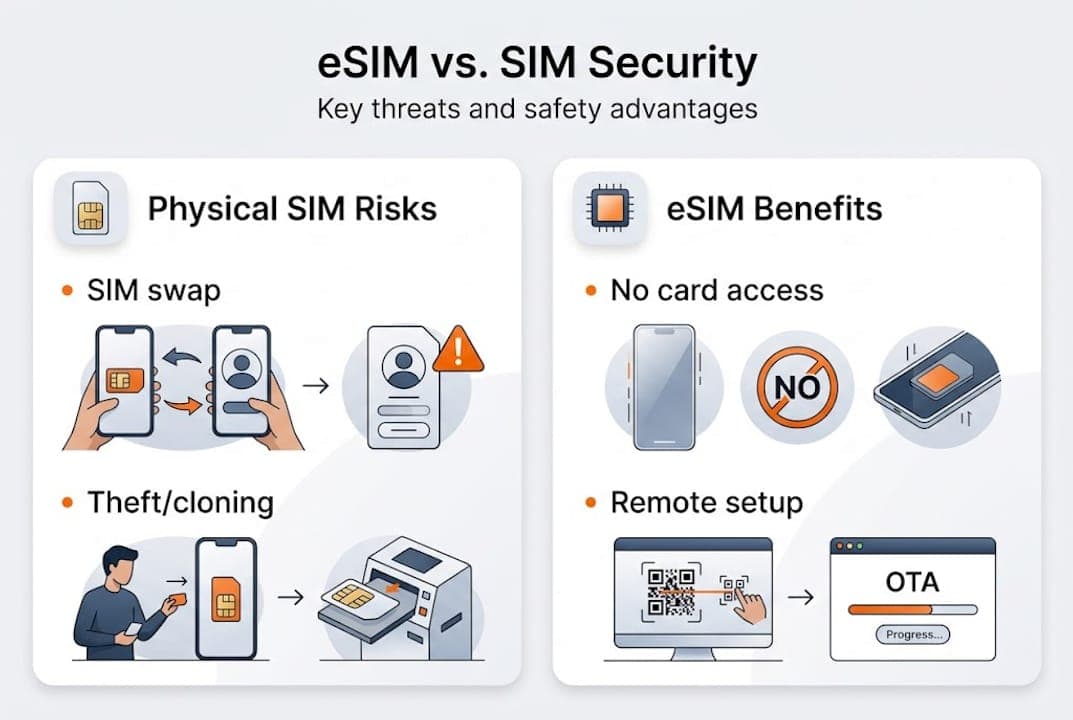
eSIM technology addresses several vulnerabilities that physical SIM cards simply cannot. With a traditional SIM, your biggest risks include SIM swapping (where an attacker convinces your carrier to transfer your number to their card), physical theft of the card itself, and cloning attacks. eSIM eliminates all three at the hardware level.
Because eSIM is embedded directly into your device, there is no card to steal, clone, or swap without direct access to your account and the carrier’s remote provisioning system. eSIM is more tamper-resistant than physical SIM cards, and the remote provisioning process adds an additional layer of authentication that traditional SIM swaps bypass entirely.

Here’s a quick comparison of how the two stack up:
| Threat | Physical SIM | eSIM |
|---|---|---|
| SIM swap attack | High risk | Very low risk |
| Physical theft/cloning | Possible | Not applicable |
| Remote provisioning security | None | Encrypted, carrier-authenticated |
| Multiple profiles | Not supported | Supported |
| Loss or damage | Data at risk | Data stays on device |
For travelers switching between countries, the advantages of eSIM go beyond convenience. Switching carriers remotely without visiting a store means fewer opportunities for social engineering attacks at the point of SIM issuance. You can also explore eSIM security facts that explain how profile management works in practice.
Pro Tip: Always choose eSIM providers who clearly disclose how your data is routed. Some low-cost resellers route traffic through third-party infrastructure with weak security standards, which can negate the built-in advantages of eSIM entirely.
Core threats and common misconceptions
Even with eSIM’s structural advantages, real risks remain. Most of them come not from the technology itself but from how people use it and who they trust to provide it.
Here are the threats that catch travelers off guard most often:
| Threat | How it works | Impact |
|---|---|---|
| Rogue Wi-Fi networks | Mimics trusted networks to intercept traffic | High |
| Fake carrier networks | Tricks device into connecting to malicious tower | High |
| VPN data leaks | App fails to encrypt traffic despite claims | Medium to High |
| Insecure eSIM providers | Routes data via unvetted third-party servers | High |
| Malicious app permissions | Accesses data in background without consent | Medium |
One critical risk that doesn’t get enough attention: poor eSIM providers can route your traffic through third-party infrastructure in regions with weak data protection laws. The eSIM chip itself may be secure, but your data can still be exposed at the network routing level.
“The technology is only as secure as the provider behind it. A trusted eSIM chip connected to an unvetted network is still a vulnerability.”
Now let’s bust the myths travelers repeat most:
- “eSIM can’t be hacked” — eSIM reduces attack vectors but doesn’t eliminate all risk, especially at the provider level
- “Cellular data is always secure” — Fake cell towers can intercept cellular traffic just like Wi-Fi
- “Any VPN makes me safe” — Over 20% of tested VPN apps leak sensitive information
- “I only need to worry on public Wi-Fi” — Threats exist on cellular networks too
Layered defense is the only real answer. Explore global connectivity challenges to understand how network choice intersects with security.
Practical steps to secure your mobile data while traveling
Knowing the risks is only useful if you act on them. Here are the top five things you should do before and during any trip or remote work session:
- Update your OS and apps before you leave. Security patches close known vulnerabilities that attackers actively exploit on older software versions.
- Install your eSIM from a reputable provider with clear privacy policies. Verify that they disclose data routing and do not rely on unvetted third-party infrastructure.
- Use a trusted VPN but verify it first. 61 of 281 VPN apps tested leaked unencrypted data, so check independent reviews and audit reports before trusting any app with your traffic.
- Enable strong authentication on all accounts. Use a password manager and turn on two-factor authentication, especially for email and financial apps.
- Avoid auto-connecting to networks. Disable automatic Wi-Fi and Bluetooth connections so your device doesn’t join networks without your knowledge.
Pro Tip: Before choosing any eSIM plan, search for the provider’s privacy policy and look specifically for language about data routing and third-party sharing. Silence on those topics is a red flag.
For more detailed guidance, mobile security tips cover device-level settings in depth, and secure mobile data while traveling pairs security advice with cost-saving strategies. Reviewing data privacy best practices can also help you evaluate which apps deserve access to your data.
Our take: What most travelers miss about mobile data security
After working with travelers and remote workers across dozens of countries, we’ve noticed a pattern. The weakest link is almost never the technology. It’s the habit of trusting defaults.
People install eSIM from the cheapest provider they find, connect to the first available network, and assume the setup process handled security for them. It didn’t. The question worth asking isn’t “is eSIM secure?” It’s “am I using eSIM the right way?”
Researching your provider before you travel, not after something goes wrong, is the single most underrated security move available to you. Security explained for travelers is a good place to start that research. The technology gives you a strong foundation. What you build on it is up to you.
Protect your data with trusted eSIM solutions
Choosing a reputable eSIM provider is one of the most direct security decisions you can make as a traveler or remote worker. Lumo offers instant activation, coverage across over 160 countries, and transparent privacy practices so you know exactly how your data is handled.

With flexible plans, high-speed 5G/4G connectivity, and 24/7 support, Lumo is built for people who need reliable, secure connectivity without the guesswork. Browse global eSIM data plans and connect with confidence wherever your work or travel takes you next.
Frequently asked questions
Can eSIM be hacked like a physical SIM card?
eSIM is significantly harder to tamper with than a physical SIM card due to its embedded design and encrypted remote provisioning, but choosing a poor-quality provider can still expose your data at the network level.
Is using a VPN always safe for my mobile data?
Not all VPNs deliver on their security promises. Research found that 61 of 281 VPN apps tested leaked unencrypted data, so always verify an app’s track record before trusting it with sensitive traffic.
How should I choose a secure eSIM provider?
Look for providers who explicitly disclose where your data is routed and maintain clear privacy policies. Providers who route via third parties without disclosure introduce risk that the eSIM chip itself cannot prevent.
What are quick steps to secure my mobile device before traveling?
Update your OS, install eSIM from a trusted source, enable two-factor authentication, use a verified VPN, and disable automatic network connections before you leave home.
Recommended
- eSIM Security Explained: What Travelers Should Know | Lumo eSIM Store
- Secure Mobile Data While Traveling: Cut Costs by 80% | Lumo eSIM Store
- 6 Essential eSIM Security Tips for Global Travelers | Lumo eSIM Store
- Blog - eSIM Travel Tips & Guides | Lumo eSIM Store
- Pocket App | Mobile App Security: Protecting User Data in a Digital World
- Mobile app security best practices every UK business needs
Related Topics
Stay Connected Anywhere
Prepaid eSIM data plans for 180+ countries and territories. No physical SIM required.