Avoid Roaming Surprises: VPN With eSIM for Travelers and Expats
Use a VPN alongside a travel eSIM when you need privacy or want to reach blocked services. An eSIM supplies mobile data access; a VPN adds encryption and lets you route around network blocks. Device makers like Apple document how travel eSIMs work on modern phones, and eSIM providers such as Lumo deliver the connectivity side of that equation.
TL;DR:
- A travel eSIM provides cellular data, but it does not encrypt traffic or bypass content blocks, which require a VPN.
- Some eSIM providers claim “built-in VPN” features, but these often only refer to proxies or secure DNS, not full encryption protocols like WireGuard or OpenVPN.
- In regions with heavy internet censorship, a VPN is essential to access blocked sites and apps, as it routes traffic outside local restrictions.
- Using dual SIM setups requires careful configuration, including disabling data roaming and matching APN settings, to avoid charges and connection issues.
- VPNs can slow or drop mobile data due to protocol overhead and network interference, so testing protocols like WireGuard beforehand improves reliability.
Table of Contents
- What an eSIM does versus what a VPN does
- Do travel eSIMs come with a built-in VPN?
- Why you still need a VPN in restrictive regions like China
- Setting up dual SIM and data switching before you fly
- Why a VPN can slow or drop your mobile data
- A practical security checklist for eSIM and VPN together
- A traveler’s take on running eSIM and VPN together
- A simple eSIM option to pair with your VPN
- FAQ
- Sources
What an eSIM does versus what a VPN does
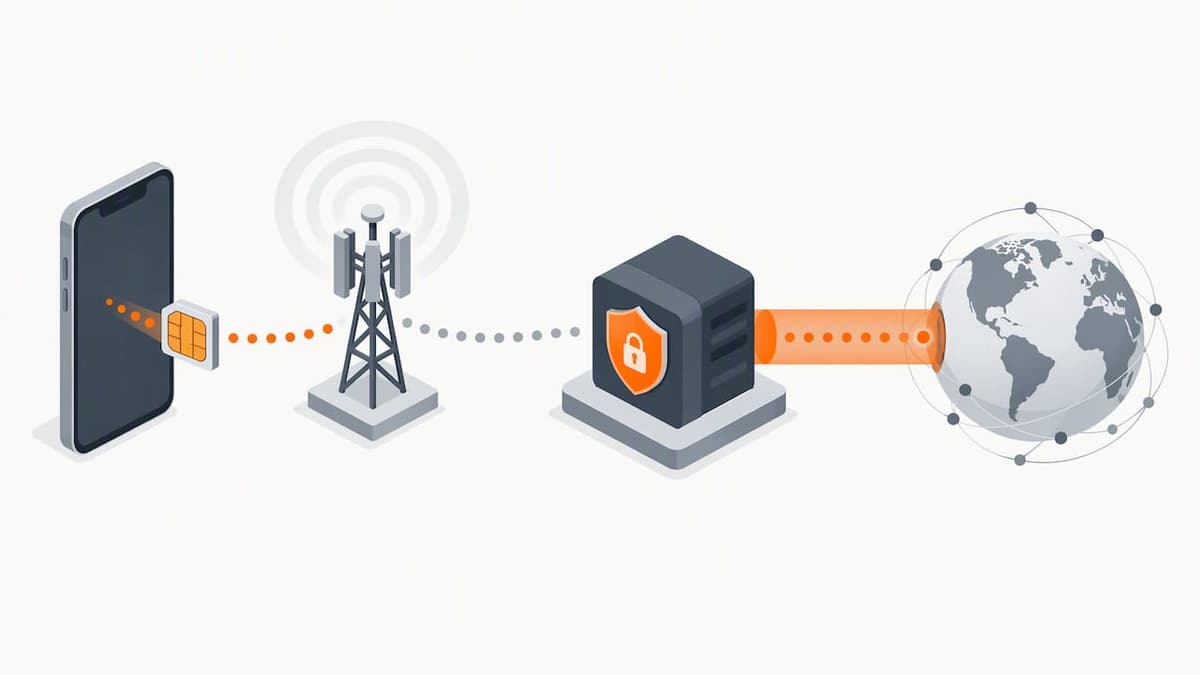
An eSIM is a digital SIM profile that connects your phone to a local or regional carrier, giving you mobile data the same way a physical SIM card would. A VPN is a separate layer that encrypts your traffic and routes it through a server elsewhere, which can mask your location and get around content blocks.
They solve different problems:
- Public Wi-Fi at a cafe or airport: a VPN encrypts your session; your eSIM has no role here since you are not using cellular data.
- Cellular data in a new country: your eSIM gets you online; a VPN then protects what you send over that connection.
- Reaching a blocked app or site: only a VPN helps, since an eSIM just connects you to a local network, blocks and all.
Neither tool replaces the other. An eSIM gets you a signal; a VPN decides how private and unrestricted that signal is.
Do travel eSIMs come with a built-in VPN?
Some eSIM marketing mentions “secure browsing” or a “built-in VPN,” but the wording often means something narrower, like a proxy or secure DNS setting rather than full VPN encryption. Those are not interchangeable: a proxy can mask your IP address without encrypting your traffic, while a true VPN does both.
Before trusting a claim, check for specifics:
- Look for named protocols like WireGuard or OpenVPN in the technical specs.
- Check whether the provider states what is encrypted and how.
- Search for independent reviews that confirm the feature actually works as described.
Vague phrases like “bank-level security” with no protocol named are a reason to dig further rather than assume full VPN protection.
Pro Tip: If a provider cannot name the VPN protocol it uses, treat the “built-in VPN” claim as marketing shorthand, not a security guarantee.
Why you still need a VPN in restrictive regions like China
Some countries block access to specific apps, search engines, or social platforms at the network level, regardless of which carrier or eSIM supplies your data. Your eSIM connects you to a local network, but that network applies the same blocks to everyone on it. A VPN routes your traffic through a server outside that restriction, which can restore access to blocked services.
This matters most on mobile networks and public Wi-Fi, where traffic is easier to intercept. The FTC recommends encryption or a VPN for safer use of public hotspots, since most public wireless networks are not secure by default.
- A VPN is close to essential in countries with heavy internet filtering.
- A VPN is a reasonable precaution, not a requirement, in places with open internet access and trustworthy networks.
The FTC’s guidance on public Wi-Fi security has stood since 2011, and its core advice, that open networks expose your data unless you add encryption, still applies to today’s travel routines.
One caveat: VPN legality varies by country, so check local rules before relying on one to bypass censorship.
Setting up dual SIM and data switching before you fly
Most recent iPhones and many Android phones, including Pixel 3a and later, support Dual SIM setups that pair a physical SIM or your home eSIM with a travel eSIM. Apple’s support documentation and Google’s Pixel help pages both detail how to configure this correctly.
- Disable data roaming on your home line before you land, so it cannot connect and rack up charges.
- Set the travel eSIM as your primary data line in your cellular settings.
- Confirm whether “Allow Cellular Data Switching” should be on or off. Leaving it on can let your phone quietly switch back to the home line and roam.
- Check that the eSIM’s APN settings match what your provider documents, since a wrong APN can block data entirely.
Pro Tip: Test your eSIM and these settings on home Wi-Fi before departure so any misconfiguration shows up while you can still fix it easily.
If data still will not connect after landing, contact your carrier for the home line, your eSIM provider for activation issues, or your VPN provider if the connection drops only when the VPN is on.
Why a VPN can slow or drop your mobile data
A VPN adds overhead to every packet it encrypts, and on mobile networks that overhead sometimes causes drops or slow speeds that would not happen on Wi-Fi. Several technical culprits show up often: MTU and packet fragmentation mismatches, carrier-side packet inspection, APN conflicts, or a VPN protocol the local network handles poorly.
To diagnose the issue:
- Turn the VPN off and on again to confirm whether it, specifically, is the cause.
- Switch VPN protocols. WireGuard tends to handle mobile networks more gracefully than older protocols in many setups.
- Check whether split tunneling is enabled, since routing only some apps through the VPN can isolate the problem.
- Rule out an app-level block, which can look identical to a network problem.
If the issue persists after these tests, note which protocol, app, and network you were using before contacting your VPN provider or eSIM provider, since that detail speeds up troubleshooting considerably.
A practical security checklist for eSIM and VPN together
Running an eSIM and VPN side by side only helps if a few habits stay consistent on the road:
- Turn on your VPN automatically on public Wi-Fi, and avoid open hotspots without one active.
- Prefer networks using WPA2 or WPA3 encryption over open networks when you have a choice.
- Stick to HTTPS sites, use unique passwords, and enable two-factor authentication on sensitive accounts.
- Avoid staying permanently signed in to banking or email apps on a shared or borrowed device.
- Keep your device OS and VPN app updated, since outdated software is a common entry point for attacks.
The FTC’s guidance for securing remote connections notes that encrypted connections, VPNs among them, are a core defense when accessing networks you do not control. Carrying a backup eSIM profile or an alternate data plan is also worth it, since losing connectivity entirely in an unfamiliar country creates its own security risk.
A traveler’s take on running eSIM and VPN together
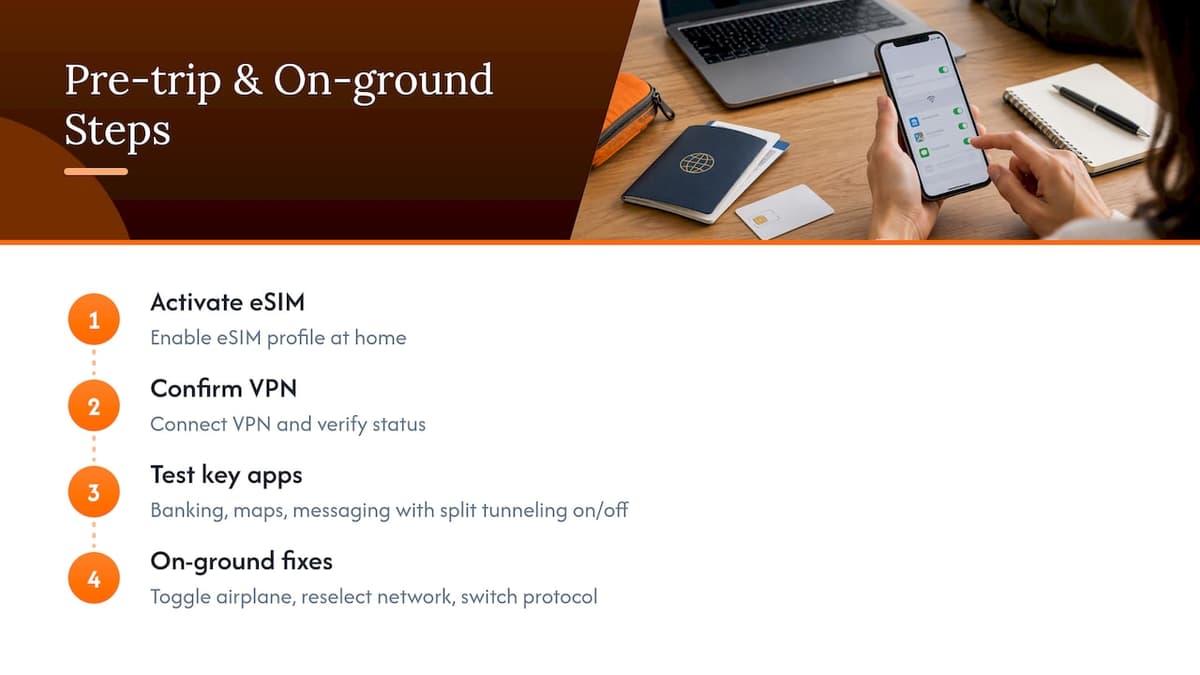
Before any trip, I test the full chain at home: activate the eSIM, confirm the VPN connects, and check that key apps (banking, maps, messaging) work with split tunneling on and off. That single test catches most problems before they become a headache at an airport counter.
On the ground, the fixes that solve most issues are simple: toggle airplane mode off and on, manually reselect the data network, or switch VPN protocols if one stalls. Using an eSIM provider for the connectivity side keeps that part predictable, so when something goes wrong, you know to look at the VPN first.
— Theo Wheeler
A simple eSIM option to pair with your VPN
Pairing a standalone VPN with a reliable eSIM gives you both halves of the equation: connectivity and encryption. This eSIM service is built around instant QR code activation, no contracts, and coverage across many countries, so the connectivity side of your trip is settled before you even think about your VPN settings.
- Activate instantly by scanning a QR code, no registration required.
- Supports multiple eSIM profiles across your phone, tablet, and laptop.
- Choose prepaid plans with flexible data and duration, so you pay for what you need.
- Reach customer support if activation or data issues come up abroad.
For a trip spanning several countries, our Global eSIM Plans start at $7 one-off. For a single region, check our Asia eSIM Plans, starting at $2 one-off, and pair whichever plan you choose with your VPN of choice for a setup that covers both connection and privacy.
FAQ
Is eSIM good for international travel?
An eSIM is a practical way to get mobile data in a new country without swapping physical SIM cards, and most recent phones support it. It does not add encryption or bypass content blocks on its own, so pairing it with a VPN covers the privacy side separately.
What is the best eSIM for travel to the USA?
The right eSIM for US travel depends on your coverage needs and trip length rather than a single universal answer. Providers like Lumo offer United States eSIM Plans starting at $2 one-off for travelers who want prepaid data without a contract.
What is the difference between an eSIM and a VPN for travel to China?
An eSIM connects your device to a local or regional carrier network, which still enforces that country’s content restrictions. A VPN encrypts your traffic and can route it outside those restrictions, so in a country with heavy filtering, the VPN is doing the access work, not the eSIM.
Do travel eSIMs act as a VPN?
No, a standard eSIM profile does not encrypt your traffic or bypass content blocks the way a VPN does; it only provides the carrier connection. Some providers market extra features like secure DNS, but that is different from full VPN encryption, so check the specifics before relying on it.
Sources
- Use eSIM while traveling internationally with your iPhone - Apple Support (CA)
- FTC Offers Tips on Wise Use of Wi‑Fi Networks | Federal Trade Commission
- How to use dual SIMs on your Google Pixel phone - Pixel Phone Help
Recommended
Related Topics
Stay Connected Anywhere
Prepaid eSIM data plans for 180+ countries and territories. No physical SIM required.