Check Android eSIM Compatibility in Under a Minute; Dial *#06#
Yes, most Android phones released after 2020 support eSIM, but plenty of exceptions exist depending on brand, region, and carrier. The fastest way to know for sure: dial *#06# and look for a 32-digit EID starting with “89,” or search your Settings app for “Add eSIM.” If neither shows up, your phone likely lacks the hardware, and no software update will fix that.
TL;DR:
- Most Android phones from 2020 onward support eSIM, but regional variants and carrier restrictions often limit actual functionality.
- Checking for a 32-digit EID starting with “89” or searching for “Add eSIM” in Settings quickly confirms hardware support.
- Carrier support policies vary, and some operators only activate eSIM via their app or in-store, even on compatible devices.
- Firmware restrictions, especially on devices sold in China or locked phones, frequently disable eSIM activation despite available hardware.
- Updating device software, toggling airplane mode, or requesting a new activation code often resolves most common eSIM setup issues.
Table of Contents
- What Determines Android eSIM Compatibility, and How Do I Check It Fast?
- Which Android Phones Support eSIM? A Brand-by-Brand Breakdown
- Why a “Compatible” Phone Might Still Refuse to Activate eSIM
- The Technical Stack Behind Android eSIM: eUICC, LPA, and EuiccManager
- What to Do When Your eSIM Won’t Activate
- Why Android’s eSIM Rollout Still Feels Uneven
- Sources
- FAQ
What Determines Android eSIM Compatibility, and How Do I Check It Fast?
Checking android eSIM compatibility takes less time than making coffee. You’re looking for one of three signals: an EID number, an “Add eSIM” option in Settings, or an official spec sheet that lists eUICC support. Here’s the order that wastes the least time.
- Dial
*#06#. This pulls up your device identifiers, including IMEI. If you see a 32-digit EID beginning with “89,” your phone has eSIM hardware, full stop. - Open Settings and search “eSIM.” Most Android skins put it somewhere logical: Pixel phones list it under Network & Internet → SIMs → “Download a SIM,” while Samsung buries it in Connections → SIM Manager → “Add eSIM.”
- Look up your exact model number, not just the marketing name, on the manufacturer’s spec page. Carriers sometimes sell region-locked variants of the same phone with eSIM hardware physically removed.
- Ask your carrier directly whether they support eSIM activation for your specific device and account type. A phone can be technically capable and still get blocked by carrier policy.
For anyone comfortable poking around developer settings, there’s a more definitive check. Open a terminal-adjacent app or check via ADB whether PackageManager.hasSystemFeature(PackageManager.FEATURE_TELEPHONY_EUICC) returns true, then confirm EuiccManager.isEnabled() also returns true. The Android developer reference for EuiccManager lays out exactly what these calls mean and why both need to pass.
- No EID and no “Add eSIM” option: your hardware almost certainly doesn’t support it.
- EID present but no eSIM menu: possible carrier or firmware restriction, worth investigating further.
- Both present: you’re in good shape to activate a plan right now.
Pro Tip: If your phone shows an EID but Settings won’t let you add a profile, don’t assume it’s broken. Try switching your default SIM app or checking for a pending system update first. Carrier-locked builds sometimes hide the eSIM menu until the phone is unlocked.
Which Android Phones Support eSIM? A Brand-by-Brand Breakdown
Compatibility varies more by model number than by brand name, but some clear patterns hold across major manufacturers. This isn’t exhaustive, but it covers where most buyers land.
Google Pixel has offered eSIM since the Pixel 3, and every generation since has kept it standard, including the budget-friendly “a” series. Pixel’s implementation is arguably the cleanest in Android: the download flow through Network & Internet → SIMs is nearly identical to Apple’s QR scan process, and Pixel phones rarely ship in eSIM-stripped variants.
Samsung Galaxy support is broad but not universal. The S-series (S20 and later) and the Fold/Flip lineup all include eSIM hardware. The A-series is where things get murky. Some A-series models support it in Europe but ship without it in North America, or vice versa depending on the carrier deal. Samsung’s own carrier support page lists which networks support instant profile transfer versus requiring a fresh QR scan, and the differences by carrier are bigger than most people expect.
OnePlus added eSIM starting with the OnePlus 11 and carried it into the OnePlus 12, though earlier flagships like the OnePlus 9 series often lack it depending on the carrier variant sold. The Settings path sits under Wi-Fi & Network → SIM & Network Manager.
Xiaomi, Oppo, Nothing, and Motorola all support eSIM on recent flagship releases, but regional variants are where buyers get burned. Xiaomi and Oppo phones sold in mainland China frequently ship without eSIM hardware entirely, even when the identical model sold in Europe includes it. Nothing Phone (2) and (2a) support eSIM in most markets. Motorola’s Edge and Razr lines have included it since around 2021, though budget Moto G models often skip it.
A few other notes worth flagging:
- Enterprise and ruggedized devices (some Cat phones, certain Zebra or Sonim models) frequently omit eSIM entirely, since fleet management software often assumes physical SIM swapping.
- Older flagships (pre-2020) rarely support eSIM regardless of brand, even if they were considered high-end at launch.
- If you’re shopping specifically for a device that handles international data well, Lumo’s North America device checklist tracks current models by exact variant, which matters more than the brand name alone.
The general rule holds: most flagships from 2020 onward added eSIM as aggregated compatibility guides confirm, but “most” isn’t “all,” and region variants are the most common reason a seemingly compatible phone isn’t.
Why a “Compatible” Phone Might Still Refuse to Activate eSIM
Hardware and permission are two different things, and this is where a lot of confused support calls come from. A phone can have a fully functional eUICC chip and still refuse to let you add a profile, because the carrier or the firmware build is standing in the way.
Carriers control activation policy independently of what the hardware allows. Some carriers only support eSIM activation through their own app or a physical store visit, refusing third-party QR codes even on fully capable phones. Others support instant digital transfer between phones but only for specific account tiers. This is a business decision, not a technical limitation.
Region and model variants complicate things further. Phones sold in mainland China and, in some cases, Hong Kong frequently ship without eSIM support baked in, even when the international version of the identical model has it. This isn’t a rumor. It’s a documented pattern across Xiaomi, Oppo, and even some Samsung builds, tied to local regulatory requirements around embedded SIM technology.
- Ask your carrier explicitly: “Does my plan support eSIM activation on this exact model?”
- Request an unlock if your phone is carrier-locked. Many carriers won’t push an eSIM profile to a locked device from another provider.
- Confirm whether your carrier uses QR-code activation, direct carrier-app push, or both. Some support only one method.
Pro Tip: Before you assume your phone is broken, check whether it was purchased through a carrier or bought unlocked directly from the manufacturer. Carrier-sold units sometimes run modified firmware that disables features the base hardware fully supports.
The Technical Stack Behind Android eSIM: eUICC, LPA, and EuiccManager
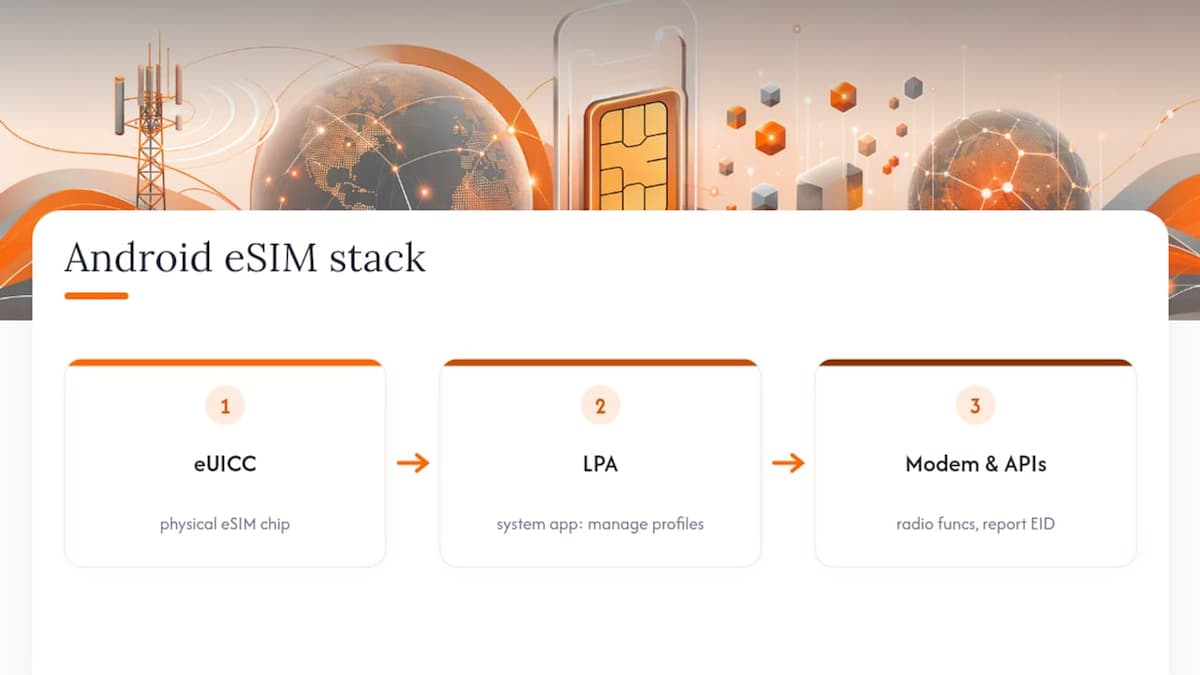
Understanding why some “capable” phones still fail comes down to three layers working together: hardware, a software component called the LPA, and the Android APIs that connect them.
The eUICC (embedded Universal Integrated Circuit Card) is the physical chip that stores multiple carrier profiles. It’s the eSIM itself, soldered into the device rather than inserted as a removable card. The LPA (Local Profile Assistant) is the system app responsible for downloading, activating, and deleting those profiles. Android’s own documentation is direct about this dependency.
The LPA is a system app required to manage eUICC profiles, and
EuiccManager#isEnabled()returns true only when both the euicc hardware feature is present and an LPA is actually installed on the device.
That distinction matters because a manufacturer can ship a phone with eUICC hardware but skip the LPA in certain firmware builds, which effectively disables eSIM even though the chip is physically there. Android’s eSIM implementation documentation confirms this happens, particularly on carrier-customized builds.
Beneath both of those sits the modem. Android’s modem requirements for eSIM specify that the radio hardware layer must support functions like setSimPower and getSimSlotsStatus, and must correctly report the EID. Two phones with the identical chipset can behave differently here if one manufacturer’s firmware never implemented these modem-level calls. For developers or curious power users, checking PackageManager.hasSystemFeature(PackageManager.FEATURE_TELEPHONY_EUICC) alongside EuiccManager.isEnabled() tells you definitively whether the full stack, hardware through software, is actually switched on.
What to Do When Your eSIM Won’t Activate
A handful of failure patterns cover most support tickets: no eSIM option appears at all, an EID shows up but activation stalls, or the QR code scan fails repeatedly. Each points to a different fix.
- Update your OS first. Carrier and Android updates frequently patch LPA bugs that block activation, and this resolves a surprising share of “my eSIM won’t add” complaints.
- Toggle airplane mode on and off after installing a profile. This forces the modem to re-register and often clears a stuck activation.
- Remove your physical SIM if you’re trying to run eSIM-only, since some phones get confused juggling both during setup.
- Request a carrier unlock if your device was purchased through a carrier and shows no eSIM menu at all.
- Ask your carrier for a fresh QR code or manual activation code if the original scan failed. Codes can expire or get invalidated after one failed attempt.
If none of that works, escalate with your EID, IMEI, and the exact error message in hand. That combination is what carrier support and OEM technicians need to diagnose the problem quickly. Lumo’s own activation troubleshooting guide walks through device-specific fixes, and the multiple eSIM profile management guide helps if you’re juggling more than one plan on the same phone.
Why Android’s eSIM Rollout Still Feels Uneven
The gap between “eSIM is standard now” and what actually happens when you buy a phone is wider than most coverage admits. Manufacturers love announcing eSIM support in press releases, but the fine print, the regional variant that quietly drops the feature, the carrier build that skips the LPA, rarely makes it into marketing copy. That’s not an accident. It’s cheaper to build one hardware SKU and disable features by firmware than to manufacture separate versions for every regulatory environment.
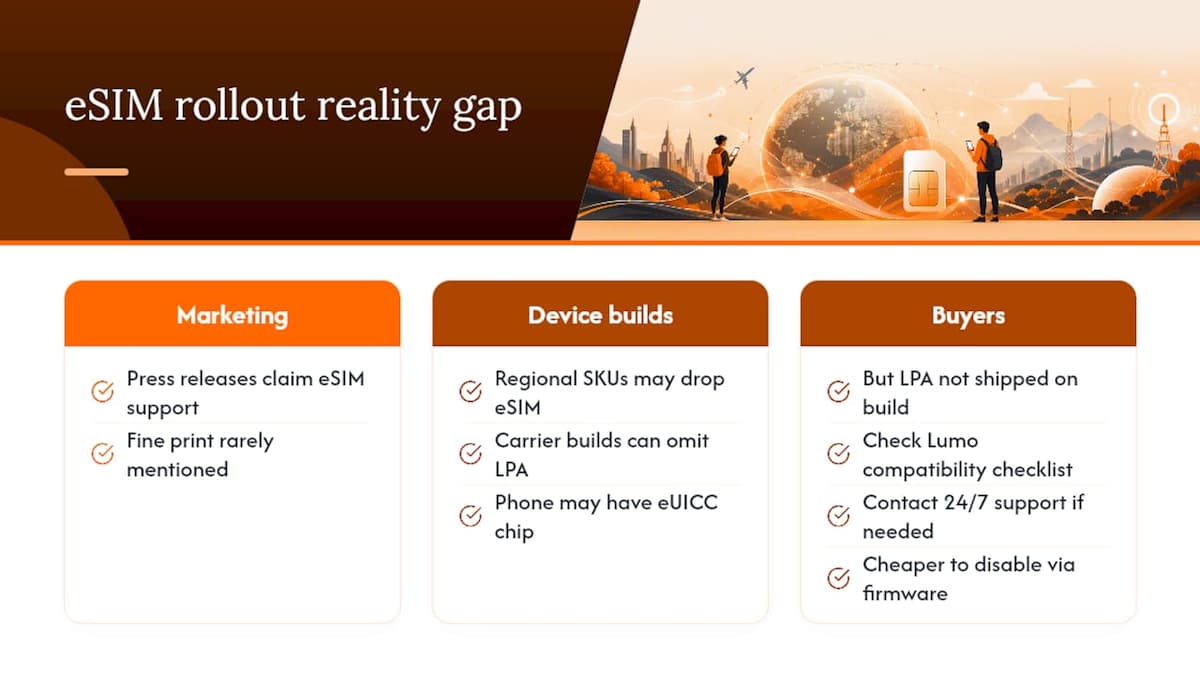
What gets underestimated is how much of this is a software decision dressed up as a hardware limitation. A phone with a perfectly good eUICC chip can be functionally eSIM-less because nobody bothered to ship the LPA on that particular build. That’s worth knowing before you blame your carrier or assume your phone is defective.
Lumo keeps a running device checklist and tests activation flows across current Android models because “compatible on paper” and “actually works” are not the same claim. If you’re planning travel connectivity, checking Lumo’s compatibility resources before you buy a plan saves a frustrating first day abroad. Support is available around the clock if activation still gives you trouble.
— Theo Wheeler
Sources
- Implement eSIM | Android Open Source Project
- Does My Phone Support eSIM? Full Compatibility List (2026)
FAQ
Are All Android Phones eSIM Compatible?
No. Most flagship Android phones released since 2020 support eSIM, but many budget models, older devices, and specific regional variants (particularly those sold in mainland China) do not.
How Do I Check if My Android Phone Supports eSIM?
Dial *#06# and look for a 32-digit EID starting with “89,” or search your Settings app for “eSIM” or “Add eSIM.” Both checks take under a minute and are more reliable than relying on general compatibility lists.
Which Android Phones Support eSIM?
Google Pixel (3 and later), Samsung Galaxy S and Fold/Flip series, recent OnePlus flagships (11 and 12), and current Xiaomi, Oppo, Nothing, and Motorola flagships generally support eSIM, though exact support varies by regional model.
Why Does My Phone Show an EID but Still Won’t Let Me Add an eSIM?
This usually means the eUICC hardware is present but the LPA (Local Profile Assistant) software component is missing or disabled, often due to carrier firmware restrictions rather than a hardware fault.
Can a Carrier Block eSIM Even on a Compatible Phone?
Yes. Carriers set their own activation policies, and some only support eSIM through their own app or in-store visits, or restrict it entirely for locked devices, regardless of what the phone’s hardware allows.
Recommended
Related Topics
Stay Connected Anywhere
Prepaid eSIM data plans for 180+ countries and territories. No physical SIM required.