Avoid 20–60 Minute Dead Zones with a Cruise Ship eSIM Plan
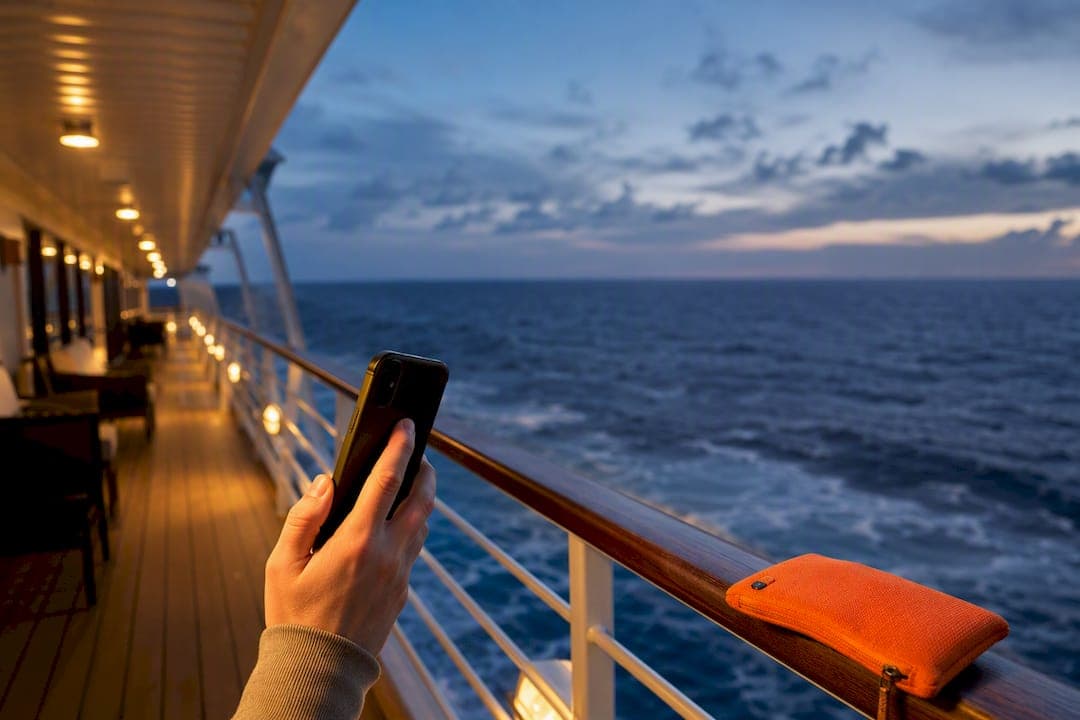
A regular travel eSIM works fine in port because your phone connects to local land towers just like at home, but it typically goes dark once the ship clears the coast. The fix is a hybrid setup: buy ship Wi-Fi for sea days, activate a prepaid eSIM the moment you dock, and expect a short dead zone during departure and arrival while the ship switches between networks.
TL;DR:
- A prepaid eSIM provides reliable local land tower connectivity in port but often fails at sea due to satellite reliance, dead zones, and network management.
- Combining port eSIM data with ship Wi-Fi for sea days offers a cost-effective, flexible solution that minimizes unnecessary satellite charges.
- Budgeting for 2 to 3GB of eSIM data suits typical port-heavy cruises, with a 25% buffer recommended for unexpected usage or detours.
- Activation should be done before leaving home, with care taken to disable roaming, trust offline maps, and check network connection after the dead zone.
- Choosing cruise lines with modern satellite systems like Starlink and pre-booking Wi-Fi passes helps avoid slow, overpriced onboard internet experiences.
Table of Contents
- Does an eSIM Work on a Cruise Ship?
- What’s the Best Strategy for Staying Connected on a Cruise?
- How Do You Set Up an eSIM Before a Cruise?
- Ship Wi-Fi vs Prepaid eSIM: What Actually Costs Less
- Common Pitfalls That Lead to Surprise Charges
- Comparing eSIM Providers for Cruise Travel
- Apps and Tools to Track Data and Switch Networks
- Checklist for Verifying Ship Wi-Fi Before You Book
- Privacy and Security on Cruise Networks
- A Traveler’s Pre-Cruise Checklist and Final Word
- How Lumo Fits Into Your Cruise Connectivity Plan
- Sources
- FAQ
Does an eSIM Work on a Cruise Ship?
Yes, but only half the time, and knowing which half matters more than any single provider you pick. Cruise connectivity splits into two completely separate environments, and a regular eSIM only serves one of them.
In port, your ship is essentially parked next to a city. Land-based cell towers are within range, so a standard travel eSIM connects exactly the way it would on a road trip. You get 4G or 5G speeds depending on the local carrier network, and pricing works the same as any other international eSIM plan.
At sea, land towers are out of reach and the ship relies on its own satellite backhaul instead. This is why a phone that had full bars in Nassau shows nothing an hour after leaving the dock. Most major cruise lines have shifted to Starlink or comparable low-orbit satellite systems for their onboard networks, which is a real jump from the older geostationary satellite links that plagued cruise Wi-Fi for years. Even so, that bandwidth is a managed resource, and cruise lines prioritize premium and streaming-tier customers over basic-package passengers.
Somewhere between “docked” and “at sea” sits a gap most travelers never see coming. Ships commonly power down or restrict their maritime cellular signal near shore to avoid interfering with land networks, which produces a dead zone lasting roughly 20 to 60 minutes right after departure and right before arrival. Your phone might show a signal bar or two during this stretch and still fail to send a text.
Here’s what that means for how you actually use your phone once you’re underway:
- Messaging apps and light browsing: Usually fine over ship Wi-Fi, though expect a delay compared to home broadband.
- Video calls: Workable in short bursts, especially early in the day before the ship fills with passengers streaming shows.
- HD video streaming: Often throttled or unreliable, since older onboard access points and network congestion create real variance in upload and download speeds.
- Large uploads (photos, video backups): Save these for port days on your eSIM connection, or wait until you’re home.
- Voice calls over the ship network: Possible with most Wi-Fi calling setups, but latency spikes are common during peak hours.
The practical takeaway: don’t expect ship internet to replace home broadband, and don’t expect your everyday eSIM to replace ship internet once you’re 12 nautical miles out. They’re two different tools for two different zones.
What’s the Best Strategy for Staying Connected on a Cruise?
The hybrid plan beats every single-network approach, and it’s not close. You get land-speed data in every port and a working, budget-friendly connection at sea without paying for satellite bandwidth you don’t need in Barcelona.
Here’s how the split works in practice:
- Buy a prepaid eSIM data plan covering the countries on your itinerary, installed and ready before you leave home.
- Skip ship Wi-Fi entirely on port days. Switch your phone to the eSIM data line the moment you’re within range of local towers, which is often while you’re still walking down the gangway.
- Purchase a ship Wi-Fi package only for your sea days, ideally a basic messaging-tier plan rather than a premium streaming package, unless you genuinely need to work online at sea.
- Reassess for long crossings. A transatlantic repositioning cruise with five or six consecutive sea days is a different animal than a seven-night Caribbean run with a port almost every day, and it may justify a higher Wi-Fi tier or a maritime-capable eSIM if your carrier offers one.
- Download everything offline-capable before boarding: maps, boarding passes, playlists, and any documents you might need during the dead zone.
There’s a real cost logic behind this. A hybrid setup that buys eSIM data for port days and Wi-Fi only for sea days tends to cut the total connectivity bill noticeably compared to paying for a full-cruise Wi-Fi package you barely use in port.
To figure out how much eSIM data you actually need, add up your expected port days, multiply by your typical daily usage (most travelers land somewhere between 200MB and 500MB for maps, messaging, and social media browsing), then add a 25% buffer for unplanned scrolling, navigation detours, or a video call home. A seven-day Caribbean cruise with multiple ports and moderate daily usage often needs a few gigabytes of data, with a buffer added to avoid running out mid-trip, which is a modest data plan on most eSIM platforms.
Pro Tip: If your itinerary includes back-to-back sea days, check whether the ship offers a short-term or daily Wi-Fi pass instead of committing to the full-cruise package at check-in. Paying by the day only on the days you actually need it almost always beats a blanket purchase.
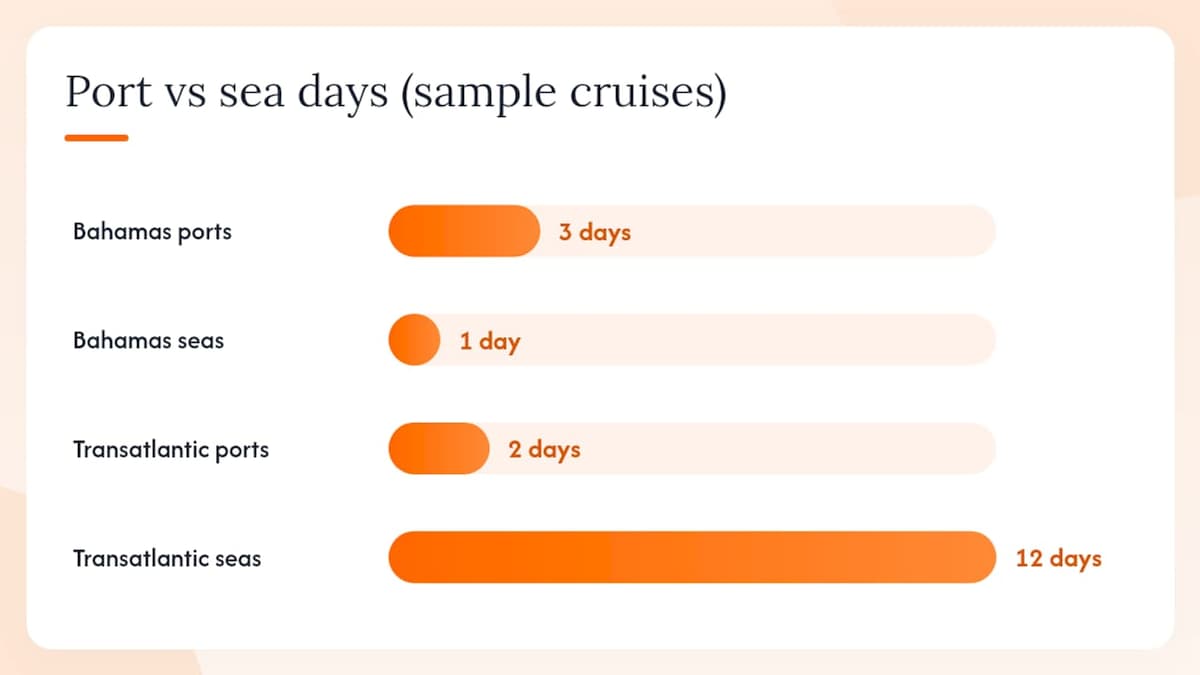
Two quick comparisons make this concrete. A four-night Bahamas cruise with three port days needs very little: a small eSIM bucket and maybe one day of basic ship Wi-Fi for the single sea day. A 14-night transatlantic crossing flips the ratio almost entirely to ship Wi-Fi, since you might only touch land twice.
How Do You Set Up an eSIM Before a Cruise?
Do this before you leave home, not at the port, and definitely not once you’re already on the gangway with spotty terminal Wi-Fi. eSIM activation depends on a stable internet connection, and terminals are notoriously bad for that.
Before you travel:
- Confirm your device supports eSIM and Dual SIM. Most modern iPhones (XS and later) and recent Android flagships from Samsung, Google, and other major brands support this, but check your specific model before buying a plan.
- Install the eSIM profile via QR code while connected to home Wi-Fi, following the step-by-step device walkthrough for your phone.
- Set up Dual SIM so your physical home SIM stays active for calls and SMS verification codes, while the eSIM handles data. Your phone’s cellular settings menu lets you choose which line handles data by default.
- Disable data roaming on your physical home SIM entirely. This single step prevents the vast majority of accidental charges travelers report after a cruise.
- Turn off automatic cloud backups, photo sync, and app auto-updates, or switch them to “Wi-Fi only” in your device settings.
Once you’re on board or in port:
Airline mode has become the default in-transit habit, but on a cruise it’s the wrong reflex at the wrong moment: switching it off too early during the dead zone just burns battery hunting for a signal that isn’t there yet. A more reliable pattern is waiting until the ship has cleared the departure dead zone before turning your data line back on, then confirming the connection by checking the network name in your settings rather than just glancing at the signal bars.
For the roughly 20 to 60 minutes of dead zone during departure and arrival, keep your phone in airplane mode with Wi-Fi enabled separately, so you’re not draining battery searching for a cell signal that isn’t reachable yet.
Quick troubleshooting checklist if your data isn’t working once you’re clear of the dead zone:
- Toggle airplane mode off and back on to force a fresh network search.
- Move to an exterior deck. Metal-heavy interior cabins and hallways block signal noticeably more than open-air spaces.
- Check that your eSIM profile shows as “active” (not just “installed”) in your cellular settings.
- Confirm you’re connected to a local carrier network name, not a maritime or “SOS only” signal.
- Restart the device if the eSIM line shows active but data still isn’t passing.
Ship Wi-Fi vs Prepaid eSIM: What Actually Costs Less
Ship Wi-Fi is priced by the day or by the cruise, and it adds up fast if you’re paying for the whole voyage instead of just the days you’re at sea. Day passes commonly start in the low-to-mid $20s per device per day, with premium streaming-capable tiers running higher, and multi-device or full-cruise bundles priced to look like a discount even when they cost more than a targeted approach.
Prepaid eSIM data works on a completely different model: you buy a fixed data bucket for a fixed price, and it only gets used on days you’re actually in cellular range. For port-heavy itineraries, that’s a meaningfully cheaper way to stay connected, since you’re not paying satellite-tier prices for a connection you’d normally get from a $5 local SIM anyway.
A simple way to run the numbers: take the ship Wi-Fi day rate, multiply it by your total cruise length, and compare that to your eSIM cost (based on your GB estimate) plus a Wi-Fi day rate multiplied only by your actual sea days.
- Example 1: A 7-night Caribbean cruise with 5 port days and 2 sea days. Full-cruise Wi-Fi at a day-pass rate across 7 nights costs noticeably more than a modest port-day eSIM bucket plus Wi-Fi for just the 2 sea days.
- Example 2: A 10-night transatlantic crossing with 8 sea days and 2 ports. Here the math flips, and paying for Wi-Fi across most of the trip makes more sense than trying to string together brief port-day eSIM windows.
A few habits stretch your budget further:
- Book cruise Wi-Fi in advance rather than at the onboard kiosk. Prebooking discounts are common and the onboard walk-up rate is almost always the worst price on the ship.
- Start with a smaller eSIM data bucket than you think you need, then top up. It’s far easier to add a small amount of data than to have paid for a large bucket you didn’t use.
- Build in that 25% buffer discussed earlier rather than buying the bare minimum, since one unexpected video call or a wrong-turn Maps session can eat through a tight budget fast. The travel data management guide walks through estimating usage by trip type if you want a more detailed breakdown.
Common Pitfalls That Lead to Surprise Charges
Most connectivity horror stories from cruises trace back to the same handful of mistakes, and nearly all of them are preventable with a five-minute settings check before you board.
Accidental maritime roaming tops the list. If you never disabled data roaming on your home SIM, your phone may quietly latch onto the ship’s maritime cellular signal and rack up per-megabyte roaming charges that dwarf any prepaid plan. Check your settings menu for the network name; if it says anything referencing a maritime or satellite carrier instead of a normal local carrier, disable roaming immediately.
Background sync is the second-biggest culprit. Photo backups, app updates, and cloud sync all run silently unless you switch them to Wi-Fi only, and they can burn through a data allowance in minutes without a single deliberate tap.
- Check Settings > Cellular (or Mobile Data) and disable background app refresh for anything non-essential.
- Turn off automatic photo/video cloud backup, or restrict it to Wi-Fi only.
- Confirm your eSIM data line, not the home SIM, is the one active for cellular data.
Device restrictions trip up more travelers than you’d expect. Carrier-locked phones can’t install a second eSIM profile from a different provider, so confirm your device is unlocked before you buy a plan. Some ships also block VPN traffic or restrict certain app categories on the free or basic Wi-Fi tier; if a normally reliable app won’t load, ask guest services or ship IT before assuming your eSIM or device is broken.
Pro Tip: For the strongest in-cabin signal, head toward exterior decks or common areas with more glass and less metal. Interior cabins near the ship’s core consistently show the weakest reception, no matter which network you’re on.
Comparing eSIM Providers for Cruise Travel
Not every eSIM provider covers cruise itineraries the same way, and the differences show up fastest when your ship crosses multiple countries in a single week. The features worth comparing before you buy: coverage map depth (does the provider actually cover every port on your route, not just the big ones), plan flexibility (can you top up mid-trip if a port visit runs long), and device compatibility documentation.
Coverage maps matter more for cruises than for a single-destination trip, since a Mediterranean itinerary might touch Italy, Greece, Croatia, and Malta in one week. A provider with a regional plan covering the whole zone saves you from buying and swapping four separate country-specific eSIMs. Lumo’s regional and global plans are built around exactly this kind of multi-country hopping, with coverage across 160-plus countries and instant QR activation so you’re not scrambling to reinstall a profile between ports.
User reviews across the eSIM category tend to cluster around three recurring themes: activation speed, whether support responds quickly when a profile fails to connect, and whether the advertised speed holds up in dense port areas where cruise passengers flood local towers all at once. That last point is worth remembering when a port city’s network feels sluggish. It’s often less about your eSIM and more about a few thousand fellow passengers hitting the same tower within the same hour.
Apps and Tools to Track Data and Switch Networks
Managing two connections across a week-long cruise gets easier with the right small set of tools, rather than relying on memory to switch modes at every port.
Your phone’s built-in data usage tracker (found in cellular or mobile data settings on both iOS and Android) is the simplest option and requires no extra download.
For switching between your eSIM and home SIM data lines, both iOS and Android let you assign a default data line and switch it manually in a couple of taps, which is faster than digging through a full settings menu each time. Bookmark that exact screen or add it to your control center for one-tap access, since you’ll be toggling it every time you leave or return to port.
A basic offline maps app, downloaded before departure, removes most of the pressure to stay connected at all. Google Maps and Apple Maps both support offline map downloads for specific regions, letting you navigate a port town even during the dead zone or before your eSIM connects.
If you’re managing multiple eSIM profiles across a longer trip, checking each profile’s status directly in your device’s cellular settings beats guessing based on signal bars alone. A profile can show as “installed” while quietly failing to connect, and that distinction only shows up if you actually check.
Checklist for Verifying Ship Wi-Fi Before You Book
Ship Wi-Fi quality varies enormously between cruise lines, and even between ships within the same fleet, which makes it worth a few minutes of research before you finalize a booking.
Ask your travel agent or check the cruise line’s own site for which satellite technology the ship uses. Ships that have upgraded to Starlink or a comparable low-orbit system generally deliver noticeably better speeds and lower latency than older ships still running legacy satellite links.
Look up recent passenger reviews specifically mentioning Wi-Fi, not just general cruise reviews. Sites and forums dedicated to cruise travel often have Wi-Fi-specific threads per ship, and recency matters here since a ship that upgraded its network last year will read very differently from a three-year-old review.
Check whether the cruise line publishes its Wi-Fi package pricing and tiers in advance, since that transparency is itself a decent signal about the service quality. Lines that hide pricing until you board or that only reveal it at checkout tend to correlate with weaker infrastructure.
A short pre-booking checklist worth running through:
- Confirm which satellite system the ship uses (Starlink or older geostationary tech).
- Search for the specific ship name plus “Wi-Fi” in recent review threads, not just the cruise line generally.
- Check whether pricing and speed tiers are published before booking.
- Ask whether the package includes video calling or streaming, since basic tiers often exclude both.
- Confirm cabin location if Wi-Fi quality is a priority. Cabins near the ship’s core structure or lower decks often see weaker coverage than upper, outward-facing decks.
Privacy and Security on Cruise Networks
Shared ship Wi-Fi carries the same basic risks as any public network, and a few of those risks are amplified by the sheer number of passengers sharing one connection for a week straight.
Avoid logging into banking or sensitive accounts over open ship Wi-Fi unless the connection requires a password and shows as encrypted. Some ships block VPN traffic outright on their basic tiers, which limits your ability to add an extra security layer, so check with guest services early in the cruise if a VPN is important to your routine.
Your eSIM data connection, by contrast, behaves like a normal cellular connection in port, meaning it carries the same security profile as your regular phone plan at home. That’s one underrated advantage of the hybrid approach: sensitive tasks like checking a bank account are safer done over your port-day eSIM connection than over the shared ship network.
Public ship Wi-Fi terminals, the shared kiosks some ships still offer for guests without personal devices, deserve extra caution. Never enter passwords or personal information on a shared terminal, and always log out of any account fully rather than just closing the browser tab.
Turn off Bluetooth discoverability and file-sharing features (AirDrop, Nearby Share) while on ship networks, since these can expose your device to other passengers on the same crowded network segment. It’s a small setting most people forget to check until a stranger’s file-share request pops up mid-dinner.
A Traveler’s Pre-Cruise Checklist and Final Word
Here’s the compact version, the one worth screenshotting before you pack: install your eSIM on home Wi-Fi, confirm your device supports Dual SIM, disable roaming on your physical SIM, turn off background sync, buy a modest Wi-Fi pass only for sea days, download offline maps, and pack a power bank since checking signal repeatedly drains battery faster than normal use.
The hybrid strategy works because it matches each network to what it’s actually good at instead of asking one system to do everything. Ship Wi-Fi handles the satellite-dependent open ocean, and a prepaid eSIM handles the fast, cheap, land-based connection every port already offers. Travelers who try to force one network to cover the whole trip almost always overpay, underperform, or both. The two-network split isn’t a workaround. It’s just how cruise connectivity is actually built, and planning around it beats fighting it every time.
Regional and global eSIM plans are built for exactly this kind of multi-country, port-hopping itinerary, with instant activation that fits neatly into a seamless Greek island-hopping holiday plan and pre-cruise setup routine.
— Theo Wheeler
How Lumo Fits Into Your Cruise Connectivity Plan
You can get online the moment you step off the gangway, without hunting for a local SIM kiosk or paying roaming rates on your home carrier. Instant QR code activation means your eSIM is ready before you even leave your driveway, and coverage across 160-plus countries covers nearly any multi-port itinerary a cruise line can throw at you, from a Caribbean island run to a Mediterranean crossing touching five countries in a week.
If you’re not sure your device will play nicely with Dual SIM before you commit to a full data bucket, start small. A modest, low-cost plan lets you confirm your phone activates cleanly and holds a connection in port before you scale up for a longer or more complex itinerary.
Ready to set up your port-day connection before you sail? Browse Lumo’s eSIM plans and get your profile installed tonight, well before your ship ever leaves the dock.
Sources
- Does eSIM Work on Cruise Ships 2026? What Happens at Sea — Andreon Digital
- Cruise ship connectivity in 2025: Starlink dominates — TelecomLead
- Cruise ship Wi‑Fi: what you need to know — The Points Guy
- Cruise ship Wi‑Fi analysis — Ookla
FAQ
What eSIM can I use on a cruise ship?
Any standard travel eSIM works while your ship is docked in port, connecting to local land towers like a normal international plan. At sea, you’ll rely on the ship’s own Wi-Fi network instead, since regular eSIMs generally can’t reach land-based cell towers once you’re out of range.
Is it worth getting an eSIM for a cruise?
Yes, especially for itineraries with multiple ports, since a prepaid eSIM gives you fast, affordable data in every destination without roaming fees on your home carrier. Pair it with a modest ship Wi-Fi pass for sea days and you’ll cover the whole trip for less than a full-cruise Wi-Fi package alone.
How much is a cruise eSIM?
Cost depends on your total data needs and the countries on your route, but a typical port-heavy weeklong cruise needs somewhere around 2 to 3GB total, which is an affordable plan size on most eSIM platforms including Lumo. Ship Wi-Fi day passes, by comparison, commonly start in the low-to-mid $20s per device per day.
What’s the cheapest way to get internet on a cruise ship?
The hybrid approach is generally cheapest: buy ship Wi-Fi only for your actual sea days rather than the full cruise length, and use a prepaid eSIM for every port day instead of paying satellite-tier prices for a connection a local network already provides for less.
Recommended
Related Topics
Stay Connected Anywhere
Prepaid eSIM data plans for 180+ countries and territories. No physical SIM required.