Mobile Data Management Guide for Travelers and Pros

TL;DR:
- Controlling and monitoring mobile data use helps reduce costs and protect sensitive information across devices. Implementing device controls, enterprise policy enforcement, and layered security practices prevents overages and security breaches during travel or remote work. Cross-check device and carrier data, enable security features like MFA and VPNs, and regularly review usage to maintain effective mobile data management.
Mobile data management is the practice of controlling, monitoring, and securing cellular data usage to reduce costs and protect sensitive information across devices. Whether you travel internationally or work remotely, unmanaged data consumption leads to bill shock, security breaches, and productivity loss. This mobile data management guide covers personal device controls, enterprise policy enforcement with tools like Cisco Meraki, and security best practices recommended by NIST and the Canadian Centre for Cyber Security. Apply these strategies and you gain predictable costs, protected data, and reliable connectivity anywhere.
How can you monitor and control mobile data usage on personal devices?
Android and iPhone both include built-in tools to track and limit data consumption. These native controls are the first line of defense in any effective mobile data handling strategy.
On Android, go to Settings > Network & Internet > Data Usage to see per-app consumption during your billing cycle. You can set a data warning that alerts you at a chosen threshold, and a hard limit that disables mobile data entirely when reached. Android data settings show usage by app, which makes it easy to spot which apps consume the most.
On iPhone, navigate to Settings > Cellular to see per-app usage and toggle off data access for individual apps. Low Data Mode, available under Cellular Data Options, reduces background activity and pauses automatic updates.
Key steps to reduce consumption on both platforms:
- Enable Data Saver (Android) or Low Data Mode (iPhone) to block background data. Activating these modes cuts mobile data usage by 30–60%.
- Disable background app refresh for social media and email apps.
- Set streaming apps like YouTube or Spotify to lower quality when on cellular.
- Turn off automatic app updates over cellular in your app store settings.
One critical detail most travelers miss: phone-reported usage and carrier-billed data often differ. Always cross-check your device stats against your carrier’s billing portal before setting hard limits.
Pro Tip: Set your data warning at 80% of your plan limit, not 100%. That buffer gives you time to adjust behavior before the hard cutoff kicks in.
What are cellular data management policies for organizations?
Individual device controls work for personal use. Organizations managing fleets of devices need a centralized approach, and Cisco Meraki’s Cellular Data Management is the industry standard for this.

Cisco Meraki lets administrators create Cellular Data Profiles that define usage thresholds and automated responses. Meraki’s policy enforcement goes beyond simple monitoring by triggering actions like SIM failover and alerts when thresholds are crossed. Admins assign profiles to individual devices or device groups, then monitor consumption through a centralized dashboard.
Here is how policy enforcement compares to basic monitoring:
| Capability | Basic monitoring | Policy enforcement (Cisco Meraki) |
|---|---|---|
| Usage visibility | Yes | Yes |
| Automated alerts | No | Yes |
| SIM failover on threshold | No | Yes |
| Per-device profile assignment | No | Yes |
| Prevents unexpected overage costs | No | Yes |
Threshold-based SIM routing is the key differentiator. When a device hits a defined percentage of its data budget, Meraki can automatically switch to a backup SIM or cut off non-essential traffic. That prevents a single device from generating thousands of dollars in roaming charges.
Pro Tip: Configure Meraki data reset frequency to match your carrier’s billing cycle. A mismatch means your thresholds reset on the wrong date and your protection window disappears.
Which security best practices protect mobile data while traveling?
Security is the most overlooked dimension of mobile data management best practices. Travelers and remote workers access corporate resources from airports, hotels, and coffee shops, all of which present real threats.
The Canadian Centre for Cyber Security recommends phishing-resistant MFA instead of SMS codes for protecting mobile data access. SMS codes can be intercepted through SIM-swapping attacks. Use authenticator apps like Google Authenticator or Microsoft Authenticator, or hardware keys like YubiKey, instead.
Core security controls for travelers:
- Keep your OS and apps updated. The UK NI Cyber Security Centre confirms that updates patch vulnerabilities that attackers exploit remotely. Enable automatic updates.
- Use a VPN on untrusted networks. VPNs encrypt mobile traffic and prevent interception on public Wi-Fi. Avoid public Wi-Fi entirely when handling sensitive data.
- Enable cloud backups. The Canadian Centre for Cyber Security notes that automated cloud backups protect data if a device is lost or compromised during travel.
- Apply Zero Trust principles. NIST’s Zero Trust model verifies user identity and device health continuously, regardless of network location. This is the right framework for hybrid workforces.
“Access decisions are not based on network location but on authorization and verification.” — NIST Zero Trust Architecture
VPNs alone are not enough. Combining VPN encryption with identity-based access controls and device health verification is the complete approach for mobile data security in high-risk environments.
What common mistakes should you avoid in mobile data management?
Most data management failures come from a short list of repeated errors. Recognizing them is the fastest way to improve your setup.
- Trusting only device-reported data. Device stats and carrier billing rarely match. Measure both and reconcile them before setting policy thresholds.
- Ignoring OS and app updates. Skipping updates leaves known vulnerabilities open. Attackers actively target unpatched mobile devices on public networks.
- Using public Wi-Fi without a VPN. Open networks in airports and hotels are prime targets for traffic interception. A VPN is non-negotiable for remote workers.
- Failing to configure alerts. Without threshold alerts, you discover overages only when the bill arrives. Set warnings at multiple levels: 50%, 80%, and 100% of your data budget.
- Misconfiguring Data Saver settings. Aggressive data saver configurations can break apps that need background data to function, like messaging or navigation tools. Test settings before a critical trip.
Pro Tip: Run a one-week audit before any international trip. Check both your device stats and your carrier’s app to establish a baseline. That baseline tells you exactly where to set your thresholds.
How to build an effective mobile data management strategy
A practical strategy combines the right tools with a clear sequence of steps. The table below maps the core tools to their function:
| Tool | Function | Best for |
|---|---|---|
| Android / iPhone native settings | Usage tracking and hard limits | Individual travelers |
| Cisco Meraki Cellular Data Management | Policy enforcement and SIM failover | Enterprise device fleets |
| VPN apps (e.g., Mullvad, ProtonVPN) | Traffic encryption on untrusted networks | All remote workers |
| Cloud backup services (iCloud, Google One) | Data recovery after device loss | Travelers and businesses |
| Authenticator apps (Google Authenticator) | Phishing-resistant MFA | All users |
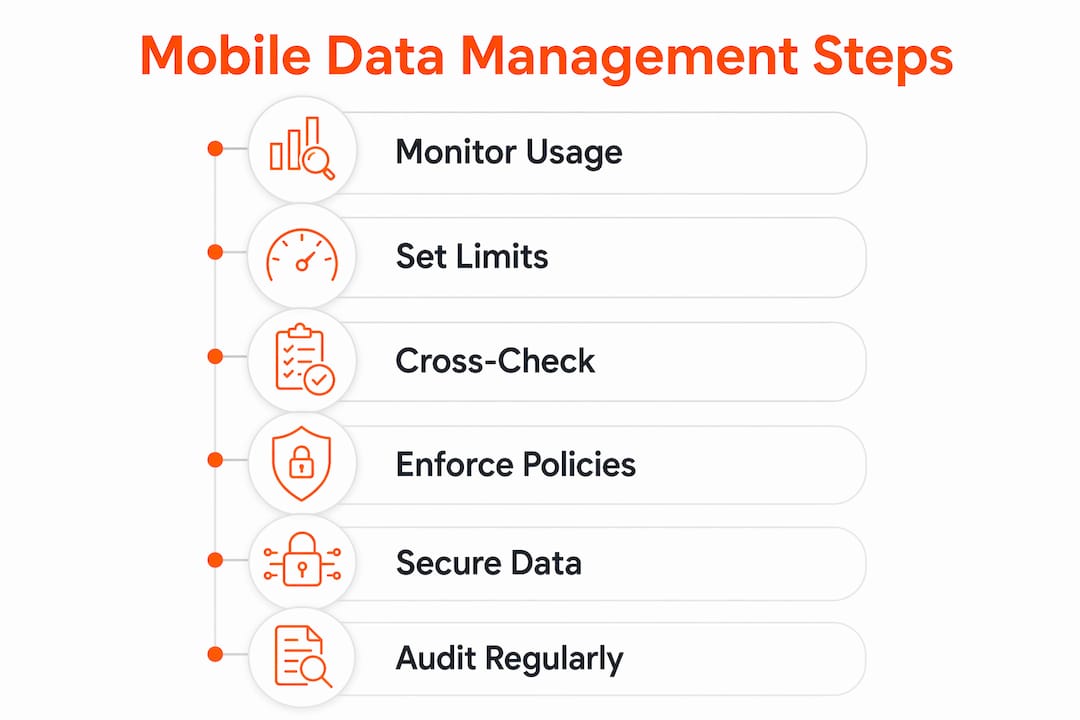
The step-by-step approach for business travel data management follows this sequence:
- Assess your baseline. Measure current data usage across devices and compare device stats to carrier reports.
- Configure device-level controls. Set warnings, limits, and Data Saver or Low Data Mode on every device.
- Deploy enterprise profiles. For organizations, assign Cisco Meraki Cellular Data Profiles with thresholds matched to your billing cycle.
- Layer in security controls. Enable MFA, VPN, automatic updates, and cloud backups before any travel begins.
- Review and adjust monthly. Usage patterns change. Revisit thresholds and profiles after each billing cycle.
Key Takeaways
Effective mobile data management requires combining device-level controls, enterprise policy enforcement, and layered security practices to prevent cost overruns and protect sensitive data.
| Point | Details |
|---|---|
| Monitor at the device level | Use Android data settings or iPhone Low Data Mode to track and cap usage per app. |
| Enforce policies at scale | Cisco Meraki Cellular Data Profiles automate SIM failover and alerts to prevent overages. |
| Validate both data sources | Cross-check device-reported usage against carrier billing to set accurate thresholds. |
| Secure every connection | Use phishing-resistant MFA, VPNs, and automatic updates on all devices before traveling. |
| Review monthly | Adjust thresholds and profiles after each billing cycle as usage patterns evolve. |
What I’ve learned from managing data across borders
The biggest mistake I see travelers and IT teams make is treating monitoring as the end goal. Watching a dashboard does not stop a $3,000 roaming bill. Policy enforcement does. The moment I shifted from checking usage after the fact to configuring automated thresholds and failover rules, the surprises stopped.
The second lesson is about data sources. Device-reported numbers and carrier-billed numbers are almost never identical. I have seen teams set hard limits based on device stats, only to get hit by carrier charges that exceeded those limits. Always reconcile both sources before you trust your thresholds.
Security is where most individuals cut corners. SMS-based two-factor authentication feels secure, but it is the weakest option available. Switching to an authenticator app takes five minutes and closes a real attack vector. For business travelers accessing corporate systems, Zero Trust access controls are not optional. They are the baseline.
The tools exist. The frameworks exist. The gap is almost always in execution, not knowledge. A travel data management checklist run before every trip closes that gap faster than any policy document.
— Bogdan
Global data plans that work with your management strategy
Managing data usage is only half the equation. The other half is having a data plan that gives you predictable costs and reliable coverage before you land.
Lumo provides instant global data plans across more than 160 countries, activated by QR code in minutes. For travelers and remote workers who need cost control built into their connectivity, Lumo’s flexible eSIM plans eliminate roaming fees and let you switch between local carriers without swapping physical SIMs. Paired with the monitoring and security practices in this guide, a Lumo global eSIM plan gives you full visibility and control over your mobile data from the moment you arrive. Lumo supports smartphones, tablets, and laptops, with 5G/4G speeds and 24/7 customer support.
FAQ
What is mobile data management?
Mobile data management is the practice of monitoring, controlling, and securing cellular data usage across devices. It applies to both individual travelers and organizations managing device fleets.
How do I set a data limit on Android?
Go to Settings > Network & Internet > Data Usage, then set a data warning and a hard limit. The device disables mobile data automatically when the limit is reached.
Why does my phone show different data usage than my carrier?
Device-reported and carrier-billed data differ because carriers measure usage at the network level, which includes overhead not counted by the device. Always compare both before setting thresholds.
What is the safest MFA method for mobile data access?
Authenticator apps like Google Authenticator or hardware keys like YubiKey are the safest options. The Canadian Centre for Cyber Security recommends avoiding SMS codes because they can be intercepted.
Do I need a VPN if I already use a secure eSIM?
Yes. A VPN encrypts your traffic at the application layer, which protects data even if the underlying network is compromised. eSIM security and VPN protection address different threat vectors and work best together.
Recommended
- Enterprise mobile data explained: global connectivity for travelers | Lumo eSIM Store
- Business travel data management guide for global connectivity | Lumo eSIM Store
- What is high-speed mobile data: guide for travelers | Lumo eSIM Store
- 7 Essential Steps for a Travel Data Management Checklist | Lumo eSIM Store
Related Topics
Stay Connected Anywhere
Get instant eSIM data plans for 160+ countries. No physical SIM required.