Business travel data management guide for global connectivity

Business travel often brings unexpected mobile data costs and connectivity headaches. Without a clear strategy, roaming charges spiral, productivity drops when connections fail, and security gaps emerge. This guide walks you through proven methods to manage international data effectively, control expenses, and maintain reliable connectivity wherever work takes you. You’ll learn practical preparation steps, real-time management tactics, and troubleshooting techniques that keep you connected and in control.
Table of Contents
- Key takeaways
- Understanding the challenges of business travel data management
- Preparing for international travel: tools and setup essentials
- Executing data management during travel: strategies and best practices
- Verifying results and troubleshooting common issues
- Optimize your international data with Lumo eSIM plans
- FAQ
Key Takeaways
| Point | Details |
|---|---|
| Real time data control | MDM platforms provide real time data caps and app level restrictions to curb roaming charges. |
| Business only profiles | Creating business only profiles confines data use to corporate apps and prevents nonessential streaming, dramatically cutting unnecessary consumption. |
| Tiered data caps | Configure tiered data caps with automatic enforcement to alert at 75 percent usage and restrict non essential apps at 90 percent. |
| Predeparture preparation | Prepare before departure by installing MDM, creating business profiles, testing VPNs, and downloading offline maps. |
Understanding the challenges of business travel data management
Business travelers face a perfect storm of connectivity issues abroad. High roaming charges create significant unexpected expenses, with bill shock accounting for roughly 14% of total cost for enterprise fleets. That’s money disappearing from budgets without delivering value.
Connectivity quality varies dramatically across countries and carriers. You might have blazing fast 5G in one city, then struggle with spotty 3G coverage an hour away. These inconsistencies disrupt video calls, delay email responses, and frustrate clients waiting for deliverables. Productivity suffers when you can’t rely on stable connections.
Security risks multiply without proper controls. Employees streaming videos or downloading large personal files over international networks create vulnerabilities. Unsecured public Wi-Fi becomes tempting when cellular data runs low, exposing sensitive business information to potential threats.
Common challenges include:
- Unpredictable roaming rates that vary by carrier and destination
- Limited visibility into real-time data consumption across devices
- Difficulty restricting non-essential app usage during travel
- Inconsistent network quality affecting critical business communications
- Security gaps from employees seeking alternative connectivity options
Understanding these mobile data roaming costs risks motivates the need for systematic management approaches. The good news? Each challenge has practical solutions you can implement before your next trip.
Preparing for international travel: tools and setup essentials
Effective data management starts before you board the plane. The right tools and configurations eliminate surprises and give you control from day one.
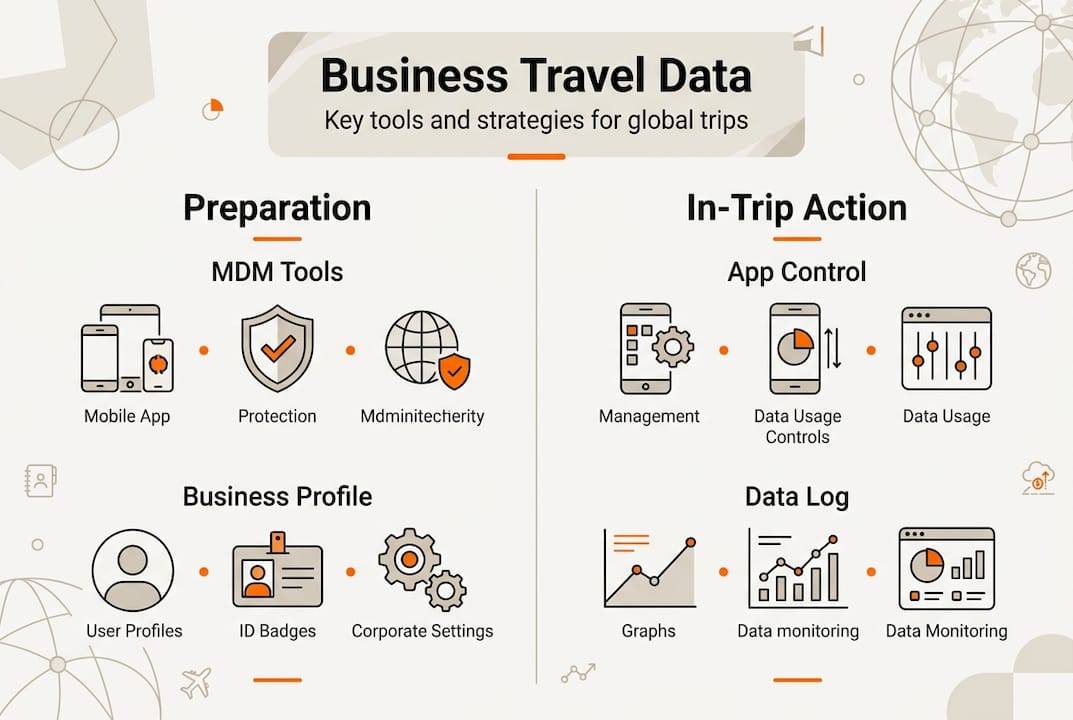
Mobile Device Management (MDM) platforms are your first line of defense. These tools, like Hexnode, enable real-time data caps, app-level restrictions, and tiered policies that prevent runaway usage. You set the limits, the system enforces them automatically. No more hoping employees remember to disable background app refresh.

Business-only profiles transform how devices handle data abroad. By creating a separate work profile, you limit connectivity to corporate apps like email, messaging, and essential productivity tools. Streaming services, social media, and other bandwidth-hungry apps get blocked automatically. This simple step cuts unnecessary data consumption dramatically.
Pro Tip: Set up your business profile at least 48 hours before departure to test functionality and ensure all critical apps work properly within the restrictions.
Data caps provide a safety net against excessive charges. Configure your MDM tool to alert you at 75% usage and automatically restrict non-essential apps at 90%. This tiered approach keeps you connected to what matters while preventing costly overages.
Essential preparation steps:
- Install and configure MDM software on all travel devices
- Create business-only profiles with approved app lists
- Set tiered data caps with automatic enforcement
- Test VPN connections and security protocols
- Download offline maps and essential documents
Here’s how different tools compare for travel data management:
| Tool Type | Key Feature | Best For | Setup Time |
|---|---|---|---|
| MDM Platform | Real-time monitoring and restrictions | Enterprise fleets | 2-4 hours |
| eSIM Solutions | Flexible local data plans | Individual travelers | 15 minutes |
| VPN Services | Secure encrypted connections | Security-focused teams | 30 minutes |
| Carrier Apps | Basic usage tracking | Light travelers | 10 minutes |
Combining secure mobile data traveling cut costs eSIM approaches with MDM tools creates a robust system. Follow this travel data management checklist to ensure nothing gets missed during setup.
Executing data management during travel: strategies and best practices
Once you’re on the ground, active management keeps costs controlled and connectivity reliable. Think of this as piloting rather than autopilot mode.
Continuous monitoring beats reactive alerts every time. Real-time monitoring via MDM prevents bill shock better than carrier notifications that arrive after damage is done. Check your dashboard daily, ideally each morning before business hours begin. Spot trends early and adjust before small issues become expensive problems.
Follow these steps for effective daily management:
- Review overnight data usage each morning via your MDM dashboard
- Adjust app permissions based on actual needs for that day’s activities
- Switch to Wi-Fi for large file transfers or video conferences when available
- Monitor connection quality and switch carriers if performance drops
- Document any unusual usage patterns for post-trip analysis
Tiered policies give you flexibility without sacrificing control. Priority one apps like email and messaging get unrestricted access. Priority two apps like cloud storage work within daily limits. Priority three apps like social media stay blocked unless you manually enable them for specific situations.
Pro Tip: Keep a running log of which apps you actually need versus which ones you thought you’d need. This data refines your profiles for future trips and eliminates unnecessary restrictions.
Different situations call for different strategies:
| Strategy | When to Use | Data Savings | Complexity |
|---|---|---|---|
| Full roaming with caps | Short trips, high connectivity needs | Moderate | Low |
| Local eSIM plans | Extended stays, cost-sensitive budgets | High | Medium |
| Wi-Fi only with hotspot backup | Predictable locations, office-based work | Very High | Low |
| Hybrid approach | Variable itineraries, mixed connectivity | High | Medium |
Location matters significantly. Urban centers typically offer better connectivity options than rural areas. Adjust your expectations and data allocation accordingly. In cities, you might rely more on cellular data. In remote locations, download everything you need in advance.
This avoid roaming charges checklist global travelers provides additional tactical steps. Understanding roaming avoidance save mobile data 2026 principles helps you make smarter decisions in the moment.
Verifying results and troubleshooting common issues
Post-trip analysis turns experience into expertise. Review your data usage reports within 48 hours of returning while details remain fresh.
Usage reports reveal patterns you missed during travel. Look for apps that consumed more data than expected. Identify times when usage spiked unexpectedly. Compare actual consumption against your pre-trip estimates. These insights inform better planning next time.
Common issues and solutions:
- Unauthorized app usage: Tighten profile restrictions and add forgotten apps to block lists
- Poor connection quality: Document problem locations and carriers for future reference
- Unexpected charges: Cross-reference usage reports with carrier bills to identify discrepancies
- Security incidents: Review VPN logs and update protocols to close gaps
Troubleshooting requires systematic investigation. When problems occur, follow these steps:
- Gather all relevant data including usage logs, carrier bills, and incident reports
- Identify the root cause rather than treating symptoms
- Test potential solutions in controlled settings before next deployment
- Update your MDM policies and profiles based on findings
- Document lessons learned and share with team members
Even with strong preparation, bill shock still represents significant cost but MDM approaches reduce it substantially. The key is continuous improvement rather than one-time fixes.
Maintaining effectiveness over time requires regular updates. Technology changes, carriers modify policies, and your business needs evolve. Schedule quarterly reviews of your data management strategy. Update app lists, refresh usage caps based on actual patterns, and incorporate new tools as they become available.
Understanding what is data roaming avoid bills abroad fundamentals helps troubleshoot when things go wrong. Learning from international roaming mistakes avoid prevents repeating common errors.
Future trips benefit from each iteration. Your first managed trip might save 30% on data costs. Your fifth trip could save 60% or more as your system becomes refined and personalized to your actual usage patterns.
Optimize your international data with Lumo eSIM plans
Managing data effectively requires both smart strategies and the right connectivity solutions. While MDM tools control usage, you still need affordable, reliable data access across destinations.
Lumo eSIM delivers instant global data plans designed specifically for business travelers. Instead of juggling multiple SIM cards or accepting expensive roaming rates, you activate local data plans instantly via QR code. Coverage spans over 160 countries with high-speed 5G and 4G connectivity.
The platform integrates seamlessly with MDM tools, giving you visibility and control while Lumo handles the connectivity infrastructure. Flexible plans scale with your needs, whether you’re taking a quick two-day trip or managing month-long projects abroad. You pay for what you use without contracts or hidden fees.
For business professionals managing multiple devices, Lumo supports smartphones, tablets, and laptops with multiple eSIM profiles. Switch between carriers based on location and performance without physical SIM swaps. This flexibility combined with your data management strategies creates a complete solution for international connectivity challenges.
FAQ
How can I avoid unexpected data charges while traveling internationally?
Use MDM tools to monitor and cap data usage in real time before charges accumulate. Create business-only profiles that restrict access to work-essential apps, blocking streaming services and other bandwidth-heavy applications automatically. This avoid roaming charges guide save mobile data 2026 provides additional tactics for cost control.
What are the best tools for managing mobile data when traveling?
MDM and UEM platforms like Hexnode enable detailed monitoring, app-level restrictions, and automated policy enforcement across devices. These tools provide real-time visibility into usage patterns and prevent overages through tiered controls. eSIM providers offer flexible, cost-saving connectivity options that complement MDM strategies by delivering affordable local data rates. Combining secure mobile data traveling tools creates comprehensive protection.
How can business travelers ensure secure data use abroad?
Use MDM platforms to block non-business apps and monitor all data activity continuously. Regularly update security policies to address emerging threats and enable VPN connections for encrypted data transmission. Restrict access to public Wi-Fi networks and enforce automatic security protocols through device profiles. This travel data management checklist covers essential security configurations.
What should I do if my data usage exceeds expectations during a trip?
Immediately review your MDM dashboard to identify which apps are consuming excessive data. Temporarily restrict or disable non-essential applications until you can investigate further. Switch to Wi-Fi for large transfers and downloads when secure networks are available. Document the incident details for post-trip analysis to prevent recurrence on future travels.
How often should I review and update my data management policies?
Conduct thorough reviews quarterly to incorporate technology changes, carrier policy updates, and evolving business needs. Perform quick assessments after each international trip while details remain fresh, adjusting app permissions and usage caps based on actual consumption patterns. This regular maintenance ensures your strategy stays effective and cost-efficient over time.
Recommended
Related Topics
Stay Connected Anywhere
Get instant eSIM data plans for 160+ countries. No physical SIM required.