24/7 Connectivity for Business Travelers: 2026 Guide

TL;DR:
- Using a prepaid global eSIM paired with a home-carrier SIM ensures continuous connectivity during business trips. Activating the eSIM before departure and keeping the home SIM active for SMS and 2FA prevents account lockouts and supports secure communications. This layered setup minimizes travel stress and maintains uninterrupted access to vital work applications worldwide.
A layered setup built around a prepaid global eSIM plus a backup home-carrier SIM is the fastest, lowest-friction way to stay online for work wherever you land. Here is the exact stack:
- Primary connection: A prepaid global eSIM (Lumo covers 160+ countries, activates via QR code in minutes, runs on 4G/5G)
- Secondary connection: Your home-carrier SIM, kept active for SMS and two-factor authentication (2FA)
- Optional tertiary: A portable hotspot or travel router for multi-device setups or weak-signal areas
Next step: Buy and activate a prepaid global eSIM before you board. Scan the QR code, assign it as your primary data profile, and you land already connected.
Table of Contents
- Why always-on mobile data matters for business travelers
- How the layered connectivity model works in practice
- How to choose the right prepaid global eSIM plan for nonstop business travel
- Activate an eSIM before you land: the QR-code walkthrough
- Common problems and security best practices for using an eSIM abroad
- What to expect to pay and how to stretch your budget
- Your pre-travel checklist for round-the-clock connectivity
- Key Takeaways
- The part most travelers skip
- Lumo keeps your business connected from the moment you land
- Useful sources and further reading
- FAQ
Why always-on mobile data matters for business travelers
Losing your connection mid-trip is not just an inconvenience. It stalls client calls, locks you out of cloud files, and blocks CRM access at the exact moment you need it. The eSIM benefits for travelers go beyond convenience — they directly protect your output.
Mission-critical use cases that break without a stable connection:
- Video calls on Zoom, Teams, or Google Meet
- Real-time access to CRM platforms and project management tools
- Cloud file sharing and collaborative editing
- GPS navigation and field-service apps
- VPN authentication for secure enterprise access
Choosing between roaming, local SIMs, and public Wi-Fi creates genuine mental friction for professionals on the road. Resolving connectivity at the planning stage reduces that anxiety before it affects performance in high-stakes situations.
A survey on business travel stress found that secure internet access ranked ahead of raw speed for a large share of business travelers. Employees provisioned with a reliable mobile data solution also reported higher productivity than those relying on roaming or improvised setups. Public Wi-Fi at hotels and airports is the alternative, and it carries real risks for anyone handling sensitive business data.
How the layered connectivity model works in practice
Layered connectivity keeps you online in almost every scenario because each layer covers a different failure mode. Your primary eSIM handles data. Your home SIM handles SMS and 2FA. A hotspot handles overflow.
Setting up the three layers:
- Primary data (eSIM): Buy a regional or global prepaid eSIM plan before departure. Assign it as your default data line. For video work, choose a plan that specifies 4G LTE or 5G — real-time collaboration and large file transfers need LTE/5G minimum, not legacy 3G fallback.
- Secondary SMS/2FA (home SIM): Keep your home-carrier SIM active in the second SIM slot. Do not cancel or pause it. Bank logins, enterprise VPN prompts, and app verifications all route through SMS — losing this layer locks you out of accounts at the worst times.
- Tertiary hotspot (optional): A travel router or portable hotspot makes sense when you need to connect a laptop and phone simultaneously, or when you are in a weak-signal area where boosting a hotel Wi-Fi signal helps.
Configuration tips:
- In your phone’s cellular settings, set the eSIM as the default data line and the physical SIM as the voice/SMS line
- Enable data roaming on the eSIM profile before landing
- Name your eSIM profiles clearly (“Lumo Europe,” “Lumo Asia”) so switching takes seconds
Pro Tip: Label each eSIM profile with the region and activation date. When you need to swap mid-trip, you will not waste time guessing which profile is active.
For deeper context on how eSIM fits into a remote work connectivity setup, the device-compatibility and profile-management details are worth reviewing before your first multi-country trip.
How to choose the right prepaid global eSIM plan for nonstop business travel
The six dimensions that actually matter when comparing plans: coverage (countries supported), activation speed, data limits and durations, network speed (4G/5G), device compatibility, and support availability.
Selection checklist:
- Short business trip (3–7 days): A regional plan with a 7-day validity window and 5–10 GB is usually enough. Confirm the plan covers your specific destination countries, not just the continent.
- Multi-country tour: A global plan beats buying separate regional plans. One plan, no swapping, no gaps at borders.
- Extended remote work (30+ days): Look for 30/60/90-day validity, generous data caps, and remote top-up capability. Plans with top-up options prevent service gaps when projects run longer than expected.
- Heavy daily usage: Prioritize plans that explicitly state 4G/5G speeds, not throttled or deprioritized tiers.
- Multi-device work: Confirm the plan supports tethering or hotspot sharing.
Check the provider’s coverage map and device compatibility guide before purchasing. For a structured comparison of plan dimensions by use case, the top eSIMs for remote workers breakdown is a useful reference.
Activate an eSIM before you land: the QR-code walkthrough
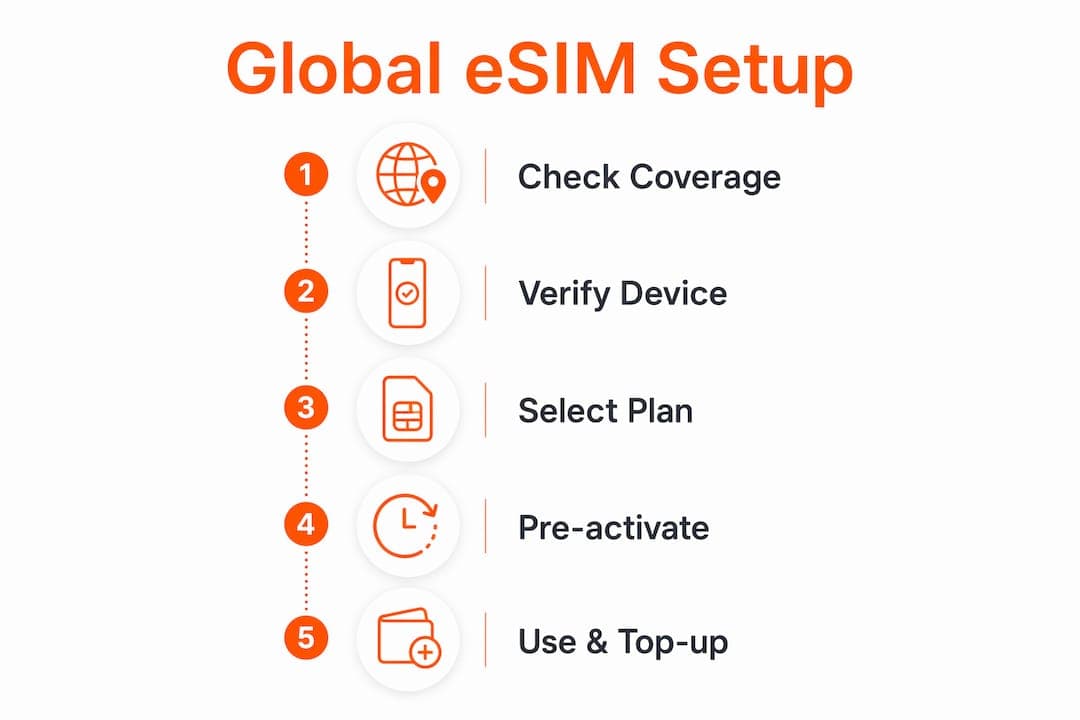
eSIM activation is instant via QR code and can be completed before you board. Do it the day before departure, not at the airport.
Activation steps:
- Purchase your prepaid eSIM plan online and receive the QR code by email
- On iOS: go to Settings → Cellular → Add eSIM → Use QR Code. On Android: Settings → Network → SIM → Add eSIM
- Scan the QR code with your camera
- Name the profile (e.g., “Lumo Global”) and assign it as your primary data line
- Enable data roaming for the new profile
- Send a test message or load a webpage to confirm the connection
Device compatibility check:
- iPhones from XS onward support eSIM; iPhone 14 and later (US models) are eSIM-only
- Android support varies by manufacturer — check your model’s spec sheet or the provider’s compatibility guide
- Many recent laptops and tablets support eSIM; see eSIM for laptops for device-specific setup steps
Pro Tip: Screenshot the QR code and save it to your camera roll AND email it to yourself. If the original email is inaccessible abroad, you still have the code.
Common problems and security best practices for using an eSIM abroad
Most eSIM issues resolve with four checks: signal strength, profile priority, APN settings, and carrier blockage. Start there before contacting support.
Troubleshooting steps:
- Toggle the eSIM off and back on in cellular settings
- Confirm the eSIM profile is set as the active data line (not the physical SIM)
- Check that data roaming is enabled for the eSIM profile
- Verify the APN setting matches the carrier’s published APN
- Reboot the device in airplane mode, then disable airplane mode
- If still offline, re-scan the QR code if the provider allows re-download
Security best practices:
- Use a VPN for all business traffic. Keeping traffic on mobile networks avoids unmanaged hotel and airport Wi-Fi risks, but a VPN adds a second layer of encryption on top.
- Keep your home SIM active for 2FA. Never route enterprise authentication through a temporary local SIM you might discard.
- Set a strong device PIN or biometric lock before travel.
- Before contacting support, gather: device model, eSIM profile ID, country you are in, and a screenshot of the error.
What to expect to pay and how to stretch your budget
Pricing for prepaid eSIM plans varies by region, data volume, and validity. Short regional trips typically run on the lower end; extended global plans cost more but deliver far better value per day than roaming.
Factors that shape the price:
- Regional vs. global: Regional plans cost less per GB for single-continent trips; global plans make sense when you cross multiple regions in one trip
- Speed tier: Plans that guarantee 4G/5G cost slightly more than throttled options, but for business use the speed difference is not optional
- Data cap and validity: Longer validity windows (30/60/90 days) spread the cost and reduce the risk of running out mid-project
- Tethering allowance: Plans that allow hotspot sharing are worth the small premium if you work from a laptop
Cost-saving tactics:
- Match validity to your actual trip length — a 30-day plan on a 10-day trip wastes money
- Top up remotely rather than buying a new plan; most providers support this from the app
- Use your home SIM only for SMS and calls, not data — that keeps roaming charges near zero
- For mission-critical work, budget for a higher-tier plan. A dropped client call or a locked VPN session costs more than the price difference between a basic and a business-grade plan.
Your pre-travel checklist for round-the-clock connectivity
Run through this before you leave. It takes 15 minutes and prevents most travel connectivity problems.
- [ ] Buy and activate your prepaid eSIM at least 24 hours before departure
- [ ] Confirm the eSIM is set as the primary data profile
- [ ] Enable data roaming on the eSIM profile
- [ ] Screenshot and back up the QR code
- [ ] Confirm your home SIM is active and will receive SMS abroad
- [ ] Test your VPN on the eSIM connection
- [ ] Verify your device supports eSIM and dual-SIM operation
- [ ] Save your provider’s 24/7 support contact before you need it
Priority items: Confirm dual-SIM works on your specific device model before departure. Keep your home SIM active for 2FA — this one step prevents more lockouts than any other.
Key Takeaways
A prepaid global eSIM paired with an active home-carrier SIM covers the vast majority of business connectivity failures before they happen.
| Point | Details |
|---|---|
| Primary connection | Use a prepaid global eSIM (4G/5G) as your default data line in every country. |
| Keep home SIM active | Your home-carrier SIM handles SMS and 2FA — never pause or cancel it while traveling. |
| Activate before departure | Scan the QR code and test the connection at least 24 hours before landing. |
| Use a VPN | Always route business traffic through a VPN, even on a private mobile connection. |
| Lumo as your eSIM | Lumo covers 160+ countries with instant QR activation, multi-device profiles, and 24/7 support. |
The part most travelers skip
The layered connectivity model is not complicated. What surprises me is how many professionals still treat connectivity as something to sort out on arrival. They land, hunt for a SIM vendor, burn an hour, and then wonder why the first client call of the trip feels rushed.
The real cost is not the roaming bill. It is the mental overhead of managing a broken setup while also trying to do actual work. Resolving connectivity before departure is a small planning task that pays back every single day of the trip. Activate the eSIM the night before. Test it. Screenshot the QR code. That routine takes less time than checking in for a flight.
One thing worth emphasizing: the home SIM for 2FA is not optional for business travelers. Enterprise VPNs, banking apps, and most SaaS platforms send verification codes via SMS. If your only active SIM is a temporary local card you bought at the airport, you will eventually get locked out of something important at the worst possible moment.
Lumo keeps your business connected from the moment you land
Lumo is a purpose-built prepaid eSIM platform that covers the full layered setup in one place. Coverage spans 160+ countries with 4G/5G connectivity, instant QR code activation, and multi-device profile support for smartphones, tablets, and laptops. No contracts, no registration, no waiting for a physical card.
For business travelers, the 24/7 customer support is the detail that matters most. If a profile goes offline at 2 AM before a morning meeting, help is available immediately. Plans come in regional and global options with flexible durations and data caps, so you can match the plan to the trip rather than overpaying for coverage you will not use.
Browse Lumo’s global eSIM plans and activate your connection before your next departure.
Useful sources and further reading
- How eSIM Is Changing Business Travel Connectivity — covers instant activation benefits, multi-country flexibility, and the business case for eSIM over traditional roaming
- Connectivity Fatigue: The Stress of Modern Travel — explains the mental friction of managing connectivity on the road and why pre-trip planning reduces travel stress
- Best Internet for Digital Nomads — detailed breakdown of layered connectivity stacks including eSIM, travel routers, and VPN combinations
- The Professional Traveler’s Connectivity Problem — explains why professionals need 4G/5G plan tiers and multi-country validity options
- Business Travel Stress Linked to Connectivity Issues — survey data on secure internet prioritization and productivity impact of corporate eSIM provisioning
- Types of Business Internet Connections — broader context on always-on business internet options for teams managing enterprise continuity
Before purchasing any plan, check the provider’s coverage map and device compatibility guide for your specific phone model and destination countries.
FAQ
What is the best setup for 24/7 connectivity for business travel?
A prepaid global eSIM as your primary data connection, paired with an active home-carrier SIM for SMS and 2FA, covers nearly every scenario. Add a portable hotspot or travel router if you need to connect multiple devices.
Can I activate an eSIM before I arrive in a new country?
Yes. eSIM activation via QR code is instant and can be completed before departure. Lumo’s plans activate in minutes, so you land with a working data connection rather than hunting for a SIM vendor on arrival.
Do I need a VPN if I am using an eSIM?
A VPN is still recommended for business use. An eSIM provides a more secure connection than public Wi-Fi, but a VPN encrypts all traffic end-to-end, which matters when accessing enterprise systems or sensitive client data.
How do I avoid running out of data mid-trip?
Choose a plan with a validity window that matches your trip length, and confirm the provider offers remote top-up. Plans with top-up options let you add data without buying a new plan or losing your active profile.
Which devices support eSIM for business travel?
Most iPhones from XS onward, many recent Android flagships, and a growing number of laptops and tablets support eSIM. Check your device’s spec sheet or Lumo’s device compatibility guide before purchasing a plan.
Recommended
- Business Travel Connectivity Checklist for Professionals | Lumo eSIM Store
- Business travel tech essentials for global connectivity | Lumo eSIM Store
- Stay connected abroad: Smart business travel data tips | Lumo eSIM Store
- Business travel data management guide for global connectivity | Lumo eSIM Store
Related Topics
Stay Connected Anywhere
Prepaid eSIM data plans for 180+ countries and territories. No physical SIM required.