Network Compatibility Terms: A 2026 Traveler’s Guide

TL;DR:
- Understanding network compatibility terms helps travelers avoid connectivity failures in foreign countries. Verifying supported frequency bands, unlock status, and eSIM support before travel ensures seamless cross-border mobile use. Proper preparation with device checks and updates allows reliable access to regional networks and prevents costly surprises.
Network compatibility terms define the technical specifications that determine whether your mobile device can connect to a cellular network in another country. These terms cover frequency bands, network technologies like GSM, LTE, and 5G, device unlock status, and protocols such as APN settings. Travelers and remote workers who understand these concepts avoid expensive surprises, from dead zones in rural Europe to locked phones that reject foreign SIM cards. The GSMA, the global body that governs mobile standards, sets the interoperability frameworks that make cross-border connectivity possible. Getting these details right before you board is the difference between working from a café in Tokyo and staring at a “no service” screen.
What are the key network compatibility terms?
Network compatibility terminology is the shared vocabulary between your device and a carrier’s infrastructure. Each term maps to a specific technical requirement. Miss one, and your phone may register on a network but deliver unusable speeds, or fail to connect entirely.

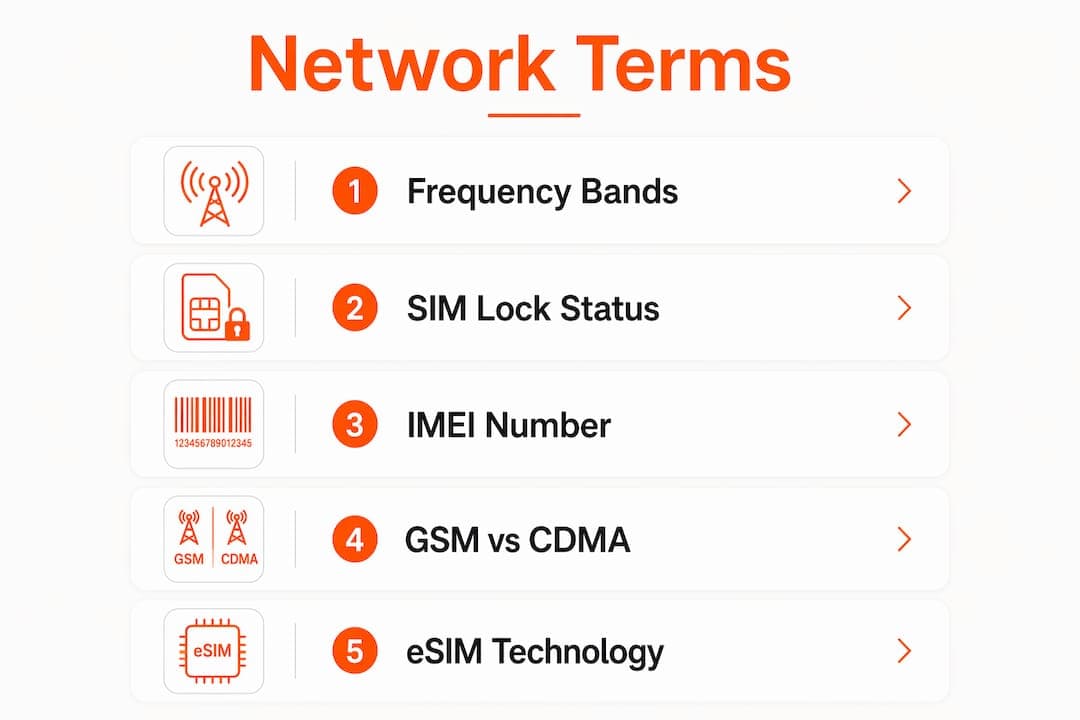
Frequency bands are the radio spectrum slices carriers use to transmit data. Each band has a number, such as LTE Band 20 or 5G n78, and different regions allocate different bands. Germany uses Bands 1, 3, 7, 20, and 28 for LTE. A device missing at least two of a carrier’s top three primary bands will experience degraded speeds outside major cities. North America, Europe, and Asia each use distinct sets of frequency bands, so a phone optimized for one region may underperform in another.
Network technologies describe the generation of cellular service:
- GSM (Global System for Mobile Communications): The global standard used by virtually every carrier outside the US. GSM devices support flexible SIM swapping.
- CDMA (Code Division Multiple Access): Mostly US-centric. CDMA phones may struggle internationally unless they also support GSM radios.
- LTE (Long-Term Evolution): The 4G standard used worldwide. LTE bands vary significantly by region.
- 5G: The current generation, using sub-6 GHz bands like n77 and n78 for broad coverage, and mmWave for dense urban areas.
Unlocked vs. locked devices is a critical distinction. A locked phone is tied to one carrier and will reject foreign SIM cards. An unlocked phone accepts any compatible SIM. Unlock status must be verified at the baseband level. Simply having an unlock status after 60 days does not guarantee full SIM freedom if carrier provisioning is incomplete. The reliable test: insert a foreign SIM and confirm the carrier name appears in your settings.
IMEI (International Mobile Equipment Identity) is a 15-digit code unique to your device. Carriers and compatibility tools use it to identify your phone’s exact model and supported bands. SIM vs. eSIM is the physical vs. digital version of the same concept. An eSIM is a programmable chip embedded in the device. Devices like iPhone XS and newer, and Samsung Galaxy S20 and newer typically support eSIM, expanding compatibility options without a physical card swap. APN (Access Point Name) is the gateway setting that connects your device to a carrier’s data network. Wrong APN settings cause failed data connections even on a fully compatible device.
How do you check your device’s compatibility?
Verifying compatibility before travel takes less than 20 minutes and prevents the most common connectivity failures. Follow these steps:
- Find your phone’s supported bands. Go to the manufacturer’s spec page for your exact model number, not just the product name. Different regional variants of the same phone support different bands. Your IMEI number identifies your specific variant.
- Use an IMEI compatibility tool. Sites like frequencycheck.com let you enter your IMEI and compare your device’s band support against a destination carrier’s spectrum. Cross-reference at least two sources.
- Compare bands with your destination. Different regions use distinct frequency bands, so check the specific carrier bands for your destination country, not just the region.
- Verify unlock status. Contact your home carrier or test with a foreign SIM. Confirm the carrier name displays in your phone’s settings after insertion.
- Check eSIM support. Go to Settings and look for a “Cellular Plans” or “Add eSIM” option. If it appears, your device supports eSIM provisioning.
- Update carrier settings and firmware. On iOS, go to Settings > General > About and accept any carrier update prompt. On Android, check for baseband firmware updates in the software update menu.
Pro Tip: Update your carrier settings while still on your home network. Skipping these updates can cause failed MMS delivery and VoLTE registration problems on foreign networks.
For travelers using dual-SIM setups, understanding how dual-SIM phones interact with remote connectivity adds another layer of flexibility when managing multiple carrier profiles abroad.
Common network compatibility challenges abroad
Most connectivity failures abroad trace back to a small set of technical causes. Knowing them in advance lets you fix problems in minutes rather than hours.
- Band gaps cause rural dead zones. A phone that works in a city center may lose signal 30 miles out if it lacks the lower-frequency bands carriers use for wide-area rural coverage. Band 28 (700 MHz) is critical in Australia and parts of Asia for exactly this reason.
- Locked devices reject foreign SIMs silently. Some phones display a “SIM not supported” error. Others simply show no signal with no explanation. Always confirm unlock status before departure.
- Carrier firmware disables bands at the software level. Carrier-specific firmware may disable certain bands despite full hardware support. This affects rural coverage and is one of the least-known compatibility traps. Updating firmware on your home network before travel re-enables those bands.
- Roaming activation does not equal compatibility. 53% of users experienced connection delays despite enabling roaming. IMSI routing and firmware limitations are the technical causes.
- VoLTE auto-switch failures. Some devices drop to 3G for calls on foreign networks if VoLTE is not provisioned by the local carrier. This also reduces data speeds during calls.
Pro Tip: Manually toggle airplane mode off and on after arriving in a new country. This forces a full PLMN scan, refreshes cached network data, and speeds up foreign network registration significantly.
Practical steps to prepare your device for international use
Applying your knowledge of mobile network compatibility before you travel prevents the majority of connectivity problems. Use this checklist:
- Confirm your device’s band support against your destination carrier’s spectrum at least one week before departure.
- Update all software. Install the latest OS update, carrier settings update, and baseband firmware while on your home network.
- Unlock your device through your carrier if it is still locked. Allow processing time, as some carriers take 48–72 hours.
- Set up eSIM before departure. Download your international data plan via QR code while on Wi-Fi. This avoids relying on data connectivity to activate your plan on arrival.
- Run a handshake test on arrival. Manually select local carriers in your network settings, verify your IP geolocation, and make a short VoLTE call. This method detects preventable connectivity problems before they affect your work or travel plans.
- Use a dual-SIM or eSIM setup to keep your home number active while running a local data plan. This avoids roaming charges while maintaining your primary number for calls.
When buying a new device for frequent travel, prioritize models with wide band support across multiple regions. A phone supporting both sub-6 GHz 5G bands and legacy LTE bands like 1, 3, 7, 20, and 28 covers the majority of global carriers. Pair that with an international data plan checklist to confirm you have covered every step before departure.
Key Takeaways
Understanding network compatibility terms before travel prevents the most common and costly connectivity failures abroad.
| Point | Details |
|---|---|
| Frequency bands determine coverage | Match your device’s supported bands to your destination carrier’s top three bands for reliable service. |
| GSM beats CDMA for global use | GSM devices work on virtually every carrier outside the US; CDMA phones need GSM radio support to work internationally. |
| Unlock status needs baseband verification | Confirm unlock by inserting a foreign SIM and checking that the carrier name appears in settings. |
| Firmware updates re-enable disabled bands | Update carrier settings and baseband firmware on your home network before departure to restore full band access. |
| eSIM simplifies international setup | Devices supporting eSIM can activate a local data plan via QR code before landing, skipping physical SIM swaps entirely. |
Why most travelers get compatibility wrong
Most travelers check one thing: whether their phone is “unlocked.” That single check misses at least four other failure points. I’ve seen people arrive in Japan with a fully unlocked phone that still couldn’t get 4G because it lacked Band 1, which is the primary LTE band used across most of Asia. The phone registered on the network, showed two bars, and delivered unusable speeds.
The misconception I see most often is treating “5G capable” as a guarantee of global 5G access. A phone supporting mmWave 5G in the US may not support the n78 sub-6 GHz band used across Europe and Asia. The spec sheet matters more than the marketing label.
My strongest recommendation: test your device with a foreign SIM or eSIM before your trip, not at the airport. The handshake test, manually selecting a carrier and confirming a VoLTE call completes, takes five minutes and catches problems that hours of troubleshooting at your destination cannot fix. Technology like eSIM has made this easier than ever. You can now load a local plan from home, confirm it activates, and arrive knowing your connection is ready. That confidence is worth more than any roaming plan.
— Bogdan
Lumo eSIM: global data without the compatibility guesswork
Travelers who understand network compatibility terms know that the right data plan matters as much as the right device. Lumo provides instant eSIM activation across more than 160 countries, with plans that work on 4G LTE and 5G networks across the bands most commonly used in each region.
Lumo’s eSIM activates via QR code before you leave home, so you arrive connected. There are no physical SIM swaps, no roaming fees, and no carrier lock-in. Flexible data plans let you match coverage to your actual destination rather than paying for a global plan you only use in two countries. For remote workers and frequent travelers who have done the compatibility homework, Lumo’s global data plans are the practical next step. Check your device’s eSIM support, confirm your destination bands, and activate before your flight.
FAQ
What are network compatibility terms?
Network compatibility terms are the technical specifications that determine whether a mobile device can connect to a specific cellular network. They include frequency bands, network technologies (GSM, LTE, 5G), unlock status, IMEI, APN settings, and eSIM support.
How do I know if my phone works abroad?
Find your phone’s supported frequency bands using your IMEI number and compare them against your destination carrier’s band list. Also confirm your device is unlocked at the baseband level by testing with a foreign SIM.
What is the difference between GSM and CDMA for travel?
GSM is the global standard used by virtually every carrier outside the US, making GSM devices far more compatible internationally. CDMA is mostly limited to US carriers, and CDMA phones need a GSM radio to work on most international networks.
Does enabling roaming guarantee connectivity abroad?
No. Roaming activation alone does not guarantee connectivity due to IMSI routing limitations and carrier firmware restrictions that may block certain bands even on unlocked devices.
What is an eSIM and why does it matter for travelers?
An eSIM is a programmable chip built into your device that replaces a physical SIM card. It lets travelers activate a local data plan via QR code before departure, avoiding roaming fees and physical SIM swaps entirely.
Recommended
Related Topics
Stay Connected Anywhere
Prepaid eSIM data plans for 180+ countries and territories. No physical SIM required.