Dual SIM management: maximize connectivity and cut costs

TL;DR:
- Managing dual SIMs effectively involves actively selecting default lines for calls, texts, and data to avoid costly roaming charges. Proper configuration on iPhones and Android devices includes labeling SIMs, assigning roles, and disabling automatic data switching, especially before international travel. Understanding your device’s hardware, like DSDS or dual active capabilities, is essential to prevent unintended data usage and maximize cost savings.
Two SIMs in your phone sounds like a foolproof solution for cheaper international travel. Yet countless frequent flyers land abroad and still rack up shocking roaming bills, wondering what went wrong. The problem isn’t having two SIMs. It’s not knowing how to manage them. Dual SIM management is the active process of controlling which line handles calls, texts, and data, and without it, your phone makes those decisions for you, often in the most expensive way possible.
Table of Contents
- What is dual SIM management?
- How dual SIM management works on Android and iPhone
- Understanding dual SIM hardware: DSDS, dual active, and data switching
- Travel hacks: avoid roaming charges with smart dual SIM management
- Enterprise controls: dual SIM management for company-owned devices
- The real value of dual SIM management: what most travelers miss
- Travel smarter with global eSIM solutions
- Frequently asked questions
Key Takeaways
| Point | Details |
|---|---|
| Active SIM control | You must designate which SIM handles calls, texts, and data to stay in control while abroad. |
| Technical constraints | Most devices only allow one active data line at a time, so check your settings before traveling. |
| Avoid costly mistakes | Labeling and managing your SIM lines properly prevents accidental roaming charges. |
| Enterprise considerations | Businesses can restrict dual SIM use to enhance security or control roaming risks on company devices. |
What is dual SIM management?
With confusion around dual SIM setups, let’s break down what dual SIM management actually means.
Most people think of dual SIM as simply having two phone numbers on one device. That’s the hardware side. Dual SIM management is what you do with those two lines. Specifically, it’s the set of practices and settings used to control which SIM (physical SIM and/or eSIM) your phone uses for specific functions like calls, SMS, and cellular data, and to keep each SIM’s behavior predictable across networks.
Think of it this way: a car with two fuel tanks doesn’t automatically use the cheaper one. You have to choose. Dual SIM management is exactly that choice, made deliberately so you never end up burning expensive fuel when affordable fuel is sitting right there.
Here’s what active dual SIM management actually covers:
- Selecting a default line for calls, SMS, and cellular data
- Assigning your home number for identity verification, banking, and two-factor authentication (2FA)
- Using a local or travel SIM for affordable data access
- Controlling whether your phone switches SIMs automatically when the primary line has weak signal
- Labeling SIMs clearly so you always know which is active
For frequent travelers and digital nomads, this separation is the foundation of managing multiple eSIM profiles without confusion or costly surprises.
“The goal is predictability. Every time you open a browser or make a call, you should know exactly which line your phone is using and what that costs.”
How dual SIM management works on Android and iPhone
Now that you know what dual SIM management is, let’s see exactly how to set it up on today’s most popular phones.
The two major platforms handle dual SIM differently, and knowing those differences helps you configure things correctly before you leave the airport.
| Feature | iPhone | Android |
|---|---|---|
| SIM settings location | Settings > Cellular | Settings > SIM Manager |
| Data line selection | Yes, one active at a time | Yes, selectable |
| Auto data switching | Optional toggle | Varies by manufacturer |
| Label customization | Yes | Yes |
| eSIM support | Yes (eSIM + physical or dual eSIM) | Varies by model |
On iPhone, only one cellular data network is active at a time. You choose a default line for data, and there’s an optional setting called “Allow Cellular Data Switching” that lets the phone temporarily use the other SIM if your primary data line has poor signal. This feature sounds helpful, but for international travelers, it’s a hidden trap if your secondary line carries roaming charges.

On Android, you can configure dual SIM under “SIM Manager” (or similar, depending on the manufacturer). You set preferred SIMs for calls, messages, and mobile data separately. The flexibility is slightly greater than iPhone, but the risk of misconfiguration is just as real.
Here’s how to set up dual SIM correctly on both platforms:
- Name your SIMs. Go into SIM settings and label each line clearly, such as “Home” and “Travel Data.”
- Assign your home SIM to calls and SMS. This keeps your number reachable and protects 2FA access.
- Set your travel SIM as the default data line. This ensures browsing, apps, and downloads use affordable local data.
- Disable automatic data switching on iPhone (unless you’re willing to monitor it closely).
- Verify settings at every new destination before connecting to a local network.
Pro Tip: Before every international trip, open your SIM settings and screenshot your current defaults. It takes 30 seconds and saves you from a nasty bill if something reset unexpectedly.
To stay ahead on this, it helps to fully understand how to manage eSIM profiles across different destinations so you can swap quickly and confidently.
Understanding dual SIM hardware: DSDS, dual active, and data switching
Understanding your device’s hardware is key. Here’s what you need to know about standby and data switching capabilities.
The hardware inside your phone determines what’s actually possible, regardless of what your settings menu shows you.
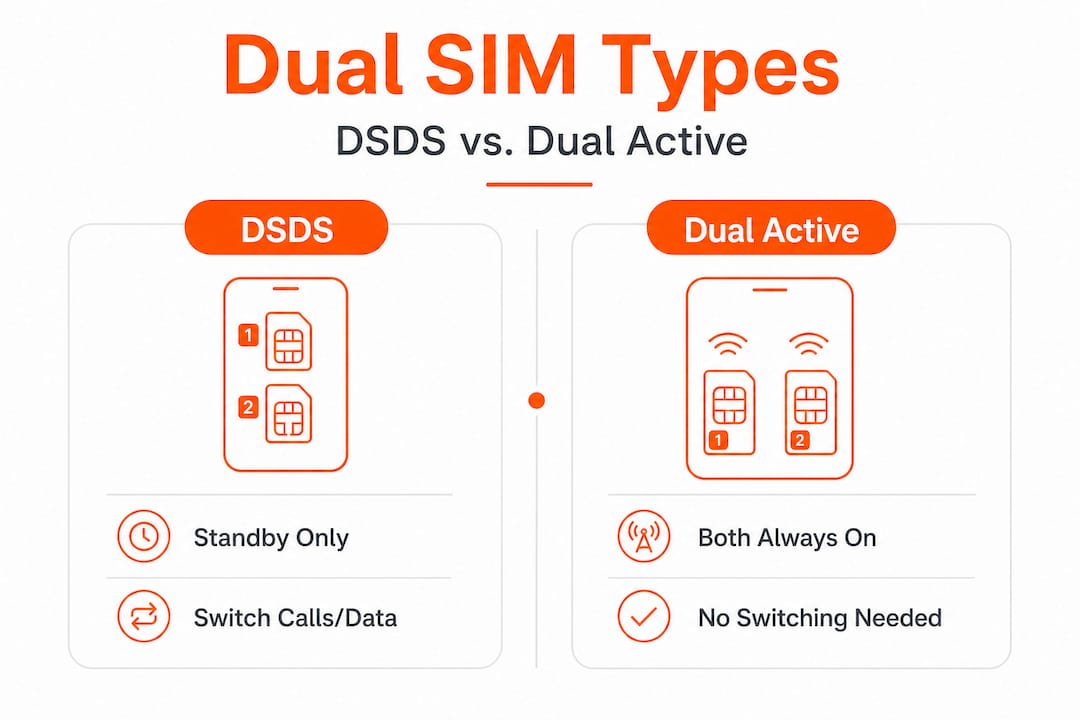
Dual SIM Dual Standby (DSDS) is the most common setup. Both SIMs are registered on their respective networks and can receive calls or messages in standby mode. However, only one SIM is active for live calls or data at any given moment. If you’re on a call on SIM 1, SIM 2 may be unreachable until the call ends.
Dual active phones are a different story. They can truly run both lines simultaneously, handling a call on one while using data on the other. These devices exist but are rare, more power-intensive, and usually found in specific Android models rather than flagship iPhones.
| Hardware mode | Both SIMs on standby | Simultaneous data and calls | Typical devices |
|---|---|---|---|
| DSDS | Yes | No | Most iPhones, many Android |
| Dual active | Yes | Yes | Select Android models |
“Most travelers assume their dual SIM phone is ‘dual active.’ It usually isn’t. That misunderstanding is where surprise roaming charges are born.”
The most dangerous scenario involves automatic data switching. When the phone detects a weak signal on your primary data SIM, it switches to the secondary. If that secondary SIM is your home carrier operating internationally, you’ve just triggered data roaming risks without a single intentional action.
Pro Tip: On iPhone, go to Settings > Cellular > Cellular Data and verify which line is selected. Then tap “Cellular Data Options” and check whether “Allow Cellular Data Switching” is on or off. Turning it off is the single most impactful thing you can do before landing abroad.
Travel hacks: avoid roaming charges with smart dual SIM management
With the technical limitations in mind, here are the practical steps that make the most difference for frequent travelers.
Smart dual SIM management is less about technology and more about discipline. The setup takes five minutes. The payoff can be hundreds of dollars saved per trip.
Follow this checklist every time you travel internationally:
- Label both SIMs with descriptive names before departure.
- Set your home SIM as default for calls and SMS only.
- Assign your travel SIM (or eSIM) as the default cellular data line.
- Disable automatic data switching on iPhone, or confirm the equivalent setting on Android.
- Turn off data roaming on your home SIM entirely if you won’t use it for calls abroad.
- Test by opening a browser before leaving the airport to confirm which SIM is serving your data.
- Re-verify at each new country if you’re on a multi-destination trip.
Key habits that separate experienced travelers from those who overpay:
- Use your home number exclusively for calls, 2FA texts, and banking notifications
- Keep your travel data SIM as a local data-only line
- Restrict your home SIM’s data access to zero unless you’re back home
- Check your phone’s active SIM indicator regularly, especially after reboots
These steps are the core of any solid strategy to save on roaming charges. A complete roaming charges checklist can walk you through every step in detail. If you’re still unclear on what roaming actually triggers, understanding what data roaming means is a smart starting point.
Pro Tip: If you’re juggling multiple eSIM profiles across different countries, add a short note in your phone’s Notes app listing which eSIM is active, what it covers, and when it expires. It sounds simple because it is, and it works.
Enterprise controls: dual SIM management for company-owned devices
Outside personal travel, dual SIM management is also a key issue for enterprise mobility.
For IT admins and business travelers, the stakes are different. The concern isn’t just personal bills. It’s unauthorized network access, data security, and uncontrolled roaming expenses across a fleet of devices.
Enterprise admins can restrict or disable secondary SIM usage entirely on company-owned devices, enforcing which networks employees can access. This reduces both security risk and the chance of accidental roaming charges showing up on the corporate account.
Key enterprise considerations include:
- Policy-based SIM restrictions prevent employees from inserting personal SIMs into work devices
- Network enforcement ensures devices only connect to approved carriers or VPN-secured connections
- Hardware limitations still apply: admins need to account for DSDS constraints when designing mobile policies
- OS differences mean Android (especially Samsung Knox) typically offers more granular controls than iOS
For individuals, these enterprise patterns offer a useful model. Treat your personal dual SIM setup with the same intentionality an IT team would: clear rules, defined purposes, and regular verification.
The real value of dual SIM management: what most travelers miss
Here’s what years of travel experience reveal that most guides skip.
The most common mistake isn’t setting things up wrong. It’s setting things up correctly once and never checking again. A phone reboot, a carrier update, or a new eSIM installation can silently reset your default data line. You open Instagram at 30,000 feet, land in Tokyo, and your home carrier has been serving your data for the past hour.
Automated features like cellular data switching exist to improve your experience, and they do, in certain contexts. But for internationally active travelers, automation is a liability unless you understand exactly how it behaves on your specific device. The risks of mobile data roaming are very real and often invisible until the bill arrives.
The framework we rely on is this: label, assign purpose, verify, and restrict. Every SIM has a name and a job. Every setting is confirmed before departure. Every automated toggle is treated as a potential cost risk. With that discipline in place, dual SIM management stops being a chore and becomes a quiet superpower. Travelers who use it well almost never overpay, and they’re never scrambling for Wi-Fi in the arrivals hall.
Travel smarter with global eSIM solutions
Ready to turn smart dual SIM management into effortless travel? The right eSIM solutions make it simple.
Smart SIM management is only as good as the travel data options you have access to. Lumo makes that part easy.
With Lumo eSIM solutions, you get instant access to affordable, high-speed local data in over 160 countries, activated by QR code in minutes. No physical SIM swapping, no hunting for a local carrier shop on arrival, and no surprises on your bill. Pair a Lumo eSIM with your existing home number and you have exactly the dual SIM setup this article describes: one line for identity, one line for data. Browse eSIM destinations to find the right plan for your next trip and activate before you board.
Frequently asked questions
What is the difference between DSDS and dual active SIM?
DSDS keeps both SIMs in standby but only one is active for calls or data at any moment, while dual active allows both lines to run simultaneously for calls and data.
How can I prevent high roaming fees when using dual SIM abroad?
Assign your travel SIM as the default cellular data line and disable automatic data switching before your trip to prevent your home SIM from triggering roaming charges.
Does dual SIM management work the same way on iPhones and Android devices?
Both platforms let you set preferred SIMs for calls, texts, and data, but iPhone allows only one cellular data network active at a time, making the data line selection especially important.
Can my company restrict which SIM I use on a work phone?
Yes. Enterprise admins can use policies to disable or limit SIM usage and enforce approved networks for security and cost control.
Recommended
Related Topics
Stay Connected Anywhere
Get instant eSIM data plans for 160+ countries. No physical SIM required.