eSIM Data Expiration: What Expires and What Doesn’t

The eSIM in your phone does not expire. The data plan loaded onto it does. Every travel plan runs on two limits, a data allowance and a time window, and the plan ends when you hit whichever comes first. Unused gigabytes are usually forfeited when the clock runs out. Once you know when the clock starts and how to read it, you can buy the right length of plan and never lose service mid-trip. Our eSIM plans are prepaid and one-off, so you choose the data and the days up front and nothing renews behind your back.
TL;DR
- The eSIM hardware in your phone doesn’t expire. The plan, the activation code and the validity window can.
- A plan such as 5 GB for 30 days ends when the data is gone or the 30 days finish, whichever happens first.
- Unused data is usually forfeited at expiry, and turning the eSIM off generally does not pause the countdown.
- A lapsed plan leaves a harmless profile on your phone that shows “No Service” or “Inactive” until you add a new plan.
- Match plan length to trip length, and buy the next plan before the current one runs out on long trips.
Table of Contents
- Do eSIMs expire?
- The two clocks: data and days
- When does the validity clock start?
- Does turning the eSIM off pause the plan?
- What happens when the plan expires or runs out?
- Did my plan expire early? A quick check
- Avoiding a gap on long trips
- How to choose a plan that won’t expire on you
- Perspective
- Pick the plan that fits your trip
- FAQ
- Sources
Do eSIMs expire?
An eSIM has two parts. The first is the embedded chip in your phone, tablet or laptop, which is built in and has no shelf life. The second is the profile, the digital package that tells the chip which network to join and how much data you may use. That profile is what carries a plan, and plans and activation codes can expire while the embedded hardware normally does not.
So the question “do eSIMs expire?” has a split answer. Your phone’s eSIM capability stays. A prepaid plan on it is finished when its terms are used up.
The two clocks: data and days
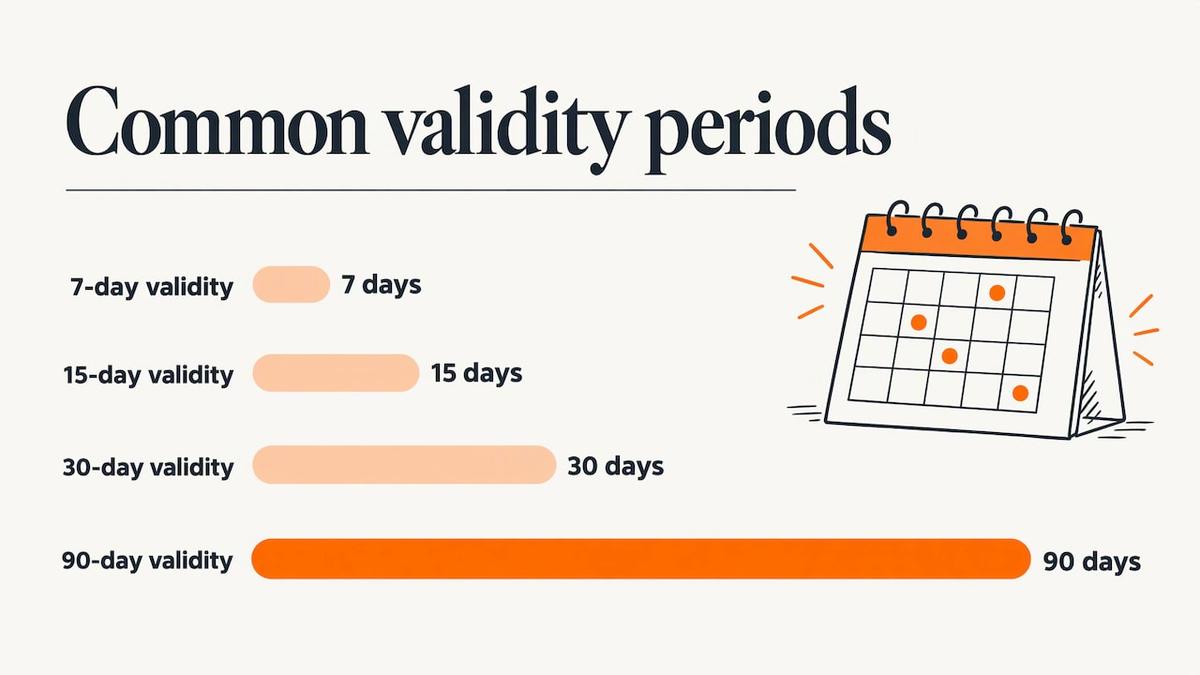
There is no universal expiration period. Travel plans commonly run 7, 15, 30 or 90 days, and the allowance comes in fixed sizes, such as 1 GB, 3 GB or 10 GB. Two limits apply at once:
| Plan | Ends when |
|---|---|
| 5 GB for 30 days | You use 5 GB, or day 30 passes |
| 1 GB for 7 days | You use 1 GB, or day 7 passes |
| 20 GB for 30 days | You use 20 GB, or day 30 passes |
The same logic applies to any limit-based product, including documents: something can be valid on paper and still be unusable because a second condition fails. It is the reason a plan can end either when its allowance is used or when its time limit expires, and why you should read both numbers before you pay.
For a deeper look at how validity windows from 7 to 365 days compare, see our guide to eSIM validity windows.
Worked example: a 10-day trip
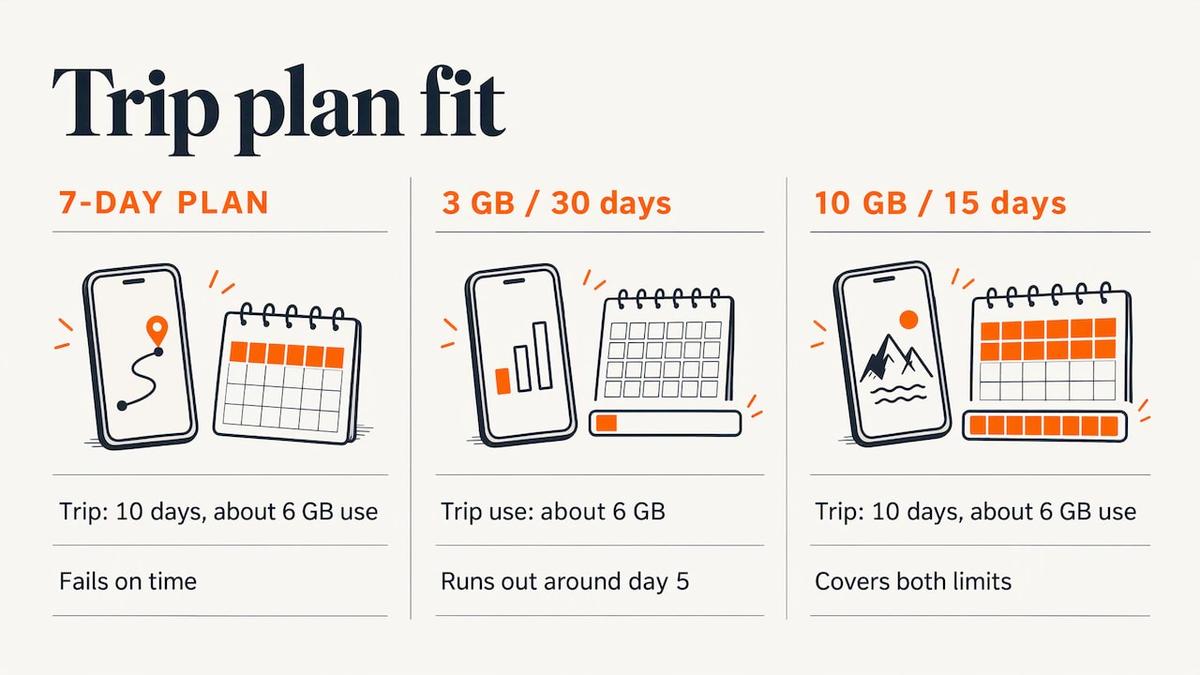
Say you fly to Lisbon for 10 days and work from cafés and the hotel. You use roughly 600 MB a day on maps, messaging, email and a few video calls, about 6 GB over the trip. A 7-day plan fails on time. A 30-day, 3 GB plan fails on data around day 5. A 15-day, 10 GB plan covers both limits with room to spare. Pick the days to cover the trip plus a buffer, and the data to cover your heaviest realistic day multiplied by the trip length.
Heavy video or tethering a laptop burns data faster than most people expect. If you work from your laptop on a hotspot, size up. Our note on data throttling explains how speed caps can make a plan feel finished before the allowance is gone.
When does the validity clock start?
This is where travelers get caught. A plan’s validity can begin at purchase, at installation, at first connection to a supported network, or when you first use data. Many travel eSIMs start counting only on the first network connection at the destination, but you should confirm the start rule on the plan page before you buy, because it differs from plan to plan.
There is also a separate window for the QR code itself. A QR code is the square image you scan to install the eSIM profile. If a code goes unscanned for too long, it may stop installing, and rescanning won’t revive it. In practice that means:
- Install the eSIM while you have Wi-Fi, ideally a day or two before departure.
- Keep the profile switched off or unused for mobile data until you land, if the plan starts counting on first connection.
- Don’t buy months ahead of a trip “just in case” and expect the code to wait indefinitely.
Our guide on when to activate an eSIM walks through the timing for different trip types, and how QR code activation works covers the install step itself.
Does turning the eSIM off pause the plan?
Usually not. Switching the eSIM line off in your phone settings generally doesn’t delete it, but the plan may keep moving toward its end date while the profile is disabled. Toggling data roaming off stops you from using data, not the calendar from advancing. If you want to save data, turn off background app refresh or use Wi-Fi, and don’t count on a pause.
The exception is a plan that hasn’t started yet. If it begins counting on first connection, an installed but unused profile has not begun its window.
What happens when the plan expires or runs out?
When a plan ends, mobile data stops. If the plan included calls or SMS, those stop too. Unused data is usually forfeited, and the profile may remain on the phone labeled “No Service” or “Inactive”. The expired profile does not damage your phone. You can reconnect with a top-up, a renewal or a fresh plan.
You can leave the old profile there or delete it from your settings once you no longer need it. If you travel to the same region often, it’s worth reading about a reusable eSIM and what that means for the next trip.
Did my plan expire early? A quick check
Most of the time, an eSIM that looks expired is a settings problem rather than a finished plan. Work through this order:
- Data roaming. Travel eSIMs generally need data roaming switched on for the eSIM line.
- Mobile data line. Confirm the eSIM, not your home SIM, is selected for mobile data.
- Line is on. Make sure the eSIM line itself is enabled in cellular settings.
- Restart. Toggle airplane mode or restart the phone to force a fresh network search.
- Allowance and days. Compare what you’ve used and how many days have passed against the plan’s two limits.
If the plan page shows time and data left but you still have no signal, contact support. We offer 24/7 customer support through human and AI channels, so you can get an answer at the airport at 2 a.m.
Avoiding a gap on long trips
On trips of a few weeks or more, the risk isn’t forgetting a date. It’s running out when you’re mid-flight, mid-train or mid-meeting, without Wi-Fi to buy the next plan. The fix is simple:
- Set a calendar reminder three to four days before the plan’s last day.
- Buy and install the next plan before the current one ends. Installing a second eSIM profile doesn’t remove the first, and most modern phones can store several.
- Switch the mobile data line to the new profile when the old one is finished.
Our guide to extending eSIM validity lists the three expiry clocks to check before you buy again.
How to choose a plan that won’t expire on you
The cleanest way to avoid losing data is to buy the right size. Use these criteria:
- Trip length plus a buffer. Add a day or two for delays and early arrival.
- Realistic daily data. Maps and messaging are light. Video calls, streaming and tethering are heavy.
- Coverage that matches your route. A single-country plan is cheapest for one stop. A regional or global plan saves you from buying three plans on a multi-country trip.
- Start rule. Know whether the countdown begins at install or at first connection.
Because our plans are prepaid with no contract or registration, an expired plan costs you nothing further. You only pay when you choose to buy again.
Perspective
Most eSIM frustration comes from one misunderstanding: people think of an eSIM like a monthly phone plan, when a travel eSIM is closer to a prepaid ticket. It has a size and a date, and you choose both.
We built Lumo around that idea. Plans are one-off purchases with flexible durations and data limits, no contract and no registration, so you buy exactly the trip you are taking. Guest checkout and QR code delivery mean you can be set up in about 45 seconds on average, and you can install ahead of time on Wi-Fi.
Our advice to frequent travelers and digital nomads is to think in two numbers, days and gigabytes, and to size the plan to your heaviest week rather than your lightest. With coverage across 160+ countries and regional and global options, one purchase can follow you through a multi-stop trip instead of forcing a new plan at every border.
Theo Wheeler
Pick the plan that fits your trip
Prices on our site start low and scale with data and days. Starting prices are $1 for United Kingdom and Europe, $2 for Asia and the United States, $7 for Global and $8 for Africa and the Caribbean, all one-off. Choose the data and the days on the plan page, scan the QR code and you’re connected. To compare networks in each country first, open our coverage map.
FAQ
Do eSIMs expire if I never use them?
The eSIM chip in your phone does not expire. An unused plan or activation code can, though, because codes and plans have their own time limits. Install and activate close to your trip, and you avoid the problem.
Can I top up or renew an eSIM before it expires?
Yes, and on long trips it is the safest approach. Buy the next plan before the current one ends, install it, and switch your mobile data line over when the first plan finishes. That way there is no gap in service.
What happens to unused data when my eSIM expires?
It is usually lost. The plan ends at its date or at zero data, whichever comes first, and leftover gigabytes don’t carry over. The profile stays on your phone as inactive until you add a new plan or delete it.
Does turning off my eSIM stop the countdown?
Generally not. Disabling the line doesn’t delete the profile, but the plan can keep running toward its end date. Only a plan that hasn’t yet started counting is unaffected.
Sources
Recommended
Related Topics
Stay Connected Anywhere
Prepaid eSIM data plans for 180+ countries and territories. No physical SIM required.