Reusable eSIM: What It Means and How to Reuse One

There is no special product called a “reusable eSIM.” The phrase covers three real things. The eSIM chip in your phone is reusable by design, because it holds many profiles over its life. A single eSIM profile can be moved to a new phone only when your carrier supports the transfer. And a travel plan is usually bought per trip, so the easy way to reuse your setup is to keep the habit and buy a fresh prepaid plan each time. Below is how each case works, what to check first, and where it goes wrong.
If your next trip needs data, a Lumo eSIM plan for your destination installs from a QR code, with no contract and no registration.
TL;DR
- Your phone’s eSIM hardware is reusable: you can add, switch and delete profiles as often as you like. How many profiles it holds depends on the model.
- A profile moves to a new phone only if the carrier or provider allows it. On iPhone, eSIM Quick Transfer and Apple’s setup flow do this for supporting carriers, and Android 12 or later has a similar transfer.
- For travel, the simplest routine is a new prepaid plan per trip, installed in minutes and removed afterward.
- Check three things before you rely on an eSIM: your phone is eSIM-compatible, it is unlocked, and data roaming is set correctly for the line you use.
Table of Contents
- What “reusable eSIM” actually means
- Moving an eSIM to a new phone
- Converting a physical SIM to an eSIM
- How many eSIMs can one phone reuse over time?
- Check these three things before you rely on any eSIM
- Should data roaming be on or off with a travel eSIM?
- A repeatable routine for frequent travelers
- Switching providers without losing your number
- What we think about reusable eSIMs
- Pick the plan for your next trip
- FAQ
- Sources
What “reusable eSIM” actually means
A physical SIM is a card. You pull it out of one phone and push it into another, and the number goes with it. An eSIM is a chip soldered inside the phone, and the “SIM” is a downloadable profile, a small file that tells the network who you are and what plan you have. People searching for a reusable eSIM usually mean one of three things:
- Reuse the eSIM hardware. Can the same chip take a new plan next month? Yes. Profiles can be added and deleted, so the chip serves many plans over the phone’s life.
- Reuse one profile on another device. Can the plan on your old phone go to your new phone? Sometimes. This depends on the carrier’s rules, not only on your phone.
- Reuse a travel plan for another trip. Can the plan you used in Lisbon work in Tokyo? That depends on the plan’s coverage, its validity window and its data allowance. Travel plans are sold prepaid for a set number of days or gigabytes, and a new destination usually means choosing a plan that covers it.
The third case is where most travelers land. The practical answer: keep your home line as it is, and add a new prepaid data plan for each trip. That costs very little. Lumo’s Europe plans start at $1 and its Asia plans at $2, as one-off payments.
Moving an eSIM to a new phone
A new phone is the moment most people ask about reuse. The route differs by platform, and in both cases the carrier has the final say.
iPhone to iPhone
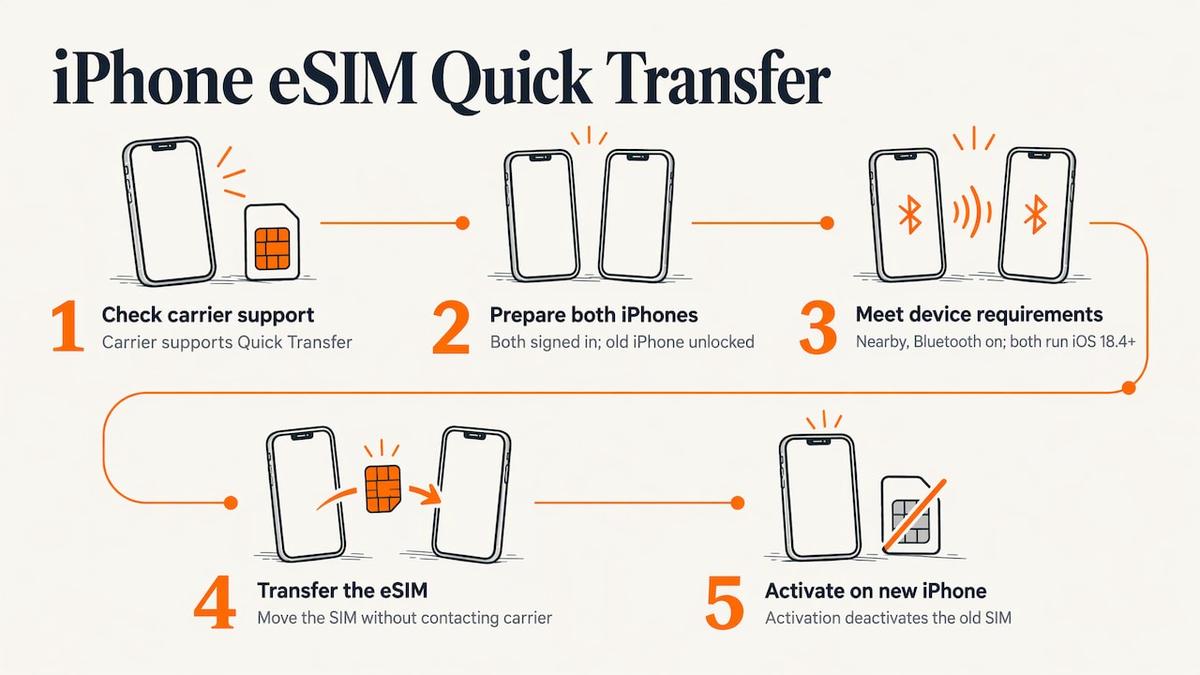
Apple describes two paths. If your carrier supports eSIM Quick Transfer, you can move the SIM from your previous iPhone to the new one without contacting the carrier. According to Apple’s eSIM setup guide, this requires that you are signed in to both devices with your Apple Account, the old iPhone is unlocked, both phones are nearby with Bluetooth on, and both run iOS 18.4 or later. When the plan activates on the new iPhone, it deactivates the SIM on the old one.
That last point matters. A transferred eSIM is moved, not copied. You do not end up with the same line live on two phones.
Android to Android
Google’s help page says you can transfer a physical SIM or eSIM to an eSIM in a new phone during setup or later from Settings. For automatic transfer, both devices need Android 12 or later, the current Google Play Services and a screen lock. Depending on your carrier, it may happen automatically during onboarding. If the phone does not detect the transfer, you contact the carrier to activate the eSIM, and your existing device keeps working if the transfer fails.
Where it goes wrong
- The carrier does not support transfer. Then you need a new QR code or activation from that carrier, which is the usual route for a prepaid travel profile.
- You wiped the old phone first. Deleting an eSIM profile can remove your ability to reinstall it. Move the line before you reset or trade in the old phone.
- The phones are on different OS versions. Quick Transfer needs the minimum versions above on both ends.
We cover the full routine in our guide to transferring an eSIM to a new phone, and the clean-up before a trade-in in erasing an eSIM before you sell your iPhone.
Converting a physical SIM to an eSIM
Many readers are really asking this: can I turn my current SIM card into an eSIM and stop carrying plastic? On a supported iPhone, Apple says you can convert a physical SIM to an eSIM through Settings if your carrier supports it. The steps in short:
- Open Settings, then Cellular.
- Tap Set Up Cellular or Add eSIM and choose your physical SIM’s number if the option appears.
- Follow the prompts and wait for the carrier to activate it.
Once it activates, the physical card stops working. If you live or work abroad long term and need to sort out phone service in a new country, this walkthrough on setting up phone service abroad covers the wider picture beyond the SIM itself.
The benefit for frequent travelers is real. With your home number on an eSIM, the physical tray is free for a second line, and you can hold a travel data profile alongside your home number without swapping anything. Our guide to iPhone eSIM settings, default line and data shows how to set which line handles calls, messages and data.
How many eSIMs can one phone reuse over time?
There are two limits, and people mix them up. One is how many profiles the phone can store. The other is how many can be active at once. Many recent iPhones can store several profiles but run only a couple at the same time, and the exact numbers depend on the model. Our breakdown of eSIM storage and active limits by iPhone model lists them.
For a frequent traveler, this means you can keep a few old profiles stored, switch them on when you return to a region, and delete the ones you no longer need. If you collect profiles across many trips, managing multiple eSIM profiles is worth a read: labeling each line clearly is the single habit that prevents the wrong plan from burning data.
| What you want to reuse | Works? | What decides it |
|---|---|---|
| The eSIM chip in your phone | Yes | Number of profiles the model can store |
| A line on a new phone | Sometimes | Carrier support for transfer, OS version, both devices signed in |
| A prepaid travel plan on the next trip | Depends on the plan | Coverage area, validity days, data allowance |
| A prepaid plan on two phones at once | No | A transferred eSIM deactivates the old one |
Check these three things before you rely on any eSIM
1. Is your phone eSIM-compatible?
Apple lists an iPhone XS, XS Max, XR or later for eSIM setup. Android support depends on the maker and model, so check your phone’s spec sheet or settings for an “Add eSIM” option. Some regional variants differ, which is why we keep a guide on eSIM compatibility for global travelers.
2. Is your phone unlocked?
This is the most common reason a travel eSIM will not install or connect. The FCC notes that in the US, a phone locked to one provider may not work on another network, and unlocking rules and requirements vary by provider and plan. If you bought your phone on a payment plan, ask your carrier whether it is unlocked before you travel, and do it days ahead, not at the airport. Our guide on whether a locked phone can use an eSIM explains what to look for in Settings.
3. Is the network compatible?
A phone supports certain bands. A plan that works on one operator may not give the same speed everywhere. Our explainer on mobile network compatibility for travelers walks through it, and the coverage page shows networks by country.
Should data roaming be on or off with a travel eSIM?
It depends on which line you are talking about. Apple’s guidance for travel eSIMs is that you can use the travel eSIM by itself or as a secondary line next to your home line. If you keep both on, the travel eSIM carries data, but you might still incur roaming fees from your home eSIM.
The working rule for travelers:
- On the travel eSIM line: turn Data Roaming on. A prepaid travel plan reaches local networks through roaming agreements, so it needs this switched on to connect abroad.
- On your home line: turn Data Roaming off, and set Cellular Data to the travel line, so your home carrier is not billed for data abroad.
- When you get home: make sure your primary line is on, and turn off any travel eSIM lines you no longer use, as Apple’s page advises.
Calls and texts on your home number can still arrive over Wi-Fi calling or in the usual way, depending on your carrier. Check your home plan’s international terms before the trip.
A repeatable routine for frequent travelers
If you travel often, the cleanest setup is one you can run the same way every time. Here is the one we would use.
- Keep your home number on its own line. Do not delete it or alter it between trips.
- Pick the plan by destination, days and data. Country plans suit a single stop, regional plans suit a route, and a global plan suits several regions. Lumo’s Global plans start at $7, the United States plans at $2 and the United Kingdom plans at $1, each as a one-off payment.
- Install before you fly, on Wi-Fi. Scan the QR code. Activation on Lumo takes an average of 45 seconds, and you need no registration, because guest checkout is available.
- Label the line. Name it for the trip, such as “Japan Mar” or “Europe summer,” so you never confuse it with your home line.
- Switch on at arrival. Turn the travel line on, set it for data, enable Data Roaming for that line only.
- Remove it when the plan ends. Delete finished profiles to keep the list short and avoid confusion.
This routine is why the question of reusing a single profile matters less than it first seems. What you reuse is the process, and it takes a few minutes per trip.
Switching providers without losing your number
Travelers sometimes confuse eSIM reuse with number portability. Your number belongs to your home carrier, and a prepaid travel data eSIM is a separate line for data. That is why you can run a travel plan without touching your number at all. If you do want to move your actual number between carriers, we explain the process in switching eSIM providers without losing your number.
What we think about reusable eSIMs
Most people who search for a reusable eSIM want the same thing: one setup they do not have to think about every time they cross a border. We believe that is the right goal, and the eSIM already delivers it. The chip stays in your phone, your home number stays on your home line, and a new prepaid plan slots in beside it.
That is how we built Lumo. A plan is a one-off purchase, with no contract and no registration, delivered as a QR code that sets up in about 45 seconds on average. You choose a country, a region or a global plan, with coverage across more than 160 countries, and you are connected on 4G or 5G.
For frequent travelers, digital nomads and business travelers, this beats carrying cards or paying roaming charges. Each trip is a clean start: right plan, right length, right data, and a line you delete when you are done. If anything goes wrong, our support is available 24/7.
Theo Wheeler
Pick the plan for your next trip
If you are heading to Europe, a regional plan covers a multi-country route without changing profiles at each border. For one country, a country plan keeps things simple. Browse every destination on the Lumo destinations page, or go straight to North America plans if your trip stays on this side of the Atlantic. Plans work on smartphones, tablets and laptops, so a single purchase can suit the device you actually work from.
FAQ
Can I use the same eSIM on two phones?
No. A transferred eSIM is moved, not duplicated. On iPhone, activating the plan on the new device deactivates the SIM on the old one. If you need data on two devices, buy a plan for each, or use a hotspot from the phone that holds the plan.
Can I reuse an eSIM profile after deleting it?
Not reliably. Deleting a profile usually removes it from the phone, and whether it can be reinstalled depends on the issuer. Treat deletion as final, and move or finish with the line before you delete it. If you are unsure, keep the profile stored but switched off until the trip is over.
Is there a physical eSIM?
The eSIM is a chip built into the phone, so there is nothing to insert. Some carriers sell a card that carries the activation details, but the profile still installs onto the phone’s built-in chip. If you want to replace a physical SIM, your carrier may let you convert it to an eSIM in Settings on a supported iPhone.
Should I turn off data roaming on my eSIM?
Turn it on for the travel eSIM line, since that is how it reaches local networks, and turn it off for your home line. Then set Cellular Data to the travel line. This stops your home carrier from billing data abroad.
Do I need an unlocked phone for a travel eSIM?
Yes. In the US, a phone locked to one provider may not work on another network, and unlocking requirements vary by provider and plan. Confirm your phone is unlocked before you leave, and set the eSIM up on Wi-Fi.
Sources
- Set up eSIM on iPhone, Apple Support
- Use eSIM while traveling internationally with your iPhone, Apple Support
- Set up cellular service on iPhone, Apple Support
- Transfer a SIM to a new phone, Pixel Phone Help
- Cell Phone Unlocking, FCC
Recommended
Related Topics
Stay Connected Anywhere
Prepaid eSIM data plans for 180+ countries and territories. No physical SIM required.