Lost Phone Abroad With an eSIM: What to Do, Step by Step
If your phone disappears abroad, do four things in this order: lock or erase it remotely from another device, call your home carrier to suspend service, secure your key accounts, then get a new phone online with a fresh eSIM. The eSIM on the missing phone is not the problem to solve first. Your accounts and your line are. Connectivity on the replacement is the easy part: a prepaid plan from Lumo is bought as a guest, with no registration, and arrives as a QR code you scan on the new device.
This guide covers the full sequence, what each step takes, where it goes wrong, and how to prepare so the next loss costs you minutes instead of days.
TL;DR
- Use another device to mark the phone as lost (Apple Find My or Google Find Hub), and erase it only if you believe it is gone for good.
- Call your home carrier right away to suspend the line, and give them your IMEI if they ask.
- Change your Google and Apple passwords and sign the lost phone out before thieves can use text-message codes.
- Get online on a replacement phone or borrowed device, then install a new prepaid eSIM by QR code. Lumo plans start from $1 for Europe and the UK.
- Before your next trip, turn on Find My or Find Hub and save your IMEI and backup codes somewhere other than the phone.
Table of Contents
- The first 15 minutes: lock the phone from another device
- Call your home carrier to suspend the line
- Secure the accounts that text you codes
- Get online on a replacement phone
- Getting your home number back
- What to do before the next trip
- Our perspective
- Get back online fast
- FAQ
- Sources
The first 15 minutes: lock the phone from another device
Start with the device, not the plan. Whoever holds your phone can reach your email, wallet and messages, so make it useless first.
iPhone or iPad. Apple says you can find a lost iPhone or iPad with the Find My app or at icloud.com/find, and that if you cannot locate it right away you should mark it as lost. That locks it with a passcode and suspends Apple Pay. T-Mobile describes the same steps: Mark as Lost locks the device, disables Apple Pay and sends a confirmation email to the primary email on the Apple ID.
Android. Google lets you find, secure or erase a lost phone through Find Hub, including “Mark as lost” and erase, as long as the listed requirements are met. Those include power, a signed-in Google Account and a connection to mobile data or Wi-Fi. Google’s Remote Lock only works if it was switched on, and the phone must be online, though if it is offline it locks once it reconnects.
Where this goes wrong
- Find My was never on. Apple states that if Find My was not turned on before the loss, the device will not appear in Find My and cannot be marked as lost or remotely erased. You then lean harder on the carrier and password steps below.
- The phone is off or offline. The lock command waits. That is another reason to move quickly on the account steps rather than waiting for the phone to reappear.
- You need a second device. If everything you own was in the lost phone, borrow a hotel computer, a travel companion’s phone or a business center terminal. Do not type your Apple or Google password on a shared machine without signing out afterward.
- Phishing texts. Apple advises never sharing passcodes, passwords or verification codes with anyone who contacts you. Someone texting “we found your phone, click here” is a common ploy.
Lock versus erase
Marking as lost is reversible. Erasing is the last resort. When you erase through Find Devices on iCloud.com, Apple sends a confirmation email to your Apple Account address, and Activation Lock stays on, so you need your Apple Account and password to reactivate the device. If you think it was stolen and you cannot locate it, erasing the data right away protects your information. If you simply left it in a taxi and might get it back, lock first and decide later.
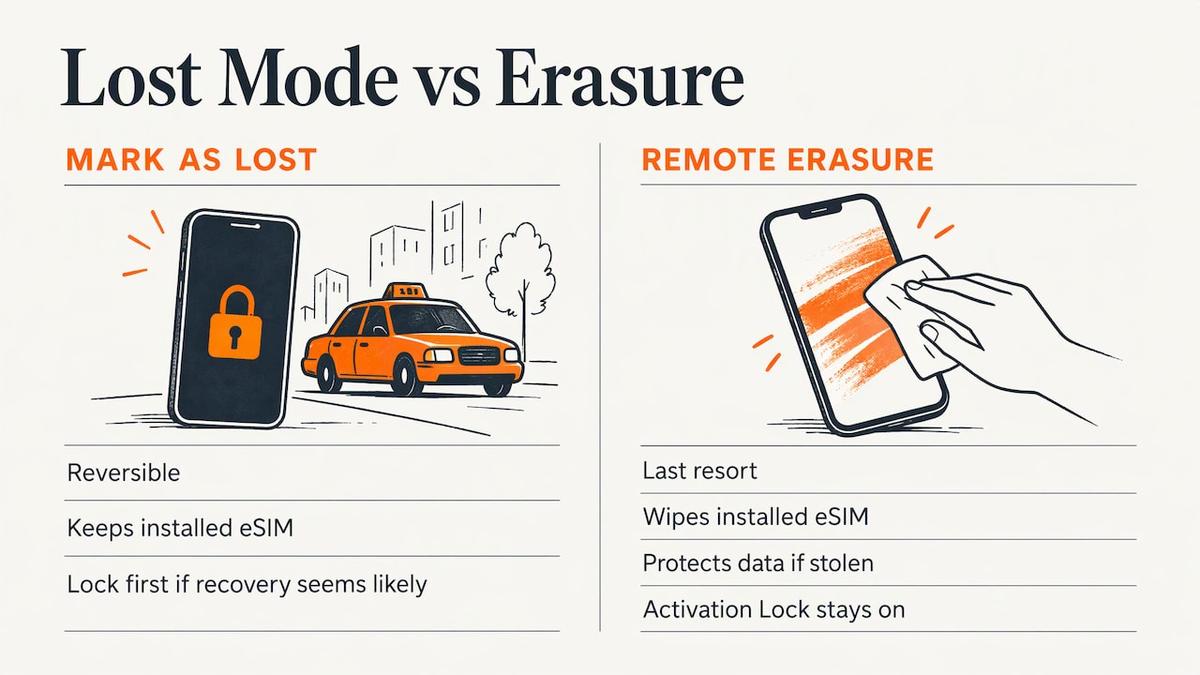
One practical consequence for eSIM users: an eSIM profile lives in the phone itself, so wiping the phone wipes the installed profile with it. Plan on installing a new one rather than recovering the old.
Call your home carrier to suspend the line
The second call matters as much as the lock. If your phone is lost or stolen abroad, the carrier is the party that can stop it from being used. A US police department advises that you contact your carrier, report the loss and provide your IMEI, and that the carrier can disable the phone and keep it from working with another SIM card.
Speed matters financially too. A UK consumer body notes that if you do not tell your provider straight away, you might have to pay for unauthorized calls. That is a UK source, but the same logic applies to any postpaid line.
What to say and what to have ready
AT&T, for example, tells customers who confirm a phone is lost or stolen abroad to call 314.925.6925 (+1 314 925 6925) so service can be suspended until a replacement arrives. Other carriers have their own international numbers, usually printed on your account page or in the carrier app. Save that number before you travel.
Have these ready when you call:
- Your account holder name and account PIN or passcode.
- The phone number on the lost device.
- The IMEI, if you saved it (it is on the original box and in your Apple or Google account device list).
- A callback or email contact that is not the lost phone.
Ask the carrier to suspend, not cancel, the line. A suspended line can be restored on a replacement device. AT&T notes that a disabled device still has data access on Wi-Fi, and that after suspension the only numbers it can call are emergency services and customer care.
Do not confront the thief
AT&T’s guidance is to try locating the phone with GPS or an app, but not to confront whoever has it. If Find My shows the phone moving, report the location to local police rather than chasing it. In most countries you will also want a police report for travel insurance or a claim, so file one at the nearest station and keep the reference number.
Secure the accounts that text you codes
A stolen phone with a working SIM or eSIM receives your SMS codes. That is why the account step comes before you shop for a replacement.
- Google. Google advises that if your phone was lost or stolen you should sign out of it and change your Google Account password. You can prove it is you with another signed-in phone, a second phone number on your 2-step verification, a backup code, a security key or a passkey.
- Apple. Change your Apple Account password from another device. Activation Lock means the thief cannot easily reuse the phone, but your iCloud data is a separate matter.
- Banking and payment apps. Log in from another device and revoke the lost phone as a trusted device, or call the bank’s international number. Freeze cards if the phone held any wallet cards.
- Messaging apps. Re-registering WhatsApp or Signal on a new SIM usually moves the account, but you need to receive the verification code, which brings you back to having a working line.
Plan for the delay
Google warns that without another second step, or if you forgot the password, account recovery can take 3 to 5 business days while it confirms it is really you. If you are on a two-week trip, that is a big share of it. People who carry a physical backup, such as printed backup codes or a hardware security key for authentication kept apart from the phone, skip that wait because the key does not live on the device that was lost.
Get online on a replacement phone
Now you need data: to reach the bank, your airline, your hotel and family. AT&T’s suggestion is to use a backup phone on Wi-Fi, or to buy a temporary replacement abroad, such as an inexpensive phone and prepaid SIM, after suspending service on the lost device.
If your replacement or spare phone supports eSIM, a prepaid travel eSIM is the quickest way to get connected, because there is nothing to find in a shop and no SIM tray to open. Lumo sells prepaid eSIM data plans with no contracts or registration, and guest checkout. The QR code is delivered right after purchase, and our average setup time is 45 seconds.
How it works on a replacement phone
- Check the phone is unlocked. A phone locked to a carrier may refuse a foreign eSIM. Our guide on whether a locked phone can use an eSIM explains what to check.
- Get on Wi-Fi. Hotel Wi-Fi, an airport network or a café is enough to buy the plan and download the profile. If there is none, read how to activate an eSIM without Wi-Fi.
- Choose the destination plan. Pick the country or region you are in, or a global plan if you are moving on.
- Scan the QR code and follow the install steps in our step-by-step eSIM setup guide.
- Turn on the new line for data. Keep the new eSIM as your data line; that is what matters while your home number is suspended.
- If the install stalls, the eSIM activation fixes for iPhone cover the common causes.
A small point on timing: some travelers worry about when a plan starts counting. Our note on when to activate an eSIM covers that, which is useful if you buy before you reach a replacement phone.
Which plan to buy
Plan choice depends on where you are and how long you need a stopgap. Lumo’s published starting prices are one-off, not subscriptions:
| Where you are | Lumo plan | Starting price |
|---|---|---|
| Europe | Europe eSIM plans | from $1 |
| United Kingdom | United Kingdom eSIM plans | from $1 |
| Asia | Asia eSIM plans | from $2 |
| Africa | Africa eSIM plans | from $8 |
| Caribbean | Caribbean eSIM plans | from $8 |
| Several regions | Global eSIM plans | from $7 |
Prices are as published on our site and vary by data amount and days, so check the plan page for the current figure. If you are replacing a phone in one city for a short stay, a single-country or regional plan is usually the sensible choice. If your itinerary crosses regions, a global plan avoids buying twice.
Getting your home number back
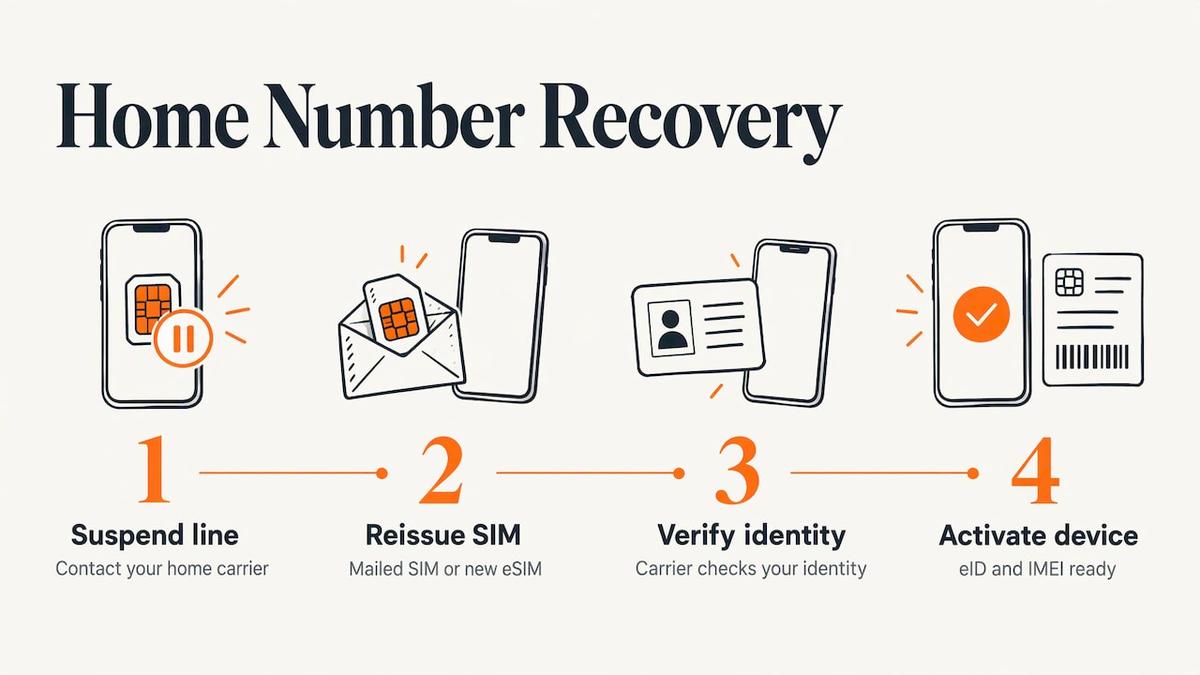
Your travel eSIM gives you data, not your home number. To restore the number, work with your home carrier. With the line suspended, ask how they reissue it: a replacement physical SIM mailed to an address, or a new eSIM profile. Practices differ by carrier. Sunrise, a Swiss operator, says that after a loss you should block the SIM and eSIM profiles in your account and request a new eSIM profile by mail. It adds that if you cannot log in because the two-factor SMS went to the stolen phone, you can contact the carrier or visit a shop, and for reactivating on a new phone you should have the new device’s eID and IMEI ready, which you can retrieve by dialing *#06#.
US carriers have their own flows, but the pattern is similar: identity check, then a new profile tied to the replacement device’s identifiers. Note the IMEI of your new phone as soon as you have it by dialing *#06#.
There is a gap trap here. Some carriers send the verification PIN for an eSIM change to your current line. If that line is on the stolen phone, you are stuck. That is why a data-only travel eSIM, plus email and an authenticator that survive the loss, is worth setting up. Our piece on keeping your home number and avoiding a service gap goes deeper on that approach.
What to do before the next trip
Most of the pain in the steps above comes from things you could not do after the loss. Spend ten minutes before you fly.
- Turn on Find My or Find Hub. Apple is clear that a device without Find My enabled cannot be marked as lost or erased remotely. On Android, remember Google’s conditions: signed in, powered and online, plus Remote Lock enabled.
- Save your IMEI in a note on another device or in email.
- Write down your carrier’s international number and keep it outside the phone.
- Set up a second verification step that does not depend on the phone: backup codes, a security key or a passkey. Our overview of eSIM security practices is a good companion.
- Keep an unlocked spare if you travel for work, so a replacement is one QR scan away.
- Know your plan. If you installed a Lumo eSIM before departing, keep the order confirmation email in your cloud mail, not only on the phone.
The broader case for travel eSIMs is in why use an eSIM when traveling.
Our perspective
Losing a phone abroad feels like losing everything at once: maps, tickets, bank, family. The remedy is a sequence, and the part travelers underestimate is how quickly a clean sequence gets them moving again.
The lock and the carrier call protect you. After those, the thing you need most is data on any phone you can get your hands on, without a store visit, a contract or an account to create first. That is what we designed Lumo around: guest checkout, no registration, a QR code, and plans in 160+ countries.
Our advice to every traveler is to treat connectivity as separate from identity. Keep your home line for your number and use a prepaid eSIM for data. When the phone goes missing, the data layer is the one thing you can rebuild in minutes.
Theo Wheeler
Get back online fast
If you are standing in a foreign city with a new or borrowed phone, pick your destination on Lumo and buy a plan as a guest. You get the QR code immediately, with 24/7 support from our team if the install does not go as expected. For a trip that spans several regions, the global plans start from $7.
FAQ
What happens to my eSIM if my phone is lost?
The eSIM profile sits on the lost phone, so whoever holds it could try to use it until the line is suspended. Call your carrier right away so it can disable the line, and lock the phone remotely. A remote erase removes the profile with the rest of your data, so you install a new one on your replacement.
Can I recover my eSIM on a new phone?
Generally you receive a new profile rather than moving the old one. For your home number, your carrier reissues it after an identity check, often asking for the new phone’s IMEI. For travel data, you buy a new prepaid plan and scan its QR code on the replacement.
Should I erase my phone remotely or just lock it?
Lock it first if there is a chance of getting it back. Erase it if you believe it was stolen and cannot be located. Apple’s Activation Lock stays on after an erase, so you need your Apple Account and password to reactivate it.
How can I get internet if my only phone was stolen?
Use Wi-Fi at your hotel or an airport, borrow a device, or buy a low-cost replacement phone. If it supports eSIM and is unlocked, you can buy a prepaid plan online and install it by QR code over that Wi-Fi.
Do I need to call the police?
File a local police report if the phone was stolen. Carriers and insurers commonly ask for it, and keeping the reference number makes later claims easier. Do not try to retrieve the phone yourself.
Sources
- What to do if your cell phone is stolen abroad | AT&T
- Smartphone Safety: Prevention and Recovery Tips | Montgomery County Police Department
- What to do if your mobile phone is lost or stolen | Citizens Advice
- How to find your lost iPhone or iPad | Apple Support
- Erase a device in Find Devices on iCloud.com | Apple Support
- Find, secure, or erase a lost Android device | Android Help
- Remote Lock | Google
- Lost or stolen device help | T-Mobile Support
- Lost your phone while traveling abroad? | Asurion
- Fix common issues with 2-Step Verification | Google Account Help
- Set up and use the eSIM | Sunrise Support
Recommended
- How to switch mobile networks abroad: a step-by-step guide
- eSIM for Expats: Keep Your Home Number and Avoid a Service Gap
- How to Set Up eSIM for Travel: Step-by-Step Success Guide
Related Topics
Stay Connected Anywhere
Prepaid eSIM data plans for 180+ countries and territories. No physical SIM required.