eSIM for Kids Travel: A Parent’s Setup Guide

Yes, you can put a travel eSIM on your child’s phone or tablet, and for most families it is the cleanest way to keep kids connected abroad. The device has to be eSIM-compatible and unlocked, and you should set it up at home on Wi-Fi before you leave. Then you take care of the part no SIM can handle for you: what the phone shares about your child once it is online.
This guide walks through the whole process in order: checking the device, deciding who needs their own data, installing the plan, locking down privacy settings, and preparing for an emergency in a country where 911 does not work.
TL;DR
- A child’s device needs to be unlocked and eSIM-capable. Apple lists eSIM support on iPhone XS (2018) and later models, and many current Android phones and tablets have it too.
- An eSIM works as a second line: your child keeps the home number for iMessage and FaceTime while the travel plan supplies local data.
- Not every child needs a plan. A hybrid setup, with adults carrying data and younger kids on Wi-Fi or a hotspot, can cost less.
- Audit location, microphone and camera permissions before departure. The FTC says that is where the real child-safety risk sits, whatever SIM you use.
- Save the local emergency number for your destination and enroll the trip in STEP before you fly.
Table of Contents
- Why an eSIM suits kids’ devices
- Step 1: Check that your child’s device works
- Step 2: Decide who actually needs their own plan
- Step 3: Buy and install the plan at home
- Step 4: Keep the home number working
- Step 5: Lock down privacy before you leave
- Step 6: Prepare for an emergency abroad
- Our perspective: connect the child, not just the phone
- Where to get a plan for your child’s device
- Common mistakes to avoid
- FAQ
- Sources
Why an eSIM suits kids’ devices
Traditional travel SIMs mean tiny plastic cards, a pin to open the tray, and a decent chance a card ends up in a car seat or a carry-on pocket. An eSIM removes all of that. Apple notes that an eSIM can’t be removed if the iPhone is lost or stolen, which is a real plus when the phone belongs to a ten-year-old who sets things down everywhere.
The other advantage is money. Without an international plan, many U.S. carrier plans may give you no data at all abroad, and the plans that do work often charge steeply for it. A prepaid eSIM uses local networks directly, so you pay a fixed price for a set amount of data. For a deeper look at the numbers, see our comparison of roaming fees versus eSIM.
Step 1: Check that your child’s device works
Three things must be true before you buy anything.
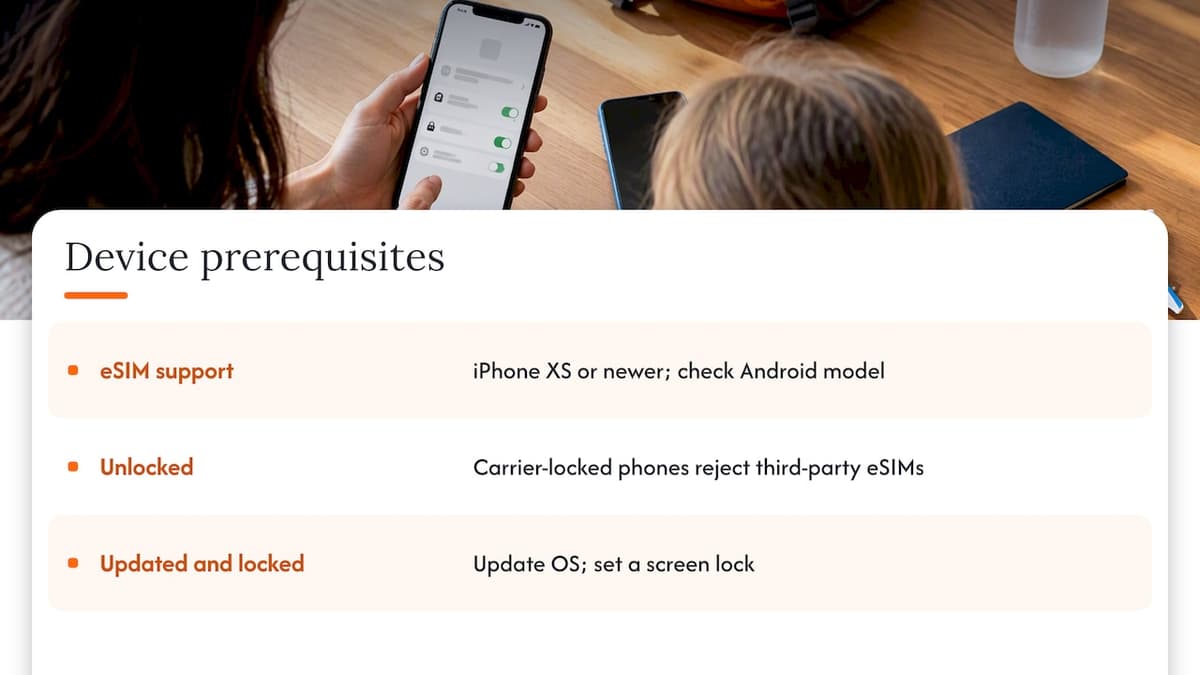
The device supports eSIM. On iPhone, that means XS or newer. On Android, check the settings menu for a SIM manager or look up the exact model with its maker. Many tablets and some kids’ phones are eSIM-capable; many hand-me-down phones are not.
The device is unlocked. This is the step parents miss most often. A phone bought through a carrier can be locked to that carrier, and a locked phone will reject a third-party eSIM. The FCC explains that unlocking policies vary by carrier, and prepaid phones may need to meet usage or time requirements first. Consumer Reports offers a walkthrough for unlocking from the major carriers. Ask for the unlock weeks before the trip, not the night before.
The phone is updated and has a screen lock. Update the operating system at home. A passcode matters more on a child’s device than you might think, because the eSIM profile and the phone’s contents travel together.
If the device is locked and the carrier won’t release it in time, the realistic fallback is Wi-Fi only for that child, or sharing data from a parent’s phone.
Step 2: Decide who actually needs their own plan
Paying for a data plan on every device is not always the smartest approach. Think about how each child will use their phone on the trip.
| Situation | Suggested setup |
|---|---|
| Child under about 8, always with an adult | No plan. Use hotel and café Wi-Fi, or a parent’s hotspot. |
| Child 9 to 12, may walk to the pool or a shop alone | Own eSIM with a small data allowance, mainly for calls, messages and maps. |
| Teen traveling with friends or on a school trip | Own eSIM with a larger allowance, plus clear rules on streaming and hotspot use. |
| Tablet used for movies on a long flight | Download shows at home on Wi-Fi. A plan is rarely needed. |
A hybrid approach, where adults get their own eSIMs and younger children rely on Wi-Fi or a hotspot, is a common suggestion among family-travel guides, and it works well when kids are seldom out of sight. When a child can wander off on their own, a working data line is a safety tool, not a luxury.
The cost of a plan depends on the destination and how much data you pick. Our regional plans start at $1 for Europe, $2 for Asia, $1 for the United Kingdom, and $7 for global coverage, all one-off payments with no contract. Check the page for the exact amount of data and days at each price.
Step 3: Buy and install the plan at home
Installing on home Wi-Fi, with the child’s device in your hands, is far less stressful than doing it at an airport gate.
- Pick the destination or region. If you are visiting several countries, a regional plan is simpler than buying one per country.
- Choose the data and days. Count only the days the child will need data, not the whole trip.
- Check out. With us there is no account to create and no registration; guest checkout is enough, and the QR code arrives right after purchase.
- Scan the QR code on the child’s device. Go to the cellular or SIM settings and add the eSIM. Apple’s page on setting up an eSIM on iPhone covers the exact taps. Our average setup takes around 45 seconds.
- Label the line. Name it something obvious, like “Travel”, so a nine-year-old doesn’t turn off the wrong one.
- Keep the travel line off until you land. Install now, switch on at arrival, so the data allowance doesn’t start counting before the trip. Follow the activation instructions on your plan for the timing, since some plans begin when first connected to a network.
One practical tip: the QR code is shown on your own screen, and you can’t scan a screen with the same phone that displays it. Keep it open on your phone or laptop while you scan from the child’s device, or print it. Our travel data management guide goes through the install flow and data tracking in more detail.
Step 4: Keep the home number working
A child’s phone with a travel eSIM has two lines: the primary one from your family’s carrier and the new data line. Apple explains that Dual SIM lets you keep two active numbers on one device, and that a travel eSIM can serve as the data plan while the home line stays available for calls and texts.
That has a few consequences for kids:
- Set the travel eSIM as the data line and turn off data roaming on the home line. Otherwise the phone may use the carrier’s roaming data, which is the exact charge you are trying to avoid. The FCC’s international roaming guide is a useful checklist for this.
- iMessage and FaceTime keep working over the travel data, so a child can still message you on the family thread.
- Regular calls and texts on the home number may be billed at roaming rates, or may not work at all. Tell your child to use messaging apps and Wi-Fi calling rather than standard calls.
For more on avoiding surprise bills, our 7-step roaming charges checklist is worth a read before you go.
Step 5: Lock down privacy before you leave
The SIM is the easy part. A phone with data is a phone that can share your child’s location, photos and habits, and abroad you have less ability to fix a problem quickly.
The FTC’s guidance on kids and cell phones points parents toward a pre-handover audit. Before the trip:
- Review app permissions. Look at location and microphone access in particular, and remove anything an app doesn’t need to work. Many apps request more than they use.
- Turn off location tagging in the camera app. Otherwise photos shared with friends or posted online can carry the place they were taken.
- Know the children’s privacy rules. Under COPPA, apps and sites aimed at children under 13 must give parents notice and get verifiable consent before collecting personal information, which includes precise location. Check what each app on the device is asking for, and don’t just tap through.
- Decide on location sharing as a family. If you want to see where your child is, choose how, and tell them. Some families prefer a dedicated device over leaving always-on location in several apps; one example of that approach is a one-time-purchase GPS tracker for families that doesn’t need a monthly plan or a phone, and it can reduce the data collection happening on the phone itself.
- Be careful on public Wi-Fi. Using a data eSIM instead of airport or café networks is itself a privacy gain. Our notes on eSIM security best practices cover the basics.
Sit down with your child and go through the settings together. It takes ten minutes and teaches more than any lecture about screen safety.
Step 6: Prepare for an emergency abroad
Connectivity matters most when something goes wrong, and kids in a foreign country need a plan that doesn’t depend on a parent being within shouting distance.
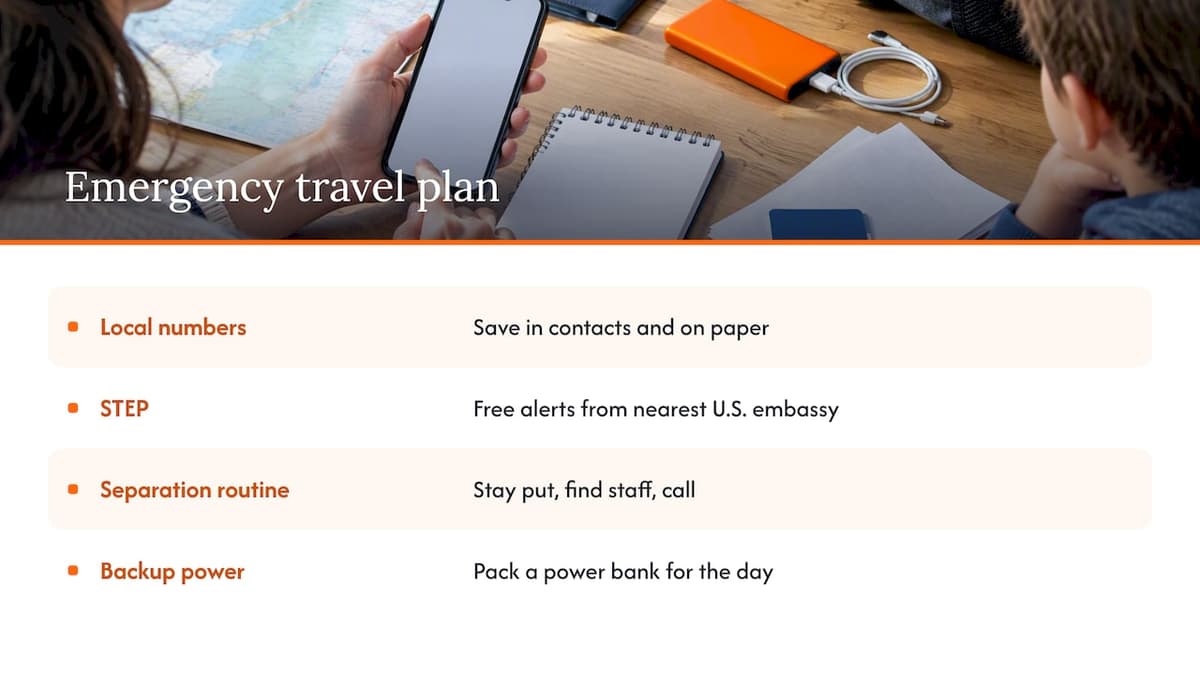
Write down local emergency numbers. They often differ from 911, and the State Department advises travelers to look them up for their destination. Save them in the child’s contacts under a clear name, and write them on paper in their bag too, in case the phone dies.
Enroll in STEP. The State Department’s Smart Traveler Enrollment Program is free and sends alerts from the nearest U.S. embassy or consulate. If a U.S. citizen has an emergency abroad, the department can be reached at +1 202-501-4444, per its guidance on communicating abroad.
Teach a simple routine. Your child should know their own number, yours, the hotel’s name and address, and what to do if you get separated: stay put, find a uniformed official or a shop employee, and call. Practice it once at home.
Add a backup. Make sure the phone’s battery will last the day. A small power bank in the child’s bag is worth more than extra gigabytes.
If your itinerary includes a long trip with younger children, a broader checklist for travel readiness, including local emergency numbers and reliable mobile access, can help you cover the non-tech basics too.
Our perspective: connect the child, not just the phone
We build eSIM plans for travelers, and the most common mistake we see with families isn’t picking the wrong plan. It is treating the eSIM as the finish line. Buying data takes a minute. What keeps a child safe and a trip calm is everything around it: an unlocked device, a tested install, sensible permissions, and a child who knows what to do when the screen shows no signal.
Our advice is to match connectivity to independence. Kids who stay beside you need less than you think. Kids who roam a resort, ride a train with cousins or join a school group need a reliable line, and they need it working the moment they land. That is why we favor instant QR delivery with no sign-up: you can do it from the couch a week before, test it, and have the plan ready to switch on.
Start small. A modest plan that covers messages, maps and the occasional video call will do for most kids, and you can top up if the trip demands it. And remember that data is only useful when the phone is within reach, so build the habit of charging overnight and carrying a power bank.
— Theo Wheeler
Where to get a plan for your child’s device
Our prepaid eSIM plans cover 160+ countries, run on 4G and 5G networks, and work on smartphones, tablets and laptops that support eSIM. There are no contracts, and support is available 24/7 if the install doesn’t go as planned.
Pick the page that matches your trip:
- Europe eSIM plans, from $1 one-off
- United States eSIM plans, from $2 one-off, for visiting family from abroad
- Caribbean eSIM plans, from $8 one-off
- Global eSIM plans, from $7 one-off, for multi-region trips
Not sure which fits? Browse our eSIM travel tips and guides, or see our guide to affordable travel data plans.
Common mistakes to avoid
Waiting until the airport. Unlock requests can take days, and installs are easier on home Wi-Fi.
Buying too much data. Kids mostly use messaging, maps and the odd video. If they need more, you can add a plan later. Our tips for saving data abroad help set sensible limits, such as turning off background app refresh and auto-playing video.
Leaving roaming on. Switch off data roaming on the home line, or the phone may quietly bill you at carrier rates.
Skipping the test. Before you leave, confirm the eSIM shows as installed, the home line still receives iMessage, and the child knows how to switch lines.
Ignoring permissions. A phone with a new data plan can start sharing location in ways you didn’t intend. Do the audit.
FAQ
Can I get an eSIM for my son’s phone?
Yes, if the phone supports eSIM and is unlocked. Apple lists support on iPhone XS and later, and many recent Android devices have it as well. Buy a plan online, scan the QR code on his phone, and keep the home line active for iMessage and FaceTime.
Do kids need their own eSIM on a family trip?
Not always. Young children who stay with an adult can use Wi-Fi or a parent’s hotspot. Give a child their own plan when they will be out of your sight, such as with friends, on a school trip or exploring a resort, so they can reach you and local emergency services.
Is an eSIM safer than a physical SIM for a child’s phone?
In one respect, yes: Apple says an eSIM can’t be removed if an iPhone is lost or stolen. But the SIM doesn’t control what apps share. The FTC advises parents to review location, microphone and camera permissions on any child’s phone, whatever SIM it uses.
What if my child’s phone is locked to our carrier?
A locked phone won’t accept a third-party travel eSIM. Contact your carrier well before departure and ask for an unlock, since policies and eligibility vary, especially for prepaid devices. If it can’t be unlocked in time, plan on Wi-Fi or a parent’s hotspot.
How do I buy an eSIM when traveling?
It is better to buy before you go. Choose your destination, pick the data and days, check out, and scan the QR code on the device while you have Wi-Fi. If you are already abroad, you can still do it on hotel Wi-Fi.
Sources
- Use eSIM while traveling internationally with your iPhone, Apple Support
- Using Dual SIM with an eSIM, Apple Support
- Set up eSIM on iPhone, Apple Support
- Cell Phone Unlocking, FCC
- International Roaming: Mobile Phone Use Abroad, FCC
- Kids and Cell Phones, FTC Consumer Advice
- Communicating While Abroad, U.S. Department of State
- Smart Traveler Enrollment Program, U.S. Department of State
- How to Unlock Your Phone From Any Major Carrier, Consumer Reports
Recommended
Related Topics
Stay Connected Anywhere
Prepaid eSIM data plans for 180+ countries and territories. No physical SIM required.