Dual SIM Travel: Keep Your U.S. Number and Skip Roaming

Dual SIM travel means your phone holds two lines at once: your regular U.S. number stays on one, and a local or regional data plan runs on the other. You keep your number for calls, texts and bank codes, and you pay local data prices instead of carrier roaming rates. The easiest second line is a prepaid travel eSIM, a digital SIM you install by scanning a QR code before you fly. Lumo sells exactly that, in 160+ countries, with no contract and no registration.
This guide covers what your phone needs, how to set it up on iPhone and Android, which settings prevent surprise charges, and what to test before you leave.
TL;DR
- Most recent iPhones and Android phones can run two lines at once: your home line plus a travel eSIM. Both can handle calls and texts, but only one line uses cellular data at a time.
- Set the travel eSIM as your data line, turn data roaming off on your home line, and turn off automatic data switching.
- Using a second carrier’s line requires an unlocked phone, so check your unlock status weeks before you travel.
- Install the eSIM before departure, then test calls, texts and a web page with Wi-Fi off.
- Lumo travel eSIMs start at $1 for Europe and the United Kingdom and $2 for Asia and the United States, one-off, with QR code activation.
Table of Contents
- What dual SIM actually means on a trip
- Does your phone support it?
- Setting up dual SIM for a trip, step by step
- Calls, texts and codes on your U.S. number
- Common mistakes with dual SIM abroad
- Is dual SIM better than swapping a physical SIM?
- Our perspective
- Pick your travel line
- Pre-trip checklist
- FAQ
- Sources
What dual SIM actually means on a trip
A dual SIM phone can keep two cellular plans active together. The second plan can be a physical SIM or an eSIM, which is a SIM built into the phone that you load by scanning a code instead of inserting a card. Google’s guide to dual SIM phones explains the travel use: keep your main SIM and add a local plan in the second slot to avoid costly roaming charges.
The typical travel split looks like this:
| Job | Which line | Why |
|---|---|---|
| Mobile data (maps, rideshare, messaging apps, email) | Travel eSIM | Local or regional data pricing |
| Calls and texts to your U.S. number | Home line | Your number stays reachable |
| Bank and app verification codes | Home line | Codes go to the number on file |
| Hotspot for a laptop | Travel eSIM | Uses the data plan you bought |
Apple describes this arrangement directly: its support page recommends using one number for your home line and another for your travel line when you travel internationally. Both numbers can make and receive voice and FaceTime calls and send and receive iMessage, SMS and MMS. The catch is data: the iPhone uses only one cellular data network at a time.
That last point matters. Dual SIM is not a way to combine two data allowances or speeds. Your phone picks one line for data, so you choose which one, and you want it to be the travel line.
Does your phone support it?
Check three things before you buy anything.
1. Dual SIM and eSIM support
On Google Pixel, Pixel 3a and later phones can use one physical SIM plus one eSIM, and Pixel 7 and later can run two eSIM profiles at once if the carrier allows it. Apple’s support page covers current iPhones with eSIM. Samsung Galaxy and other Android makers publish their own lists, so look up your exact model. If you want a closer look at the technical side, our guide to dual standby eSIM explains how two lines stay on at once.
2. Carrier unlock
A travel eSIM comes from a different provider than your home carrier. Apple’s page says that to use two carriers, your carrier must unlock your iPhone, or both plans must come from the same carrier. If your phone is still locked, a travel eSIM will not install on it.
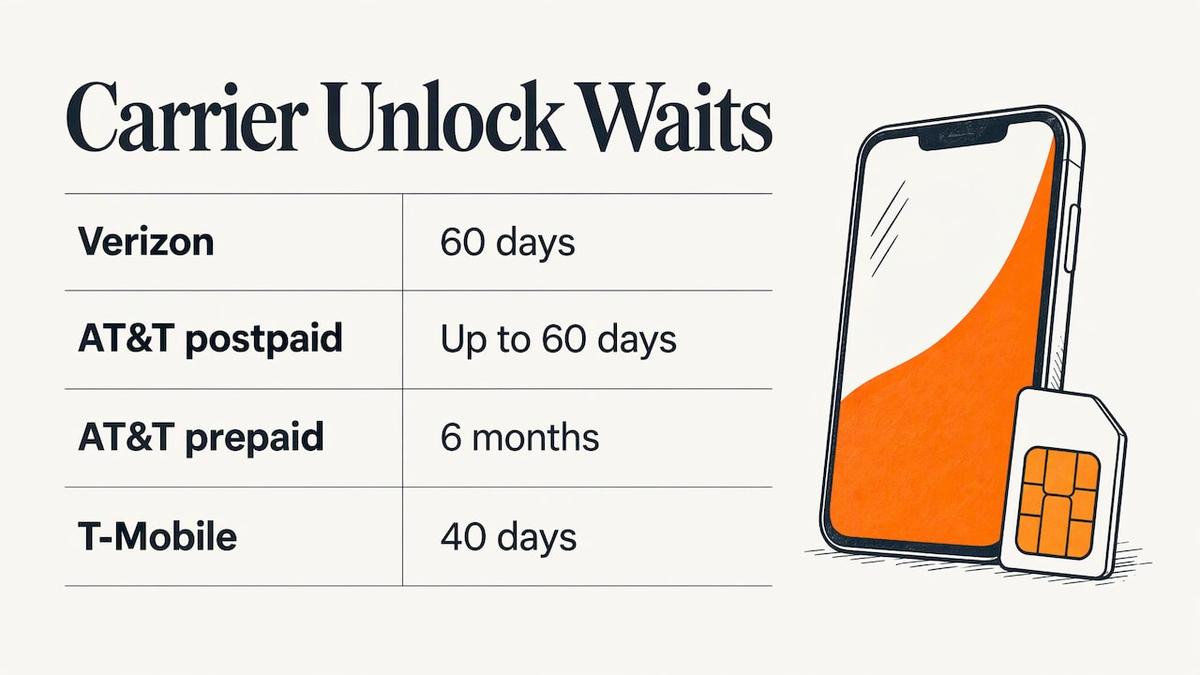
U.S. carriers set their own waiting periods. One unlock guide lists Verizon at 60 days, AT&T at up to 60 days for postpaid and 6 months for prepaid, and T-Mobile at 40 days. Policies change, so confirm with your carrier, and do it early: if you are still paying off the phone or just bought it, the wait may be longer than your trip is away. Our article on whether a locked phone can use an eSIM walks through the situation step by step.
3. Network and band compatibility
Unlocked does not guarantee every feature on every network, because supported bands vary. Some carriers allow 5G on both lines, others limit it to the primary line. Read our explainer on mobile network compatibility for travelers if you carry an older or imported phone.
Setting up dual SIM for a trip, step by step
Do this at home, on Wi-Fi, a few days before you leave. Installation needs an internet connection, and you do not want to be hunting for Wi-Fi in an arrivals hall.
Step 1: Pick a plan by destination and data
Match the plan to where you are going and how long you will stay. A single-country plan suits a week in one place. A regional plan suits a multi-country loop, and a global plan suits trips that span continents. Lumo plans are prepaid and one-off, so there is no contract to cancel afterward:
- Europe eSIM plans: from $1
- United Kingdom eSIM plans: from $1
- Asia eSIM plans: from $2
- United States eSIM plans: from $2, useful for visitors and for Americans heading to a different state or coast with a second line
- Global eSIM plans: from $7
- Africa and Caribbean plans: from $8
The reason to buy a regional or global plan rather than juggling several is simple. One SIM or eSIM generally works in just one country, so a trip that crosses borders can mean swapping SIMs at each stop. A regional plan covers the whole route with one install. Lumo’s coverage page lists the networks by country.
Step 2: Buy and install the eSIM
Checkout at Lumo works as a guest, with no account or registration needed. You receive a QR code, and the average setup takes about 45 seconds. Scan it from another screen or follow the install link on the phone itself. On iPhone, go to Settings, then Cellular (or Mobile Service), then Add eSIM. On Android, the path is usually Settings, Network and internet, SIMs, then Add eSIM, though wording differs by maker. Our Android travel eSIM checklist covers the preflight details.
Apple notes that with iOS 26 and later, downloading a travel eSIM can start a customized travel eSIM setup flow, which walks you through the choices below.
Step 3: Label your lines
Name them something obvious such as “Home” and “Travel.” When you are tired after a flight, a clear label keeps you from changing the wrong line’s settings.
Step 4: Make the travel line your data line
On iPhone, open Settings, then Cellular, then Cellular Data, and select the travel eSIM. On Pixel, Google’s page walks through choosing which SIM handles mobile data in the SIM settings. Our guides to Dual SIM data settings on iPhone, Galaxy and Pixel and iPhone eSIM settings show each screen.
Step 5: Lock down the home line
This is the step that prevents the surprise bill:
- Turn Data Roaming off on the home line.
- Turn Allow Cellular Data Switching (iPhone) or the equivalent automatic data switching option (Android) off, so the phone cannot quietly fall back to your home line for data when the local signal gets patchy.
- Turn Data Roaming on for the travel eSIM only if its install instructions say to. Many travel eSIMs need it on because they connect through partner networks.
The full list of what to flip is in our roaming settings with eSIM guide. Keep the home line itself switched on if you want to stay reachable. Do not use airplane mode as your roaming fix, because it also cuts the travel line you are paying for.
Step 6: Test before you board
A short, reversible test beats a surprise at the gate:
- Place and receive a call on your home number.
- Send and receive a text.
- Switch Wi-Fi off and load a web page on the travel line. Many eSIMs only connect to a local network once you land, so if yours activates on arrival, repeat this test after landing.
- Do not make your bank login the first time you test verification codes.
Calls, texts and codes on your U.S. number
This is the part most people worry about, and it needs care. With the home line on and data roaming off, your number can still receive calls and texts, but what that costs depends on your carrier and plan. A Points Guy report on avoiding daily roaming charges says AT&T and Verizon spokespeople stated that receiving calls and texts is free regardless of location, but answering a call or text could trigger the $10-per-day international pass. The reporter’s workaround was to let calls go unanswered and call back over FaceTime or WhatsApp on the travel eSIM’s data. That report dates from 2022, so check your own carrier’s current international terms before you leave.
A practical routine:
- Leave the home line on so verification codes and iMessage reach you.
- Make calls through apps such as WhatsApp or FaceTime on the travel data line rather than from the home line.
- Turn on Wi-Fi Calling before you leave if your carrier supports it, so calls and texts can route over Wi-Fi.
- Ask your carrier about your plan’s international rules if you plan to use the home line for voice abroad.
If you work on the road, the same thinking applies to your laptop. When your phone supplies data and you sync email across devices, mail, calendar and contacts stay current on a hotspot connection without touching the home line.
One more point for travelers who rely on banking apps: keep the home number registered with your bank and key accounts. Switching your accounts to a foreign number just for a trip creates more recovery problems than it solves.
Common mistakes with dual SIM abroad
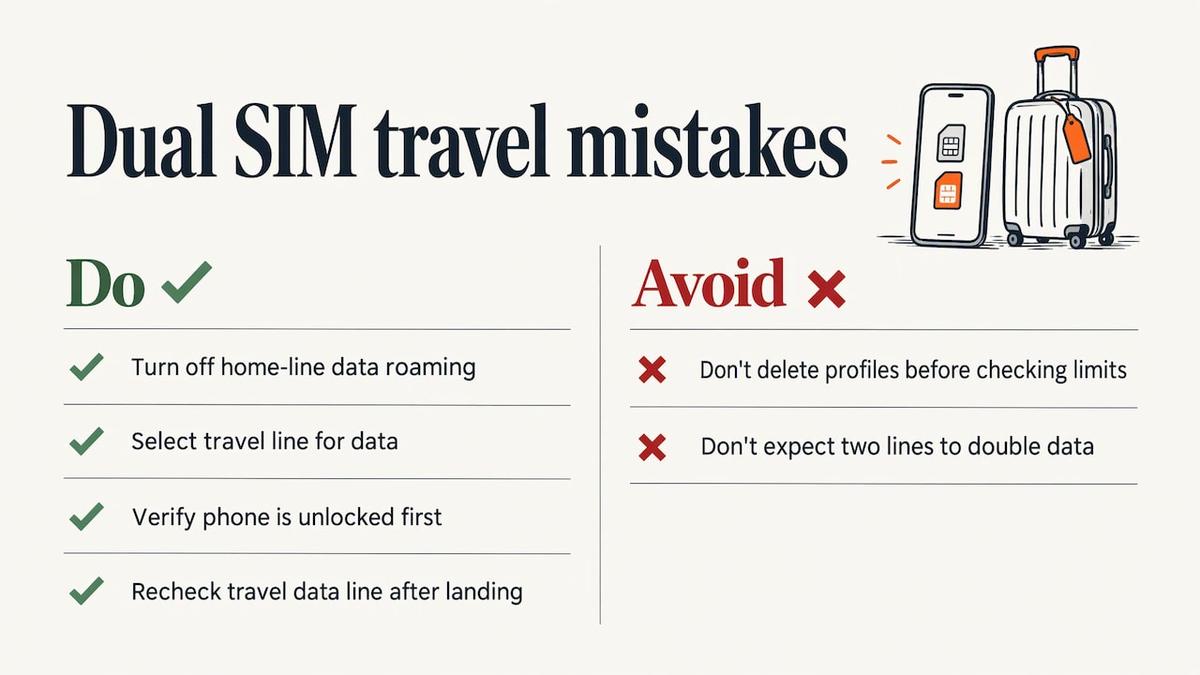
Leaving data roaming on for the home line. This is the most common source of a big bill. Turn it off before departure.
Forgetting to select the travel line for data. The phone may default to the home line after a restart or update. Recheck after landing.
Buying the eSIM before checking the unlock. A locked phone cannot install a second carrier’s eSIM. Verify first.
Installing on arrival. Airport Wi-Fi is often slow or crowded. Install at home, then activate at your destination if the plan requires it.
Deleting an eSIM to make room. Storage for eSIM profiles, the number of active lines and the usable network combinations are separate limits. Do not delete a profile you may need until you understand which limit you hit.
Expecting double the data. Two lines do not add up. The phone uses one data connection at a time.
Is dual SIM better than swapping a physical SIM?
For most trips, yes, for one reason: with a physical swap, your home SIM sits in your bag and you lose your number for calls and codes. A second slot or eSIM lets both lines coexist. An eSIM also removes the tiny-card problem: no tray tool, no lost SIM, no kiosk queue. You buy and install it from your couch.
If your phone has only one physical SIM slot and no eSIM, you are limited to swapping. Any recent iPhone or flagship Android phone is likely to have eSIM, but verify your model.
Our perspective
We built Lumo for people who live on their phones while moving: frequent flyers, remote workers, business travelers. The pattern we hear is always the same wish: keep my number, stop thinking about roaming.
Dual SIM delivers that wish, and an eSIM is the cleanest way to use it. You buy online as a guest, scan a QR code, and the average setup takes about 45 seconds. There is no registration, no contract and no card to carry.
Our advice is to treat the two lines as two jobs. Your home line is your identity: calls, texts, codes. Your Lumo line is your connectivity: maps, messaging, hotspot. Choose a plan for where you are going, install it before you fly, and spend your attention on the trip.
Support is available around the clock, from people and from AI, so if an install does not go through on the first try, you are not stuck on your own at an arrival gate.
Theo Wheeler
Pick your travel line
If your phone is unlocked and supports eSIM, the next step is choosing the plan. Lumo offers prepaid eSIM plans for smartphones, tablets and laptops across 160+ countries, with regional and global options and flexible durations and data limits. Browse all destinations, or go straight to Europe, Asia or Global plans. For a step-by-step walkthrough of the whole routine, see our dual SIM travel setup guide. If you carry more than one device, our piece on managing dual SIM to maximize connectivity and cut costs helps you plan.
Pre-trip checklist
- Confirm your phone supports dual SIM with eSIM.
- Confirm it is carrier-unlocked.
- Buy a plan that covers every country on your route.
- Install the eSIM at home on Wi-Fi and label both lines.
- Set the travel eSIM for cellular data.
- Turn data roaming off on the home line and automatic data switching off.
- Test calls, texts and a web page with Wi-Fi off.
- Check your home carrier’s international terms for voice and text.
- Save your carrier’s support details somewhere other than your phone.
For border-crossing specifics, eSIM across borders: 4 checks before you fly covers what to verify when a trip spans several countries.
FAQ
Can I use dual SIM with two different carriers abroad?
Yes, if your phone is unlocked. Apple says both plans must come from the same carrier or your carrier must unlock the iPhone. Only one number can use cellular data at a time, so choose the travel line for data.
Will I still get calls and texts on my U.S. number?
In most cases the home line stays reachable while it is switched on, even with data roaming off. Carrier rules differ, and answering calls on the home line abroad can trigger a daily international fee on some plans. Check your carrier’s terms and use app calling over the travel eSIM where you can.
Can I use the same SIM card in different countries?
A single SIM or eSIM generally works in one country only. For multi-country trips, a regional or global eSIM plan covers your whole route with one install.
Do I need to buy the eSIM before I leave?
It is the better choice. Installation requires an internet connection, and doing it at home on Wi-Fi avoids slow airport networks. With Lumo, you buy as a guest and receive a QR code right away.
Does dual SIM give me two data connections at once?
No. Even if both lines show signal, the iPhone uses one cellular data network at a time. Pick the travel line for data and keep the home line for calls, texts and codes.
Sources
- Using Dual SIM with an eSIM, Apple Support
- Discover the Benefits of Dual SIM Phones, Google Store
- How to use dual SIMs on your Google Pixel phone, Google Pixel Help
- How to avoid daily roaming charges, The Points Guy
- U.S. carrier unlock requirements, Unloky
- One SIM, one country: subscription eSIM news, PCWorld
- Syncing email across devices
Recommended
- Dual SIM Travel Setup: Keep Your Number, Skip Roaming Bills
- Keep Your Number Abroad in 15 Minutes for Travelers
- Trips Under a Few Weeks: eSIM vs Local SIM for U.S. Travelers
- How to Avoid Roaming Fees and Stay Connected Abroad
Related Topics
Stay Connected Anywhere
Prepaid eSIM data plans for 180+ countries and territories. No physical SIM required.