Day Pass vs eSIM: Which Is Better for Travel Data?

For most trips longer than a couple of days, a prepaid travel eSIM costs less than a carrier day pass, because you pay one fixed price instead of a fee for every day your phone touches data. A day pass wins on simplicity for one-night trips, when you want your normal number to ring, or when your phone is locked to your carrier. Below you’ll find how each works, what a real trip costs, and how to decide in about a minute.
TL;DR
- A day pass bills a flat fee on each day you use your phone abroad. A travel eSIM is a prepaid data plan you buy once for a set number of days and gigabytes.
- Day passes add up fast. At $12 a day, a 10-day trip is $120 per line before you add anything else. Lumo plans are one-off purchases, with Europe and the United Kingdom starting from $1.
- Keep the day pass for very short trips or if you need calls and texts on your US number. Choose an eSIM for anything longer, for groups, and for tablets and laptops.
- An eSIM needs a carrier-unlocked phone that supports eSIM. Check this before you fly.
Table of Contents
- What a day pass and a travel eSIM actually are
- How the costs compare
- What each option includes
- Check your phone before you choose an eSIM
- Keeping your US number while using an eSIM
- Avoiding surprise charges either way
- When a day pass makes sense, and when an eSIM fits better
- A quick way to decide
- Our perspective
- Get your plan before you fly
- FAQ
- Sources
What a day pass and a travel eSIM actually are
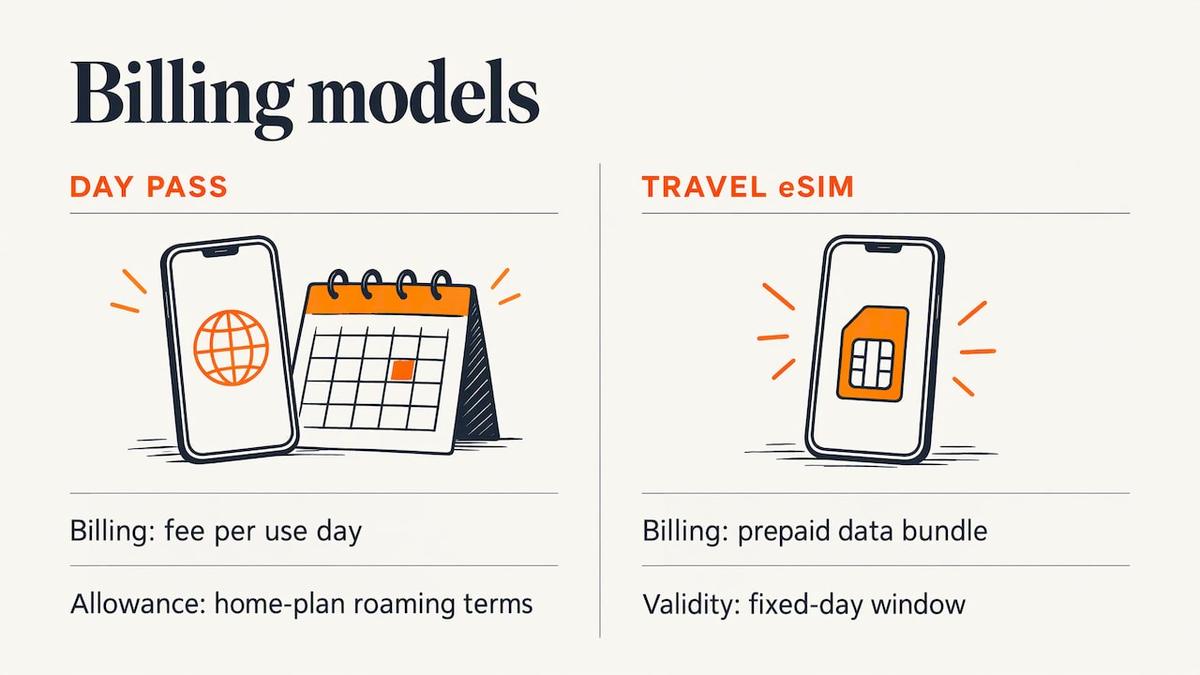
A carrier day pass is an add-on from your US mobile provider. You keep your own SIM and number. When your phone uses data, calls or texts abroad, the carrier charges a daily fee and lets you use your home plan’s allowances under its roaming terms. The FCC notes that for most US customers, domestic plans do not cover usage abroad, and higher rates may apply to voice, voicemail, texts and data when roaming (FCC guide to international roaming). A day pass is the carrier’s way of capping that exposure.
A travel eSIM is a digital SIM you download to your phone. It carries a prepaid data plan, usually from a local or regional network, with a fixed number of days and a fixed amount of data. There is no physical card and no contract. Your home SIM stays in the phone, so your US number can remain reachable for texts such as bank verification codes while the eSIM handles data.
The key difference is the billing logic. A day pass charges for days of use. An eSIM charges for a bundle of data over a validity window. That is why the two compare differently on a weekend away and on a three-week trip.
How the costs compare
Carrier prices change, so confirm them on your provider’s site before you fly. As one reference point, one published guide lists Verizon’s TravelPass at $12 a day per line in most countries, with 5GB of high-speed data per 24-hour session. We’ll use $12 a day in the examples below as a round, realistic figure for the major US carriers’ day passes.
| Trip length | Day pass at $12/day (one line) | Day pass for two travelers | Travel eSIM |
|---|---|---|---|
| 2 days | $24 | $48 | One small plan, often a few dollars |
| 5 days | $60 | $120 | One mid-size plan |
| 10 days | $120 | $240 | One plan per traveler, sized to your data |
| 21 days | $252 | $504 | One plan per traveler, with a longer validity |
Some carriers cap the number of daily charges in a billing cycle, and the cap and your billing-cycle dates can change the total. If your trip crosses two cycles, ask your carrier how that is billed.
On the eSIM side, our own published prices start low because many destinations are cheap to serve. Europe eSIM plans start from $1, the United Kingdom from $1, Asia from $2, the United States from $2, Global plans from $7, and Africa and the Caribbean from $8, all one-off payments with no contract. The exact price depends on the number of days and the amount of data you pick, so choose the size on the plan page.
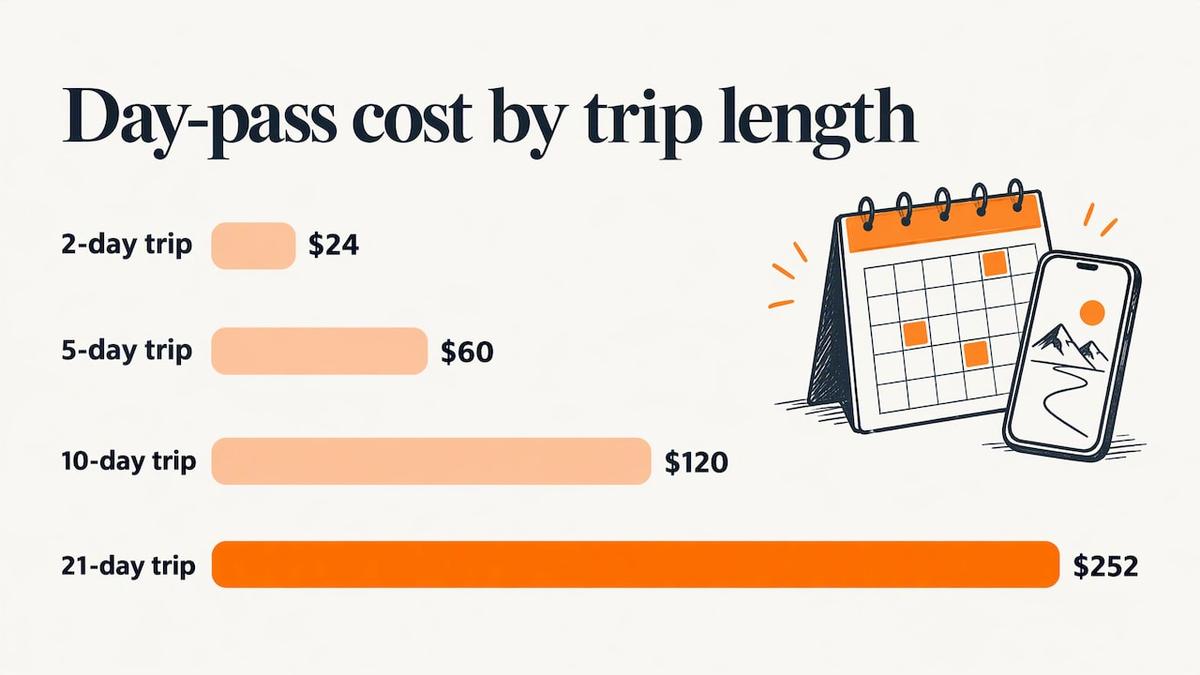
The pattern is clear. A day pass price scales with the number of days. An eSIM price scales with how much data you need. For most travelers, data needs grow more slowly than days do, because hotel, cafe and airport Wi-Fi absorb part of the load.
What each option includes
| Feature | Carrier day pass | Travel eSIM (Lumo) |
|---|---|---|
| How you pay | Daily fee on days you use the phone | One-off prepaid purchase |
| Contract or registration | Needs an eligible account with your carrier | No contract, no registration required, guest checkout |
| Your US number | Stays active for calls and texts | Stays on your home SIM if you keep it active |
| Data | Allowance set by your carrier and plan | Data amount you choose, 4G/5G where available |
| Devices | The phone on your account | Smartphones, tablets and laptops that support eSIM |
| Setup | Usually turned on automatically | QR code install, average 45 seconds by our own measure |
| Coverage | The carrier’s roaming partners | Premium carrier networks in 160+ destinations |
The row that surprises people is devices. A day pass follows the phone on your account. If you also carry an eSIM-capable tablet or laptop, a travel eSIM can put those online too, with its own plan and its own data.
Another point is calls. A day pass keeps your number fully functional, which matters if you expect inbound calls. An eSIM is a data plan, so calls and texts in a trip typically run over apps such as WhatsApp, FaceTime or other internet calling. Most travelers already do this.
Check your phone before you choose an eSIM
The day pass needs nothing from your phone. The eSIM does, and this is the step people skip.
- eSIM support. Apple says an eSIM works on iPhone XS, XS Max, XR or later, and you need a Wi-Fi connection or hotspot to activate it (Apple’s guide to eSIM while traveling).
- Carrier unlock. Per the same Apple guide, the phone must be carrier-unlocked. On an iPhone, go to Settings > General > About and look at Carrier Lock. It should read “No SIM restrictions.”
- Payment status. If you are still paying off the phone, your carrier may keep it locked. Ask the carrier about its unlock rules before you buy a plan.
If you are shopping for a handset with travel in mind, a carrier-unlocked iPhone 14 removes the lock question entirely, because an unlocked phone accepts an eSIM from any provider.
We cover the full pre-flight checklist in eSIM Across Borders: 4 Checks Before You Fly, and our step-by-step travel eSIM setup guide walks you through installation.
Keeping your US number while using an eSIM
The worry we hear most is losing the home number. You don’t lose it. On iPhone, with iOS 26 and later, if you buy a travel eSIM before you leave, you may be asked whether you plan to use it at home or while traveling. On arrival, you may get a notification to turn on the travel eSIM, where you can choose Travel eSIM only, or Travel eSIM and your current eSIM (Apple support).
The practical setup looks like this:
- Install the eSIM before you fly, over home Wi-Fi.
- Set the eSIM as your cellular data line.
- Keep your home line on for calls and texts if you want them. Switch roaming off on that line so it does not rack up charges.
Our iPhone eSIM settings guide explains default line and data choices, and iMessage with an eSIM covers the messaging quirks.
Avoiding surprise charges either way
The FCC’s advice applies to both options. Learn your carrier’s roaming rules and rates before you travel, confirm that international roaming is activated if you plan to use it, track your usage against plan limits, use Wi-Fi hotspots and calling apps over free Wi-Fi, and turn off automatic downloads (FCC).
Two habits matter most with each choice:
- With a day pass, remember that background activity can count as use. If you only want to check one map, a single data blip on a day can mean a full daily fee for that line.
- With an eSIM, switch off data roaming on your home line so the phone does not quietly fall back to it if the eSIM plan ends.
For a longer look at the money side, see Roaming Fees vs eSIM.
When a day pass makes sense, and when an eSIM fits better
A day pass fits when:
- Your trip is one or two days, such as a quick business hop to Canada or Mexico.
- You expect important voice calls on your US number.
- Your phone is locked to the carrier or does not support eSIM.
- You want zero setup and will not touch your phone’s settings.
A travel eSIM fits when:
- Your trip is three days or longer.
- You travel with a partner, family or team, so day-pass fees multiply by the number of lines.
- You use a tablet or laptop as well as a phone.
- You visit several countries. A regional or global plan covers the route under one purchase.
- You are a digital nomad who needs data for weeks at a time.
Here are three common cases.
The long weekend in London. Three days on a day pass at $12 is $36 per person. A UK eSIM, from $1 on our United Kingdom eSIM plans, is a small purchase by comparison, and you can buy it from your couch before the flight.
The two-week Europe loop. Fourteen days at $12 is $168 per line. A regional plan, such as our Europe eSIM plans, covers every border crossing with the same QR code and the same data balance.
The month of remote work in Asia. A day pass can hit a billing-cycle cap or a speed throttle, and either can undermine video calls. A 30-day plan with the data amount you choose is a simpler fit. Browse Asia eSIM plans or the Southeast Asia options if your route spans several countries.
A quick way to decide
Ask these questions in order:
- Is your phone unlocked and eSIM-capable? If not, the day pass is your default until you fix that.
- Is the trip three days or longer? If yes, price a day pass for every traveler and compare it with an eSIM.
- Do you need your US number to ring? Keep your home line on, and use the eSIM for data only. This is the best of both.
- Do you cross borders? Pick a regional or global plan instead of buying one per country.
If you want to understand why local networks are cheaper than roaming in the first place, read why switch carriers abroad for cheaper, reliable data. For picking between plan types, see choosing the right travel SIM.
Our perspective
We built Lumo because we are travelers who got tired of the daily-fee math. A day pass feels safe because it is familiar, but you pay for that familiarity every single day, and per line.
What we see is that most people need less data than they fear and more flexibility than a day pass gives them. A fixed plan removes the question of whether today counts as a billable day. You buy once, you install in about 45 seconds by our own measure, and you stop checking.
We also designed the experience for the way people really pay and travel. There is no registration and no contract, guest checkout works, and the QR code arrives right away. If something goes wrong at an arrival gate, our support team, human and AI, is there around the clock.
Our advice: keep your home number active for calls and codes, put data on a Lumo eSIM, and match the plan to your route, whether that is one country, a region or the whole world.
Theo Wheeler
Get your plan before you fly
If your numbers say eSIM, pick the destination and size on our destinations page, where we cover 160+ countries. For trips that span several countries, our Global eSIM plans start from $7. You can check which networks we use in each country on the coverage page. Checkout works as a guest, and the QR code is delivered immediately, so you can install it on home Wi-Fi the night before.
FAQ
Is an eSIM cheaper than a carrier day pass?
For most trips of three days or more, yes. A day pass charges per day, per line, while an eSIM is a single prepaid purchase sized to your data. On a one-day trip the gap is small, and your carrier’s convenience may be worth it.
Can I keep my US number if I use a travel eSIM?
Yes. Your home SIM stays in the phone, and a travel eSIM is added as a second line. On recent iPhones you can choose to use the travel eSIM only, or the travel eSIM together with your current line, as Apple describes. Turn off roaming on the home line if you only want it for incoming texts and codes.
Do I need an unlocked phone for a travel eSIM?
Yes. The phone must be carrier-unlocked and support eSIM. On an iPhone, Settings > General > About > Carrier Lock should read “No SIM restrictions” according to Apple’s guidance. If it does not, contact your carrier about unlocking.
Can I use a travel eSIM on a tablet or laptop?
Yes, if the device supports eSIM. Lumo plans work on smartphones, tablets and laptops, and you can check compatibility in our device guides. Our post on how many eSIMs an iPhone can hold covers the profile limits by model.
What if I only need data for one day?
A day pass is a reasonable choice for a single day if your phone is locked or you want no setup. If you can install an eSIM beforehand, a small plan can still cost less, and you also get a backup if your trip extends.
Sources
- FCC: International Roaming, Mobile Phone Use Abroad
- Apple Support: Use eSIM while traveling internationally with your iPhone
- Verizon TravelPass cost guide
Recommended
Related Topics
Stay Connected Anywhere
Prepaid eSIM data plans for 180+ countries and territories. No physical SIM required.